Kandev documentation
Agents and Profiles
Install agent CLIs, create profiles, manage runtime updates, and configure models, modes, flags, secrets, permissions, plugins, passthrough, and MCP.
An agent is Kandev's integration with a coding-agent CLI. A profile is its reusable launch configuration. Create separate profiles when model, credentials, or permissions need different trust boundaries.
The composer model picker shows the session's agent CLI logo beside the selected model and beside Model in the open popover. This identifies the CLI running the session, even when it supports models from several vendors.
Agent authentication is separate from repository and integration credentials.
Quick path
- Rescan or install the agent on the host running Kandev.
- Authenticate it as the same operating-system user.
- Create a profile and verify model, mode, permissions, environment, and executor compatibility.
- Use the advanced sections only when you need passthrough, MCP, or custom launch behavior.
Agent page options
On Settings > Agents, select Options beside Terminal to open Agent options. Turn on Hide disabled profiles from navigation to remove disabled profiles from the Settings navigation tree. Disabled profiles remain available on the Agents page, and the preference applies immediately in this browser profile.
Install or detect an agent
Open Settings > Agents (/settings/agents). Kandev scans the host on which its backend runs, not the browser computer.
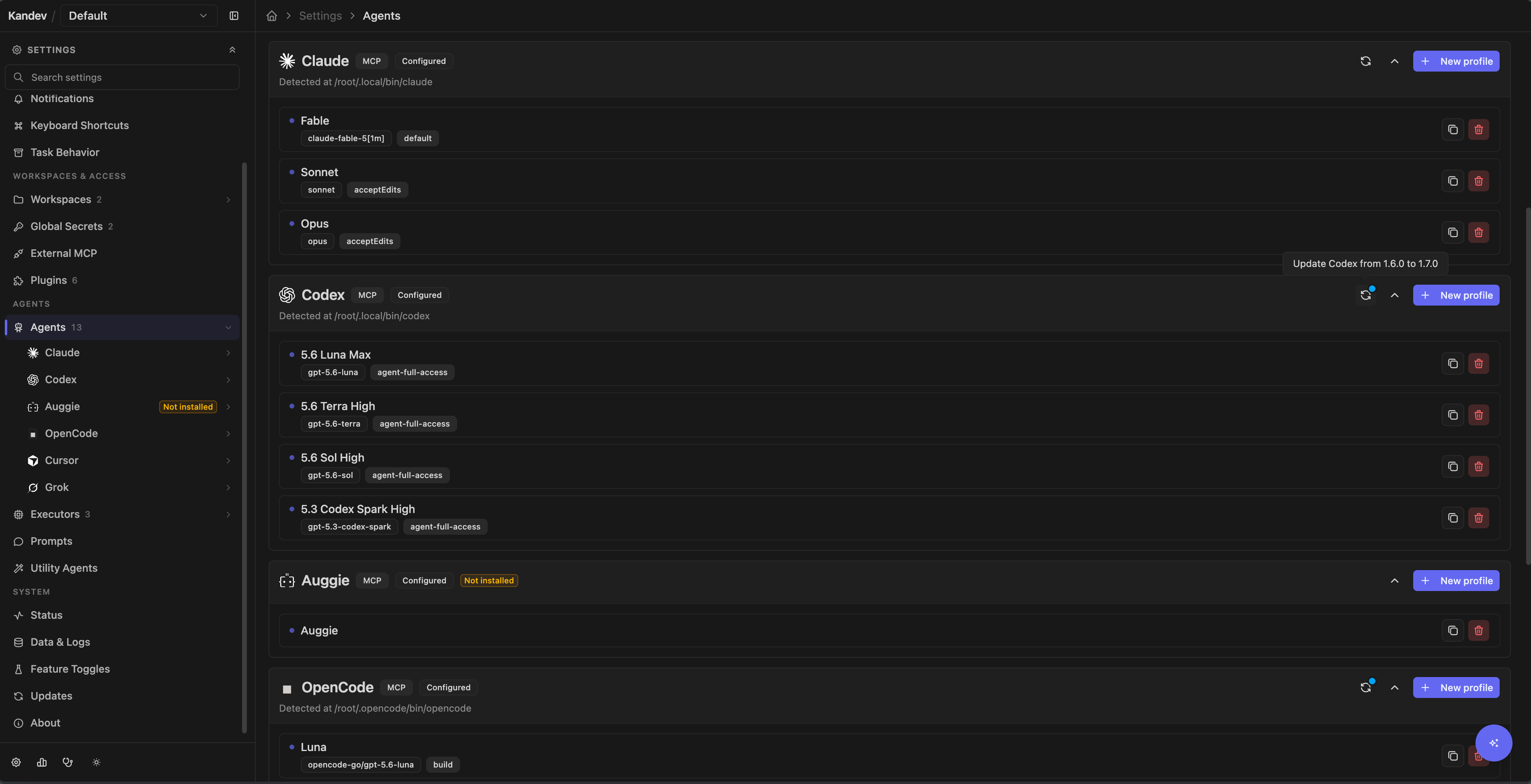
The production registry currently shows Auggie, Claude, Codex, Copilot, Gemini, OpenCode, Amp, Qwen, iFlow (beta), Droid, Kilocode, Pi, Cursor, Kimi, Kiro, Qoder, Trae, omp, Devin, Grok, Hermes, Goose, Muse, Antigravity, and MiniMax. An entry is usable only when its executable is supported on the current platform and available to the Kandev process. Development and E2E profiles can add mock agents that are not product integrations.
Hermes launches with hermes acp. Install the required hermes executable from its Settings > Agents card, which runs the official Hermes installer. Hermes currently supports task and workspace sessions. Office-assigned skill injection is not yet supported.
Goose launches with goose acp. Its Settings > Agents card runs only the official download_cli.sh installer. Homebrew (block-goose-cli) and pip (pip install goose-ai) are manual alternatives. Configure your model provider with goose configure. Goose currently supports task and workspace sessions.
Antigravity has no automated install: Google distributes agy_acp_server.par (agy_acp_server.exe on Windows) and its localharness_external or localharness sibling (localharness_external.exe or localharness.exe on Windows) as a signed archive through the ACP registry rather than npm, so extract both files into one directory and add it to PATH yourself. Kandev fails discovery closed when the harness sibling is missing or not executable, so a partial extraction reports as not installed rather than as a broken session.
Codex app-server (experimental)
Kandev offers Codex app server as a separate native Codex profile. It uses the Codex app-server protocol, while Codex ACP continues to use the ACP bridge. Existing sessions keep their original agent identity.
Enable Codex app server in Settings > System > Feature Toggles, then restart Kandev. The toggle is off by default and requires a restart. The native profile is hidden from new-session selectors while the toggle is off. Keep it enabled while native sessions need to resume.
Kandev currently uses @openai/codex version 0.154.0 as its managed default. Sign in to Codex as the operating-system user that runs Kandev, or provide OPENAI_API_KEY to the executor. The profile uses the same workspace and MCP configuration as other structured sessions.
Native sessions show response and turn token usage in the chat footer. A provider thread usage estimate may appear when Codex reports one. It is an estimate, not a promise of the billed charge. Kandev keeps provider estimates separate from calculated cost.
After a completed turn, use Fork conversation to create another session through that turn. The new session keeps the task and executor, and files remain shared in the workspace. It does not create a branch or worktree. Native Codex subagents and background commands stay within the session; they do not become separate Kandev tasks.
Inspect agent background work
Agents that report background shell commands, subagents, or monitors feed the shared background-work view. A composer chip appears only while at least one job is running; it counts and summarizes that running subset. The overview separates Active (running and waiting) from History (completed, failed, interrupted, ended, and unknown). Open it from View all work, the desktop + panel menu, or the phone Panels menu in a managed session, even when no chip is visible; passthrough terminal sessions do not expose the phone entry. Unknown activity keeps its status and never implies completion. The chip is enabled by default in the shipped profiles; the operator toggle is Agent background work in Settings > System > Feature Toggles. The same experience, counts, and detail views apply on desktop and phone, and the chip never changes how a prompt is admitted. See Tasks and workflows.
Provider support differs, and Kandev shows only what the connected runtime verifies:
- Claude ACP and native Codex report job lifecycle and, for native Codex, supported job actions. Explicit controls appear only for an advertised capability.
- OpenCode ACP reports a detached shell launch with its native shell identity. With the optional integration plugin enabled on a supported OpenCode v2 2.2.0 runtime, Kandev can settle that job when the native shell exits. Without the plugin, or on any other runtime, the job stays inspectable and its later activity remains unknown. Neither path provides live output or process controls, and the original launch banner stays in the tool message.
- Other ACP agents keep their existing behavior when they do not report background lifecycle.
A bounded probe or reconnect can also leave a job unknown. Unknown activity is neither a successful completion nor a verified running job, and retained history stays reachable after the active count reaches zero.
OpenCode terminal outcomes
Kandev can supply a small integration plugin to supported OpenCode v2 task launches. The plugin observes native shell terminal events through a private loopback callback, so an owned job can move from unknown to completed, failed, or interrupted after the foreground prompt ends.
This integration is opt-in. Enable OpenCode integration plugin in
Settings > System > Feature Toggles, or set
KANDEV_FEATURES_OPENCODE_PLUGIN=true, and restart Kandev. An environment value
wins over a stored toggle. The integration is off in every shipped profile.
Requirements and behavior:
- The runtime must be OpenCode v2 2.2.0. Other versions and OpenCode v1 keep the existing ACP behavior and the unknown-job fallback.
- Kandev supplies the plugin automatically. Do not install an npm package or add a project plugin.
- Existing
opencode.json, inline configuration, user plugins, credentials, and MCP settings keep their meaning. A malformed or conflicting inline configuration disables only this integration for that launch. - The shared Agent background work feature must also be on. Turning it off prevents shell claims and workload observations.
- A terminal result can arrive after the foreground prompt. Intermediate activity can still show unknown. Output streaming, process controls, and automatic assistant follow-ups remain unavailable.
- A job with no terminal evidence stays unknown. The plugin does not replay events lost while OpenCode or the executor was stopped.
Codex questions sent through Kandev's ask_user_question_kandev MCP tool or through the native app-server item/tool/requestUserInput method use the normal clarification UI. Native options and permitted free-text answers map back to Codex's answer format. Secret questions fail closed because Kandev's clarification flow stores answers in the conversation. If Codex resolves a pending request, Kandev closes the corresponding clarification.
MiniMax Code
MiniMax uses the official MiniMax Code
CLI directly through mcode acp. Install it from Settings > Agents > Browse,
or install the tested release with npm:
npm install -g @minimax-ai/[email protected] --registry=https://registry.npmjs.org/ --ignore-scripts=false --include=optional --allow-scripts=@minimax-ai/code,better-sqlite3
mcode --version
Use a supported Node.js version (22.19+ in the 22 series, 24.2+ in the 24 series,
or 25/26). The optional SQLite dependency and its installation scripts must be
allowed. Kandev reports MiniMax installed only when mcode is on its PATH and
responds to --version; npm alone does not count as an installation.
Sign in as the operating-system user running Kandev. For a mainland China
account use mcode login --no-browser; for a Global account use:
env -u MINIMAX_DATA_DIR -u MAVIS_DATA_DIR \
  -u __MAVIS_RUNTIME_DATA_DIR -u __MAVIS_RUNTIME_PROFILE \
  mcode login --region global --no-browser
Choose Mainland China or Global when Kandev opens the login setup. The selected login terminal prints a browser authorization link. Close an existing sign-in terminal before choosing a different region in another tab. After login, click Done to refresh capabilities, create a MiniMax profile, and choose a model from the native catalog. Subscription access stays with MiniMax Code; no OpenCode wrapper or static API key is required.
Native catalog entries currently include MiniMax-M3, M3.1-Flash-Preview, MiniMax-M2.7-highspeed and MiniMax-M2.7. Available models and thinking variants come from your CLI/account and may change. The native defaults for the two M3 models are 512k context, with an optional 1M window; M2.7 models use 200k. These are upstream catalog values, not guaranteed account entitlements. MiniMax's ACP interface currently accepts text prompts and does not advertise image, audio or video inputs, even when the underlying model supports media.
Kandev retains the native ACP provider/model/variant identifiers in profiles.
CLI passthrough translates them into --model provider/model#variant and uses
--session <id> or --continue for resume. Structured sessions use ACP model
selection, permission requests, MCP configuration, cancellation and session load.
Kandev does not add a MiniMax permission bypass flag.
MiniMax owns its config, subscription credentials and sessions under
~/.minimax. Kandev's native integration targets that default directory and
removes MINIMAX_DATA_DIR, MAVIS_DATA_DIR, __MAVIS_RUNTIME_DATA_DIR and
__MAVIS_RUNTIME_PROFILE from agent launches and POSIX login. If you already use a named
MiniMax profile or a custom data directory, sign in to the default directory
for this integration. MiniMax's installation directory ~/.minimax-code is
separate from its data directory.
The login terminal requires a POSIX host shell. On native Windows, sign in with
mcode login --no-browser outside Kandev after clearing the four data/profile
override variables above from that shell. Otherwise login can target a
directory that Kandev's ACP runtime does not use.
Containers persist an isolated .minimax directory at /root/.minimax.
Remote/container executors need their own installation and native login inside
that environment. Kandev does not copy host OAuth tokens: native credential
records include the absolute auth-directory identity and cannot be treated as
portable credentials. No provider or account fallback is injected on failure.
Claude Code and Codex CLI version and model discovery
Agent cards show the Session runtime selected for new structured sessions. For a runtime managed by Kandev, the card names the npm package and selected version. A native CLI or custom command is identified separately; unavailable identity or version information is shown as unknown. This label does not confirm authentication or a successful launch, and does not describe existing sessions or passthrough commands.
Expand Diagnostics to see the detected local CLI path. For Claude and Codex, this also shows the installed vendor CLI version, or an unknown version with the reason discovery failed. This local installation may differ from the session runtime. The card's install action refreshes discovery without a backend restart.
The profile editor's Start model dropdown includes suggestions from the host CLI. The Codex
CLI publishes a model list (codex app-server), so its dropdown shows that
list merged with the models the running session already advertises, and a
note under the selector states the source and CLI version. The Claude Code
CLI does not publish a model list, so the dropdown keeps the session's list
and the note says so. For both agent types you can type any model ID as a
free-text entry, useful the day a vendor ships a model (for example a new
Opus release) before Kandev's own build catches up. A profile's saved model
that is missing from every list still shows up as a selectable entry with
its exact identifier, and saving without changing it leaves it unchanged.
Whether the running session actually accepts a typed identifier is up to
that session; an identifier it does not recognize fails with its own error
at the start of the next turn, the same as for a listed model.
The Codex catalogue can be bundled or cached by the CLI. Listing a model does not confirm account entitlement or availability in a profile that uses a different command, configuration, or executor. The profile's capability probe and the selected executor still determine whether that model can run.
Muse command surfaces
Muse Code has no native ACP server, so Kandev runs it through the community
@bex-co/muse-code-acp adapter,
which is not affiliated with Meta:
- Structured ACP sessions and one-shot inference use the managed
@bex-co/muse-code-acppackage at the selected effective version. This needs Node.js 22 or later. - The adapter drives the native
museexecutable throughmuse serve; CLI Passthrough startsmusedirectly. - On POSIX hosts, the Muse install action runs the official
https://dev.meta.ai/install.shinstaller into the first writable directory on the backend'sPATH. Windows has no automated Muse install action because the official installer is a POSIX shell script.
Kandev detects Muse when muse is on the PATH of the backend process and
responds to --version. Sign in with muse login, or set META_API_KEY for
headless and remote executors. Muse keeps sessions under
~/.local/share/muse, which Kandev uses for session resume.
Kandev removes XDG_CONFIG_HOME and XDG_DATA_HOME overrides from Muse
processes so credentials and sessions use these managed paths. Executors use an
isolated home directory for both ~/.config/muse and ~/.local/share/muse; the
real host home directory is not mounted.
The adapter starts sessions on the model in Muse's
~/.config/muse/settings.json and falls back to its own default otherwise,
while the interactive muse CLI falls back to Meta's catalogue default. To
pin one model for both, set it there, for example
{"schema_version": 1, "model": "muse-spark-1.3"}.
Pi command surfaces
Pi uses separate executables for its two Kandev modes:
- Structured ACP sessions and one-shot inference use the managed
pi-acppackage at the selected effective version. - CLI Passthrough starts the globally installed
piexecutable. - The Pi install action runs
npm install -g --ignore-scripts @earendil-works/pi-coding-agent.
After installation, select Rescan. Kandev detects Pi when pi is on the
PATH of the backend process and responds to the non-interactive --version
check. The pi-acp adapter is not the interactive terminal CLI, and managed
ACP runtime selection does not replace the passthrough command.
- Select Rescan after installing or updating a CLI.
- If the card offers an install action, review the command before running it. Installation runs on the Kandev host.
- If the card reports that login is required, open its login terminal or authenticate the CLI as the same operating-system user that runs Kandev.
- Open the seeded default profile and review it before selecting the agent in a workflow step or session. Discovery creates one default profile the first time it provisions an agent. If you deliberately delete every profile, later rescans do not recreate one; create a replacement manually.
The status shown on this page is authoritative for the current host. A CLI that works in your interactive shell can still be absent from Kandev when the service has a different PATH, home directory, or operating-system user.
Update Oh My Pi on the Kandev host
On an installed omp card, select the update icon under Settings > Agents.
Review the installed version, the Stable latest (reference) version, and
the omp update command, then choose Update runtime or Repair runtime.
Kandev runs OMP's own updater as the Kandev service user on the host, streams
its output, and refreshes ACP capabilities only after a successful probe.
Active sessions are not restarted.
OMP detects whether its installation is managed by Homebrew, mise, Bun, npm,
or a standalone binary and updates through that method. A Nix-managed
installation cannot be updated by this action. OMP follows its already
configured stable or canary channel; Kandev does not choose a channel or pass
a version to omp update. The stable latest shown in Settings is a
comparison reference, not a promised install target: the installed
version reported by OMP after updating may differ. There is no version
picker, Kandev pin, or rollback for OMP.
The update affects only the host installation, not task containers or remote executors. If OMP's updater or the follow-up ACP probe fails, Settings reports the error and retains the previous capability catalogue; Kandev cannot restore an executable that OMP already changed. When metadata is unavailable, the update icon remains available, but a preview must resolve the stable reference before the update can start.
Update a managed agent runtime
The update icon is available on managed Claude, Codex, OpenCode, Copilot, Gemini, Pi, and Muse agent cards when Kandev owns their managed runtime. It prepares their pinned npm runtime on the Kandev host. OMP uses the separate self-update flow above.
Each managed runtime has a reviewed Kandev default. If you have not selected a version, Kandev uses that exact default for probes, sessions, standalone inference, containers, and SSH commands. A successful version update stores your exact selection for this Kandev installation. The selection takes precedence for the current default generation. Use Kandev default clears it, and a later shipped package or reviewed default resets it during startup. Kandev does not store the default as a user selection.
When a Kandev upgrade changes the managed package or its reviewed default, Kandev removes the older selection during startup before the service becomes ready. New probes and launches then use the reviewed default for that release. On the first startup with this generation tracking, Kandev treats an existing selection without a generation marker as legacy and resets it once. When the package and default stay the same, Kandev preserves your selection across restarts and unrelated upgrades. A process that is already running is not replaced, so the new default applies when Kandev starts a future process.
After startup, open the update control to select any validated stable version, including an older version. This lets you roll back the new default when a provider or environment requires it. The selection remains active until you change it or a later Kandev release changes that agent's package or default.
When the cached npm check finds a newer stable release, the update control has a blue dot and its accessible label includes the effective and latest versions. The dot is only a hint. Opening the control performs a fresh, authoritative preview before any update starts. If the check is unavailable, the control has no dot but remains usable.
- Select the update icon.
- Review the current version, active version, available stable versions, and command.
- Keep the latest version selected for a normal update, or select an older stable version to roll back.
- Select Update runtime, Roll back runtime, or Repair runtime.
- Wait for the exact version to prepare and pass its runtime capability probe.
OpenCode has two runtime families. Fresh Kandev installations use the managed
v2 package @opencode/cli. Kandev keeps an existing v1 selection on
opencode-ai until you choose the v2 migration action.
Move OpenCode from v1 to v2
Use this action only after you review the shared-data boundary. OpenCode v1 and v2 use the same configuration and session data paths.
- Stop standalone OpenCode v1 processes that use the same session data.
- Open the OpenCode update control in Settings > Agents.
- Select Upgrade to managed OpenCode v2 and review the package, version, and scope.
- Select Upgrade to managed OpenCode v2 again to start the upgrade.
- Keep Kandev open while it installs the package and checks ACP startup.
The selection applies to future OpenCode launches across every OpenCode
profile in this Kandev installation. This includes local, container, and SSH
executors. The action installs the managed v2 package; it leaves a standalone
opencode installation unchanged.
Kandev saves v2 as the active runtime only after the exact package passes an isolated ACP probe. Kandev-owned active OpenCode work blocks activation. The upgrade does not stop that work. If the probe or database write fails, v1 remains selected. If capability discovery fails after activation, v2 remains selected and Kandev reports the discovery error.
Kandev keeps saved OpenCode session IDs when it restores a conversation. If OpenCode cannot restore a saved conversation, Kandev reports the error in that session. It does not create a replacement conversation. Kandev cannot reverse changes that OpenCode v2 makes to shared session data, so selecting v1 later does not guarantee a rollback.
When an existing native OpenCode v1 installation remains selected, same-family
updates can still update that native executable. A v2 migration always uses
the managed @opencode/cli package and does not run a global npm install.
If a native OpenCode version check still fails after retries, Kandev can use a recent supported detection or the selected supported version. Cancelling the launch stops it. An observed unsupported major blocks launch until a later check reports a supported version; a transient probe failure cannot clear it.
Kandev enables the action only after the backend validates the selected version against the trusted package catalogue. It does not accept package names, npm tags, prereleases, registry URLs, or command text. When the active version, observed version, and target version match, the action is disabled as Up to date. A successful activation updates the advertised models, modes, configuration options, commands, and runtime version without a page reload.
- The active exact version survives Kandev and browser restarts.
- Later host-local probes, utility calls, and standalone sessions use the active exact version.
- Active sessions keep running. They are not restarted or hot-swapped.
- Passthrough agents and authentication helpers remain unchanged. The Settings update job prepares the host runtime only; remote executor and new-container commands still use the effective exact version and must resolve that package in their own environment. Running sessions and containers are unchanged.
- If preparation, ACP validation, authentication, or persistence fails, Kandev keeps the previous active version and capability catalogue. Select another stable version or retry the same target.
- Kandev may prepare the exact version again if npm removes its cache entry. Kandev does not own an offline package inventory, and global npm cache cleanup is not required.
When a native OpenCode installation is present on the host, its vendor update guidance stays separate from Manage fallback versions. That control selects the managed package used by remote and container launches; it does not update the native host or a remote native installation. Update, rollback and return to the Kandev default remain available for the managed fallback. A rejected or busy manual request leaves automatic-update consent unchanged; an accepted manual selection turns it off.
Recover a managed runtime startup failure
Managed runtime startup can retry once when npm reports a strict ETARGET for
the selected exact package or a recognized temporary network or cache error.
The ETARGET retry prefers an online lookup. Kandev can also retry an ordinary
process exit before ACP initialization when complete, generation-matched
startup evidence confirms that stderr was empty. Incomplete evidence, other
permanent or unrecognized npm errors, cancellation, signal termination, and
failures after ACP initialization do not trigger this automatic retry. Kandev first confirms
that the failed process has stopped, then waits two to three seconds before the
replacement starts.
The retry uses the same agent, package, exact version, environment, executor, session, and initial prompt. It does not delete the selected npm execution tree or a sibling tree. While it waits, the existing session status shows the second attempt. If that attempt succeeds, the conversation continues without a recovery card. If it fails, the card reports the cause and actual attempt count and shows one Retry runtime action with collapsed technical details.
This startup recovery applies to managed npm runtimes on a local PC, in a local
Docker executor, or in a remote SSH executor. It does not establish that an npm
race caused any particular startup failure. Host capability discovery has a
separate, narrower recovery: an exact-package ETARGET result can retry once
with an online-preferred lookup. That probe retry also preserves npm execution
trees and keeps the saved model, fallback model, mode, runtime version, and
enabled state unchanged.
Managed npx runtimes use a Kandev-owned npm project directory, so an .npmrc
in the task repository does not change the managed runtime's package lookup.
The task repository remains the command's working directory. User and global npm
settings still apply, including min-release-age and before policies. If an
age policy blocks the selected version, Kandev does not repair the npm cache or
repeat the lookup online. Wait until the version meets the policy, or select an
older trusted version, then choose Retry runtime.
Do not use npm cache clean --force as the normal recovery step. It removes
unrelated npm data and does not target the stale execution tree. If the
specialized retry cannot resolve the runtime, check that the Kandev service
uses the expected npm installation and configured registry. Run npm config get registry as the Kandev service user to inspect the registry used by that process. Then use the runtime update controls to select and prepare another trusted stable version.
Refresh profile models after a runtime update
Manage runtime versions in Settings > Agents > Agent runtime updates. Profile pages focus on model selection and launch settings.
After a managed runtime update succeeds, an open profile refreshes its model catalog with the current draft settings. The selected model stays unchanged. Unsaved launch settings remain unsaved. A failed update keeps the previous catalog.
After you edit launch settings, choose Refresh models to check the current draft. The provider returns the model catalog. Discovery success does not confirm catalog completeness or account access to every model.
Create the first profile for a newly installed agent
If you install an agent CLI after Kandev started, Settings > Agents can list it as available before any profile row exists. Open its card and create the profile as usual. Model discovery and dependent option resolution use the complete draft, so the model list, modes, and dependent options work before the first Save. Saving creates the agent and then its first profile. Invalid profile input is rejected before the agent row is created; a later storage failure reports an error instead of claiming a partial success. Discovery alone does not create a profile, change an existing one, or start a task session.
Model groups and composed selections
Some providers advertise models under native groups instead of one flat list. The picker keeps the supplied group names, order, and descriptions. Search matches model labels, exact values, group paths, and, for a composed family, its dimension labels and values.
A composed family opens a focused view with one row per supplied dimension. When the exact model resolves, the view also shows that model's real provider options, such as Thinking or Speed, so the whole configuration can be reviewed before the single Use configuration action. Only a complete combination that resolves to exactly one currently advertised model can be applied. Selecting a dimension keeps the rest of your draft visible; values that can no longer complete a pairing are marked and must be replaced before applying. Thinking, Speed, Effort, and other provider options remain separate controls and keep the selected model's authoritative option snapshot. Kandev does not guess pairings from model names: a family renders as composed only when the provider supplies verified relationships, so an unqualified family stays an ordinary group.
On a phone the picker opens as one sheet with internal Back navigation, one vertical scroll region, and a fixed Apply action. Closing the sheet without applying leaves your saved configuration unchanged.
Runtime notifications and automatic updates
Kandev checks enabled, available agent runtimes in the background, including native CLIs with a verified release source. Open Settings > Agents to review runtime versions and update policies. A notice for one runtime names it and links directly to its row in Settings > Agents > Agent runtime updates. The existing update-available notification preferences apply; repeated notices for the same runtime and version are suppressed across reloads.
At startup or after reconnect, available runtime updates discovered within the same 30-second window appear in one summary. Review updates opens the expanded runtime section. A notice for one runtime keeps its name and direct link. Update success, failure, and interruption notices remain individual and immediate.
The Agent runtime updates section is at the bottom of Settings > Agents, after your installed agents, and starts collapsed. Expand it to manage runtime policies. Notification links open the section automatically and reveal their destination. Collapsing the section preserves unsaved policy changes.
The runtime section shows the selected or observed version, latest known version, and who manages the installation. Unknown means Kandev could not verify the version or release source. It does not mean the runtime is up to date. Unavailable and disabled registrations remain listed separately, without background checks. Offline and source failures do not create error notifications.
Automatic updates are off by default. An administrator can enable Automatic updates for each eligible managed runtime, then select the shared Save changes action. This consent applies to the Kandev installation and survives reloads. Kandev checks on startup and every 15 minutes; successful release lookups are cached for six hours and failed lookups for 15 minutes.
An automatic update prepares a stable exact version and validates it before activating it for future launches. Running sessions keep their existing process and version. The retained result records the old and target versions. If preparation, validation, or activation fails, that attempt preserves the previous selection. Kandev reports the failure and does not repeatedly retry that target. An interrupted update has an unconfirmed result; review the current selection before retrying.
Use Manage versions to retry manually, choose an older stable version, or return to the Kandev default. A manual version choice turns off automatic updates, so Kandev does not undo your choice. Disabling automatic updates also prevents a candidate still being prepared from activating. To retry automatically after a failure, turn the option off and save, then turn it on and save again.
Externally managed npm packages and native CLIs show Manual update guidance
when vendor documentation is available. Their supported vendor or package-manager
updates remain owned by the operator. Kandev does not infer update authority from
PATH or run an unverified global updater. Custom commands, virtual agents, and
other runtimes without a supported updater explicitly show the unsupported state.
Add a custom terminal agent
Add a custom terminal agent
Use Settings > Agents > Add custom agent for a CLI that Kandev does not register. Enter a display name, a protocol, and a command. The entire command is split on whitespace with Go's strings.Fields.
That parser is not a shell and is not quote-aware: quotes and backslashes do not preserve a path or model containing spaces as one argument. Test the exact resulting argument split before assigning it to work.
A Terminal agent runs as passthrough. It also takes an optional model label, and {{model}} in the command is replaced by that value. It gains no ACP features: no structured permission prompts, no model discovery, no modes, no session configuration.
An ACP agent is driven over the Agent Client Protocol instead, so it does get structured chat, tool calls, permission prompts, and probed models and modes. Enter the command that starts the CLI's ACP server, usually behind a flag such as --acp. Its model comes from the capability probe rather than the command, and its MCP servers travel in session/new, so neither the model label nor the MCP strategy is offered.
Create and configure a profile
Select an agent, create a profile, then open Settings > Agents > Agent > Profile. The page shows the resolved command preview and only the settings supported by that agent.
On Settings > Agents, administrators can reorder an agent's profiles using its drag handle with a pointer or touch. For keyboard control, focus the handle, press Space to pick up the profile, use the arrow keys to move it, and press Space again to save (or Escape to cancel). The order is saved for that agent, shared with other open Settings pages, and used in the Settings navigation tree. Creating or duplicating a profile places it first in that agent's Settings list.
This order applies only to Settings. Task creation, in-task agents, handoff, and other profile selectors keep their existing option order, contextual recency, and default selection.
| Setting | Runtime behavior |
|---|---|
| Name | Label shown in workflow, session, and automation selectors. |
| Model | Requested through ACP when the agent supports model selection. Leaving it unset uses the agent's default where the form allows that. |
| Require exact model | Per-profile opt-in. When enabled, Kandev stops before inference unless the executor advertises and accepts the saved model. It disables fallback controls without erasing their saved values. |
| Fallback settings | Compatible profiles can use an advertised explicit fallback or automatic provider-default continuation. If the saved model is absent and exactly one bracketed variation is advertised, Kandev can use that variation with a warning. |
| Mode | Requested through the installed agent's advertised ACP session control before the first prompt. Kandev prefers its mode config option and supports legacy session/set_mode. An explicit mode must be confirmed by the agent or startup holds the prompt. Applying a mode does not write Claude settings or redirect its configuration directory. |
| Configuration options | Dynamic ACP values requested with session/set_config_option. |
| CLI flags | Enabled entries are tokenized and appended to the ACP launch command. |
| Command prefix | Optional launcher argv for structured sessions, ACP probes, and native terminal passthrough. No provider plugin is required. |
| Environment | Literal values or references to Kandev secrets, resolved when the process starts. |
| Provider | Native uses the agent default. OpenAI-compatible sends ACP requests to the configured HTTP(S) router and can use a Kandev global API-key secret. |
| CLI passthrough | Uses the CLI's native terminal interface instead of a structured ACP conversation. |
| Enabled | Keeps the profile available to existing sessions and settings while hiding it from new task, session, handoff, and Quick Chat selectors. |
| Auto-approve all permissions | Answers automatically with an offered allow_once or allow_always option. Requests without an allow option stay pending for a person to answer. Every automatic decision keeps its option and source in permission history. It is off by default. |
| MCP servers | Adds profile-specific external MCP servers when the agent supports MCP. |
| Share local Cursor MCP credentials | Enabled by default for Cursor ACP and Cursor-strategy terminal profiles. It applies only to local executions that share the backend home directory. |
| Import local Cursor plugin MCP servers | Enabled by default for Cursor ACP and Cursor-strategy terminal profiles. Imports supported local plugin and user MCP definitions into task worktrees. On supported macOS installations, enabled marketplace plugins are discovered from Cursor’s account service and matched to their exact cached revision. |
Agents can inspect and update declared profile settings through the compact
search_settings_kandev, describe_setting_kandev, get_settings_kandev,
and update_settings_kandev tools. Use the separate
agent_profile_mcp target for the profile MCP document. The settings tools
preserve profile validation and save replacement lists atomically. They never
return environment values or MCP credentials; use references or the existing
interactive credential flow when a secret is required.
Model and mode choices are probed from the locally installed CLI. Opening a saved concrete profile probes its saved environment, CLI flags, and command prefix. If you edit any of these launch settings, select Refresh models before you choose a model. Kandev probes the current draft without saving it or sending a prompt. A secret reference is resolved on the Kandev host and its value is not sent back to the browser. Probe status can report auth required, not installed, not configured, unsupported, or failed; a saved model name does not prove that the current provider account can use it.
For a mode defined in a repository, open Start mode, type its exact ID, select the custom entry, and save the profile. The host probe runs outside the task repository, so it may omit that mode and show options for the host default. At task startup, the selected executor must confirm the requested mode before the first prompt. If it cannot, startup fails. Leaving the mode unset uses the agent's default.
Use an OpenAI-compatible provider
Open the Provider section in a profile that supports this feature. Select OpenAI-compatible provider, enter the absolute router base URL, and select an optional global API-key secret. Enter the model ID that the router accepts. The model field is free text because the router owns the model catalogue.
Kandev sends the provider URL and optional bearer key through the ACP gateway authentication request when a new process starts. A running process keeps its existing provider settings until it restarts. CLI passthrough cannot use this provider because that path does not run the ACP authentication handshake.
Configuration options are resolved for the model selected in the profile. An agent can therefore show a different option set for each model. If a model change makes a saved option value unsupported, Kandev removes that value after a successful resolution; a failed resolution keeps the draft unchanged so you can retry it.
Use a dynamic profile
Choose the Dynamic agent family when you create a profile. Add concrete profiles in the order that Kandev must try them. The logical dynamic profile stays selected in the task and utility binding, while each launch uses one concrete candidate behind the scenes. Candidates must be enabled, launchable profiles. Dynamic profiles and rich Office profiles cannot be candidates.
Use the Dynamic agents card at the top of Settings > Agents to create and list dynamic profiles. The card is hidden, and dynamic profiles cannot be selected for new work, when dynamic routing is disabled. A new profile starts with its name and candidates; enable or disable it later from the profile editor.
Each candidate has a policy for two shared provider-error classes:
- Transient errors include capacity, overload, network, timeout, rate, and provider-availability failures.
- Hard errors include authentication, subscription, quota, credit, model, provider-configuration failures, and provider account restrictions.
For each class, configure exponential same-candidate retries, the maximum retry count, the initial interval, reset-date waiting with a maximum wait, and the final Skip candidate or Stop for manual recovery outcome. Kandev uses a trusted future reset date at most once for a candidate and class when it fits the configured maximum. It then applies the retry schedule and outcome. Unclassified, task, repository, permission, tool, and ambiguous mid-turn failures stop for manual recovery by default. The optional repeated-failure policy below is a narrow exception for eligible, current, effect-safe unclassified failures. The error catalogue is versioned and can grow as provider signals become known; an ambiguous new signal fails closed. A future classifier may improve catalogue coverage, but no model is called to classify errors today.
Native code review uses the same saved candidate policy for classified provider failures and keeps its selected candidate across prompt batches in one review run. Each prompt batch permits at most eight candidate dispatch attempts. Partial output, cancellation, and inference admission refusals stop automatic fallback. A request deadline without confirmed child termination also stops the review, even while its parent budget remains active; automatic recovery from that deadline is not available.
Dynamic profiles also have an API-only option for repeated, safe unclassified
failures. It is off by default and is not exposed in the profile editor. In a
candidate's policies object, set unclassified to:
{
  "enabled": true,
  "consecutive_failure_threshold": 3
}
When enabled, the threshold must be an integer from 2 to 10. Configure the
field through POST /api/v1/agents/dynamic/profiles or
PATCH /api/v1/agent-profiles/:id, along with the candidate's existing
transient and hard policies. An omitted or disabled policy does not count
failures; a disabled policy must use a threshold of 0.
Kandev counts only a current task-session failure that has complete trusted
evidence and no output or tool activity. Eligible errors are a terminal
unknown_provider_error before output, or a typed agent process-start or
session-initialization agent_runtime_error. A turn that ends normally
(end_turn) with no assistant text, reasoning, or tool activity also counts;
consecutive empty turns match each other. For provider errors, each counted
failure must have the same code, origin, phase, provider, and complete
diagnostic. Kandev normalizes whitespace only; case and punctuation remain
significant. Diagnostics that need redaction or truncation stay on manual
recovery. Task, repository, permission, tool, cancellation, ambiguous
mid-turn, stale, and other unclassified failures also remain manual.
Below the threshold, each failure stops for manual recovery. Use Retry to make the next attempt; there is no automatic retry timer. On the threshold failure, Kandev tries the next enabled candidate in order, without wrapping to an earlier candidate. If no next candidate is eligible, recovery remains manual. The count resets when a failure is unsafe or different, when the candidate, profile, policy, or workflow step changes, or after a successful turn. This extension applies to task sessions. Office runs and utility calls remain outside its scope.
Any workflow step can veto this policy with
disable_unclassified_fallback: true. The field is available through the
workflow-step API and is included in workflow import/export. The veto applies
to the step's task session even when the candidate policy is enabled.
After a provider switch, the failed resource enters the shared circuit backoff: 1, 5, 15, and 30 minutes, then 1, 2, and 4 hours. Failures in one open window count as one incident. A failed probe advances the ladder, while a successful probe keeps its count. A clean completed turn resets the count. A trusted provider reset time can extend the wait; inferred reset times are capped at 24 hours. Kandev runs an exclusive health probe before a dynamic candidate becomes eligible again.
When features.dynamicAgentRouting is enabled, fixed profiles use the same
shared circuits. A fixed profile waits for its resource circuit to expire and
does not switch to another provider. This flag remains off by default. This
shared error classification is used by task/Kanban and Office routing, while
per-candidate policies are configured on dynamic profiles.
When a task launch waits for session capacity, Kandev keeps the selected destination and retries it automatically. Inspecting another session does not change the workflow's selected step or primary session. You can open another session and use its normal controls. Kandev resumes it when the session can run; the automatic session ceiling still applies unless you explicitly start, resume, or use Send Now on the session.
Opening or refocusing a conversation parked by the ACP idle policy also uses automatic admission. With Limit automatic sessions enabled and capacity full, it stays parked without a manual-override notice. A queued focus resume, including a completed conversation, retries when capacity is available and only while the same conversation remains idle-suspended. Explicit Resume and Send Now keep manual admission. Ordinary message delivery waits for capacity through the same ceiling. When Prevent auto-start on open is enabled in the web app, focus does not send that resume; the composer shows the start hint and a message to the parked conversation resumes it instead.
Provider errors that occur before a result can use the configured action, such as retrying the current candidate or trying the next candidate. A started turn with an ambiguous result does not switch providers automatically. If no candidate is eligible, the session waits for a recovery action. After the current turn settles, use Retry current agent or Try next agent in the session recovery surface. These actions use the current route generation, so a stale browser action does not replace a newer route decision.
Release a provider account hold
An account restriction has a different recovery path from a timed backoff.
When a gateway diagnostic starts with Error from provider ...: 403 Forbidden
and contains user_blocked or your access has been restricted, dynamic
routing holds the failed concrete execution profile. A plain or structured
HTTP 403 does not establish this hold. Other profiles, including profiles
sharing credentials, remain eligible.
The hold has no expiry or health probe and survives a restart after its state is saved. Retries, reset waits, retained-route resumes, and selected launches cannot bypass it. A hold never replays a prompt or starts another agent by itself; the existing output and tool-effect safeguards still decide whether fallback is safe.
Find the affected execution_profile_id in the backend's
routing.metric.account_block_hold log event. A failed save also emits a
persistence warning: the hold remains active in memory and its save is retried
on later circuit changes, but a restart before a successful save can lose it.
Resolve the restriction with the provider first. Release is currently API-only; there is no release button. From a signed-in Kandev browser tab with settings configuration access, open the developer console and replace the profile ID in this request:
const profileId = "replace-with-execution-profile-id";
const boot = await (await fetch("/api/v1/app-state", { credentials: "same-origin" })).json();
const response = await fetch(`/api/v1/agent-profiles/${encodeURIComponent(profileId)}/account-block/release`, {
  method: "POST",
  credentials: "same-origin",
  headers: { "X-Kandev-Interim-Settings-Interlock": boot.interimSettingsInterlockToken },
});
console.log(response.status, await response.json());
HTTP 200 with {"released":true} means the hold was durably closed;
{"released":false} means there was no hold. Release changes no credentials,
profile settings, other holds, or candidate order, and does not resume a task
automatically. Use the session recovery action when ready.
HTTP 404 means the profile is missing or workspace-scoped. HTTP 503 means the routing release runtime is unavailable. HTTP 500 means release failed and the hold remains. A 401 or 403 requires checking authentication, settings access, and the current per-boot interlock. Bearer credentials are rejected on this settings route. The interlock is an accidental-mutation guard, not an authentication credential; see Scope agent profiles and MCP definitions.
Host probes and executor model catalogs
The model list shown while editing a profile comes from a host probe. It is an editing hint, not a launch gate. A profile remains selectable when its saved model is missing from that host list. Profile selectors show an amber warning icon for this difference. On a desktop pointer, hover or focus the icon to read its tooltip. On a touch device, select the icon to open its warning drawer. Inspect the model list in profile settings for discovery details. Authentication, installation, and probe-failure indicators remain visible on profile selectors.
At task launch, the selected executor's ACP catalog is authoritative. Kandev sends the requested model only when the executor advertises it. Profiles are compatible by default, so an unavailable saved model can use an advertised explicit fallback, one unique bracketed variation, or the executor's current or default model. Kandev records one warning with the requested and effective models when it continues with a different model. Automatic fallback allows provider-default continuation and ignores the saved explicit fallback.
Enable Require exact model when the profile must keep the saved model. The executor must advertise and accept that model before the first prompt. An empty or unsupported catalog, an unavailable model, or a failed apply stops the session before inference. Kandev never sends an unadvertised model and never rewrites the saved profile model.
For Auggie ACP task sessions, Kandev also requires the selected model and mode to take effect before it sends the first prompt. If a failed session offers the explicit recovery Resume action, it keeps the same conversation and skips saved mode and model overrides for that attempt only. Saved profile and session settings remain unchanged, and later ordinary starts or resumes enforce them again. See Manage session state for the recovery notice and resolved or dismissed history in Chat.
The host model list is only an editing hint. A missing host-probe model keeps a profile selectable and shows an advisory warning; the executor catalog decides the launch result. Upgrades and omitted API fields keep existing profiles compatible, with strictness off until a user enables it. Optional portable configuration can copy selected allowlisted files to a remote executor, but it cannot guarantee equal host and executor model catalogs.
When a started ACP probe fails during discovery, inspect the backend logs for the child-side cause. Failed profile probes record the managed-runtime failure classification and a bounded, sanitized stderr tail while their response stays generic. A line cut off at the beginning of the retained tail is omitted to avoid exposing part of a credential.
Handle a quiet agent turn
After five minutes without turn output, Chat shows Still waiting for the agent. or identifies the tool it is waiting on. The turn stays active. Silence alone does not mean the agent failed or that it is safe to repeat the instruction.
Select Cancel turn to request cancellation. The control stays disabled and shows a progress indicator until the request settles, including after a page reload. When cancellation is confirmed, you can continue the conversation. If Kandev cannot confirm the outcome, delivery remains blocked and Chat shows the existing recovery controls. Kandev does not automatically replay the instruction.
Select Resume to check the saved conversation. If received events are still being applied, Resume can wait up to 10 seconds. Its control stays busy during the check. If the wait expires or the evidence cannot be verified, delivery stays blocked. You can try Resume again after the connection or storage issue is resolved.
Monitor capability and subscription status
Use the profile refresh control after installing, authenticating, or upgrading an agent. A manual refresh updates both the advertised models, modes, and commands and the visible capability status, so an old failure banner does not remain authoritative after the local CLI recovers.
Office agent quota and provider usage
Monitor Office agent quota
When Office mode is enabled, open Office > Agents and select an Office agent to see its Subscription Quota on the overview; the Office dashboard also summarizes the highest utilization across subscription agents. These cards appear only for supported subscription agents with provider credentials.
For account-wide provider usage across supported providers, install the Provider Usage plugin. It adds a provider pill to the session top bar and can add a compact display to the global status surface. That surface is off by default and follows the portable Show status bar preference under Settings > Preferences > Appearance > Status Bar; saving applies without a restart. If it is off, the session top-bar pill remains available. When it is on, the plugin can also appear in the desktop/tablet bottom bar or phone Status drawer. Configure the plugin under Settings > Plugins > Provider Usage. These usage surfaces are operational signals, not a billing ledger or a guarantee that the next request will be accepted; provider availability, account policy, and concurrent usage still apply.
CLI flags and command prefixes
CLI flags
Each flag entry has a raw value, description, enabled state, and an agent-specific default where applicable. Only enabled entries reach the process. Kandev tokenizes each raw value as command arguments: --add-dir /shared becomes two arguments.
The field is not a shell script. Pipes, redirects, variable expansion, and command substitution do not run as shell syntax. Empty or malformed quoting is rejected. Keep separate profiles for materially different permission or workspace flags, and recheck customized flags after upgrading the CLI.
Claude CLI passthrough uses standard output by default. Add an enabled --verbose entry to the profile CLI flags when you need diagnostic output.
Some older profiles contain compatibility fields such as Auggie's allow_indexing; current launch behavior is represented by the active profile settings and flags.
Command prefixes
Command prefix wraps structured agent sessions, ACP model discovery and utility prompts, and native terminal passthrough. Basic wrapping requires no provider-specific plugin. Kandev parses the prefix into structured argv rather than running a shell: quote a path containing spaces, for example "/opt/launchers/safe wrapper" --. The resulting argv is prefixed to the agent command, so shell features such as pipes, redirects, variable expansion, and command substitution are not evaluated.
The prefix must contain a nonempty first argv element that is not flag-like. Malformed quotes, a trailing escape, an empty launcher, or a prefix beginning with - is rejected when you save or preview it. If an older persisted profile contains an invalid prefix, Kandev fails the launch rather than silently running the agent without its configured launcher. Check the command preview after changing a prefix.
The wrapper executable and all paths must exist on the execution host. Host model discovery uses the Kandev host. Remote sessions use their executor. A bare executable name uses the final process PATH. A relative executable path is relative to the working directory. Kandev does not search the current directory implicitly.
Use these references as complete, separately quoted arguments:
"{{kandev.work_dir}}"resolves to the current execution working directory."{{kandev.managed_npm_dir}}"resolves to Kandev's private managed npm directory on that host.
For example, "/opt/launchers/safe wrapper" --work-dir "{{kandev.work_dir}}" -- passes the working directory as one argument. Embedded references such as --work-dir={{kandev.work_dir}}, unknown references, and references in the executable position are rejected. Triple braces escape a literal reference: "{{{kandev.work_dir}}}" passes {{kandev.work_dir}} unchanged.
Kandev applies the wrapper once per process launch, including restart and resume. A missing wrapper or incompatible execution runtime fails the operation. Kandev does not retry without the wrapper. A failed model refresh preserves the selected model. Correct the prefix and select Refresh models to retry.
Wrapped ACP probes require an authenticated agentctl control connection. Agentctl with authentication disabled refuses wrapped control requests. Native non-ACP utility transports do not support wrappers and return unsupported. This restriction does not prevent a supported agent's native terminal passthrough from using a wrapper.
SSH native terminal passthrough does not yet carry wrapper settings. Kandev refuses a wrapped SSH terminal launch before starting the remote agent. Local native terminal wrapping and compatible remote ACP execution remain supported.
Wrapping alone does not establish a sandbox policy. The wrapper owns its access rules and platform support. Rich sandbox configuration through plugins is not implemented.
Environment variables and secrets
Create reusable secrets at Settings > Secrets (/settings/general/secrets), then select a secret reference in a profile environment entry. Secret names are 1–100 characters and values are 1–10,000 characters. Editing a secret with a blank value keeps the saved value.
Kandev has two secret scopes:
- Global secrets are available to the current user across their workspaces. When authentication is disabled, Global is install-global.
- Workspace secrets belong to one workspace and can be selected by that workspace's repositories. They are not available to shared agent or executor profiles.
The General page manages Global secrets. Manage Workspace secrets from Settings > Workspaces > workspace > Secrets. Agent and executor profile selectors intentionally show Global secrets only; a Workspace reference saved through an older or direct API path is rejected when the profile is saved or launched.
To rotate a secret, choose Edit, change the name or value, and save. The edit form replaces that secret’s row, hiding any previously revealed value. After saving, choose Reveal to fetch the current value. These controls are also available on phones. Saving does not change the environment of an already-running process or an open terminal. To use the new value in a task, stop its sessions, preserve uncommitted work, use Reset Environment, and launch a new session; a restart or warm resume can retain the old environment snapshot. For Sprites, verify the old sandbox was destroyed.
Copy or move a secret between scopes from the Copy/Move action on any secret row. The dialog picks Copy or Move, chooses a destination (Global or another workspace), and lets you edit the target name; it is pre-filled as <name> (from Global) or <name> (from <workspace name>) so copied secrets keep their origin visible. Moving removes the original after the copy is safely in place, and the value is transferred server-side between encrypted rows. It is never shown or copied through the browser. A target name that already exists in the destination blocks the action until you rename it.
Kandev encrypts secret values at rest with AES-256-GCM. The encryption key is <KANDEV_HOME_DIR>/data/master.key (by default ~/.kandev/data/master.key) and is created with owner-only file permissions. KANDEV_DATABASE_PATH does not relocate this key. Protect and back it up with the Kandev database; losing it makes stored values unreadable. Anyone with access to the Secrets settings can reveal the plaintext.
Profile environment rules are:
- at most 100 entries;
- key length at most 256 characters and value length at most 8,192 characters;
- keys cannot contain
=or a NUL character, and values cannot contain NUL; - duplicate keys are rejected;
TASK_DESCRIPTIONand everyKANDEV_*key are reserved;- an entry must use either a literal value or a secret reference, never both.
Kandev resolves secret references at process launch and cold resume. A deleted, missing, or unreadable secret blocks launch before the agent starts. The error identifies the environment key and its source.
Secret deletion is blocked while an agent profile, executor profile, or repository environment references the secret. When you select Delete, Kandev checks first. If the secret is in use, a dialog lists the affected resources and does not offer a delete action. Remove or replace those references before deleting the secret.
If a reference is already broken, open the named profile and select the replacement secret for the affected key, save, and retry. For a visible repository reference, open that repository's environment settings and replace the binding. A redacted repository reference means the repository is in a workspace that you cannot access; a workspace user with edit permission must locate and replace the binding in that workspace's repository settings. If no such user exists, ask a workspace owner or administrator to grant access or repair the binding. Creating a secret with the same name does not repair the reference because each secret has a separate ID.
API clients can explicitly force deletion. This leaves broken references and blocks future launches until those references are repaired. See the secret deletion API contract.
Repositories can bind an environment key to a Global secret or to a Workspace secret from the same workspace under Settings > Workspaces > workspace > Repositories. A task inherits bindings from every attached repository. Repository bindings are secret references, never values, and a repository binding to a deleted or unreadable secret blocks that task's launch. If two sources provide the same key, Kandev deduplicates an identical secret reference and rejects every other collision; repository order never chooses a winner.
Literal values remain in profile configuration. A secret reference avoids copying a token there, but the selected agent and its child processes still receive the plaintext at runtime. Use narrowly scoped credentials, and keep read-only review profiles separate from profiles allowed to publish, merge, deploy, or administer external systems.
Permissions and unattended work
In a structured ACP session, the agent can present a permission request and its available responses. With Auto-approve all permissions disabled, a person chooses a response in the session. With it enabled, Kandev selects an offered allow_once response, or allow_always when allow-once is not offered, without waiting. If the agent supplies no allow response, the request stays pending for a person. Automatic approval never supplies a denial or cancellation. It shows the ordinary tool progress instead of an approval prompt, and permission history keeps the selected option and automatic source.
If an automatic decision fails before dispatch while the request is still answerable, Kandev exposes the request for a person. After a decision is dispatched, a failed or uncertain outcome shows non-actionable feedback instead of a second answer.
Claude ACP also has a narrower built-in rule. When the agent uses the host-injected kandev MCP server, Kandev automatically selects an offered allow-once response, or allow-always when allow-once is not offered, even when Auto-approve all permissions is disabled. This covers every tool on that server, including task creation, task deletion, and plan changes. It is not a saved approval decision and is recreated for each task or Quick Chat session. Kandev still enforces MCP authentication, task and session authorization, user-question barriers, and workflow gates. Shell commands, file operations, third-party tools, and ambiguous requests keep the normal permission flow.
An external MCP client can also list live pending requests for an authorized task and submit one exact option originally offered by the agent. The request-generation ID prevents an old approval from targeting a replacement prompt that reused a provider pending ID. Kandev records who selected which option before delivery and rejects concurrent or replayed answers. It does not expose hidden environment values, headers, raw MCP arguments, or option metadata. See Resolve a live agent permission request.
Devin permissions and sandbox
New Devin profiles start in Smart mode with Devin sandbox set to
Disabled, which stores an explicit DEVIN_SANDBOX=false entry. Existing
profiles keep their saved values, including an inherited setting that has no
entry. Smart availability varies by account and rollout; when the current
capability snapshot does not advertise it, the editor shows Smart as unavailable
and asks for an advertised mode instead of substituting Code, Ask, or Plan.
The sandbox control has three values:
- Use CLI settings: no profile entry. Devin applies its own policy and the profile keeps its explicit mode.
- Disabled: explicit
DEVIN_SANDBOX=false. - Enabled: explicit
DEVIN_SANDBOX=trueand Autonomous mode. Kandev validates the pair and refuses a contradictory Smart or Bypass mode before the provider starts.
Install or update Devin with the official command
curl -fsSL https://cli.devin.ai/install.sh | bash. Sandbox execution needs the
provider's own prerequisites on the host; a missing prerequisite fails visibly
and Kandev does not retry without the sandbox. The ACP Start mode controls
structured sessions only. With terminal passthrough enabled, the native terminal
keeps Devin's own permission behavior. Kandev Auto-approve all permissions
remains independent and only answers approval requests the provider still sends.
Auto approval can authorize shell commands, file changes, network calls, or any other capability exposed by that agent. Agent-specific flags that suppress permission prompts can be broader still. Use either only with a constrained executor, repository, environment, and credential set.
Workspace automation selectors do not offer passthrough agent profiles. Local executor profiles are available for the repository-free target; Worktree requires a repository. Hidden automation sessions receive a fixed workspace-scoped coordinator MCP surface. Visible normal-task automations use the ordinary task profile and MCP surface. The trusted automation principal is resolved before hidden-run dispatch, and a hidden automation task and its sessions cannot be used as mutation, messaging, stopping, spawning, or blocker targets. Cross-task spawning uses the target task's normal profile. Native provider continuation and compaction remain authoritative for a healthy reusable session. When native continuation is unavailable, Kandev uses an explicit recovery action and bounded saved history. It does not restore private harness state or repeat an uncertain prompt. See Automation and MCP.
When native continuation is unavailable, Kandev parks unattended work and shows a recovery action. A provider retry, status update, or dismissed notice does not clear this block. An operator must choose the recovery action before the original work can run again. A context continuation creates a new native conversation from saved history. It does not restore private harness state.
Structured ACP and terminal passthrough
ACP sessions can expose typed messages, tool updates, permission requests, models, modes, dynamic configuration, todos, usage, and resume metadata. Each capability depends on the agent's actual ACP implementation. ACP-only profile settings, including structured configuration, do not add those capabilities to a terminal-passthrough CLI.
Terminal custom profiles use passthrough and preserve the CLI's native PTY interface. This is useful when the native terminal has features that ACP does not expose, but Kandev cannot manufacture structured capabilities that are absent. Custom ACP profiles use structured ACP sessions. Profile-specific MCP injection also varies by CLI; verify the command preview and the MCP section before depending on it.
MCP credential exposure: MCP headers and environment values are stored in profile configuration. Codex may place them in process arguments, and Cursor or Pi may leave them in project files after teardown. Use short-lived, narrowly scoped credentials and review persisted files.
Choose and prepare local Cursor MCP servers
On a saved Cursor agent profile, enable importing local MCP servers and choose whether to inherit enabled servers or use only your selected servers. Refresh discovery to see available server names grouped by plugin and whether reusable credentials exist. A credential badge means data is available, not that a connection has been verified. Selecting no servers in selected-only mode imports none. Saved selections remain visible if discovery is temporarily unavailable.
The task's workspace preparation shows discovery, selection, credential reuse, server approval and connection verification. Kandev applies the source repository and task workspace disables before approving imported connections. A profile selection cannot override those disables or executor policy. Host imports are limited to eligible local/worktree executions using the backend's home directory.
When verification requires provider consent, choose Authenticate on the preparation step. Kandev opens Cursor's native login flow in the task terminal; complete its browser consent and choose Retry connection. For Cursor ACP, recovery reloads the same task conversation. Automatic reload of a running Cursor terminal session is currently unavailable because Kandev does not own its native chat ID; Kandev never resumes an arbitrary latest chat. Preparation commands do not create agent chat turns, and automatic server approval does not bypass tool-call permissions. The login-terminal action currently requires a POSIX host shell; native Windows login recovery is unavailable.
If native approval or verification fails, expand the preparation details to review the operation, failure stage, optional exit status and sanitized cause. These details do not include raw command output or credential values. If retry reports that the agent is using the session, wait for its current turn to finish before trying again. An early busy check runs no native command. A prompt can also start after retry begins, after approval or verification commands have run. In that case Kandev keeps the existing preparation details and rejects the session reload without stopping, reloading or replaying the active prompt.
Share local Cursor MCP credentials
The Share local Cursor MCP credentials profile option is enabled by default for Cursor ACP and custom terminal profiles that use Cursor's MCP strategy. It applies only to local and worktree executions that use the same home directory as the Kandev backend. Remote and container executors, and profiles that set a different HOME, do not share the backend user's credentials.
On launch, Kandev combines valid mcp-auth.json files from other local Cursor projects into ~/.cursor/kandev-mcp-auth-unified.json. For duplicate server names, an object containing an access or refresh token takes precedence over registration-only data. Within each group, the newest source file wins; equal timestamps use project path order. Kandev selects the entire object, preserving its matching client registration, without combining credentials from different sources.
Kandev links the current project's auth path to this private shared file. It preserves an existing regular mcp-auth.json file. While sharing is enabled, it replaces an existing symlink at that path when it points elsewhere. Disabling sharing does not restore the replaced target. On a disabled launch, Kandev removes only its own project auth link and leaves unrelated symlinks unchanged.
Imported plugin definitions retain Cursor's plugin-<plugin-name>-<server-name> identity so existing workspace credentials match. Credential sharing and server import are separate preferences. Importing servers authorizes Kandev to approve only the eligible imported connections through Cursor's native CLI before starting the agent. This does not grant permission to invoke their tools. Automatic imports honor disabled-server preferences from the task's primary source repository and its own workspace. Other workspaces can supply credentials, but their disabled settings are not inherited.
For marketplace plugins, Kandev reads Cursor's enabled-plugin inventory and uses only the exact cached revision it identifies. This currently supports the observed macOS keychain installation. If the inventory cannot be read, local plugin and global MCP definitions remain eligible. If the selected workspace disable state cannot be read safely, automatic imports are skipped. Explicit profile and user-owned project entries are preserved. Kandev does not sign you in automatically, refresh Cursor account tokens, install plugins, or automatically approve tools. Provider consent starts only when you choose Authenticate.
The shared auth file is keyed by MCP server name. Kandev does not compare server URLs or OAuth issuers between projects. A project with a matching server name can therefore use a copied credential even when its MCP configuration points to a different endpoint. Enable sharing only for trusted local project configurations. If a credential may have reached an unintended endpoint, revoke it through that provider.
To stop sharing, clear the option and launch that profile again. That launch removes only the Kandev-created link for its project. Running processes keep credentials they already loaded. Cursor may refresh credentials through the link, but Kandev does not copy refreshed credentials back to source projects. A later launch rebuilds the shared file from those source projects. Kandev preserves a native-refreshed credential while its original source remains unchanged. Changed or removed source credentials invalidate that preservation; Kandev does not treat an old shared snapshot as an independent source.
Load Copilot plugins for a profile
On a saved Copilot profile, open Plugins and choose Refresh plugins. Kandev uses the profile's selected managed interactive Copilot CLI with its effective home, path, and resolved secret references. The list shows installed plugins, their marketplace and version, and the CLI's native enabled status. A disabled installed plugin can still be selected for this profile. This selection asks Copilot to load the whole plugin for this profile; it does not enable the plugin globally.
Kandev supports inventory and plugin-metadata adapters for managed Copilot CLI
versions 1.0.88 and 1.0.104. For a supported version and valid local or
worktree context, Kandev can prepare a native --plugin-dir mount without an
enterprise-policy qualification gate. mount_permitted describes that
preparation eligibility; it is not policy approval, authentication, or a
guarantee that a plugin component will load. Kandev uses the runtime selected
for this profile and does not fall back to an unrelated global CLI or change a
runtime pin.
A selection asks Copilot to load the whole plugin through its native support. A plugin can run MCP servers, skills, agents, commands, hooks, and other executable components. Loading is additive, not an exclusive whitelist. Copilot can still load other plugins its own configuration enables, so review a plugin's publisher and contents before selecting it.
Selections are stored on the profile and apply when the next Copilot process starts. Saving a profile does not reload or stop a running process; it keeps the plugins it started with. Plugin loading is limited to local and worktree executions. A nonempty selection cannot start on Docker, SSH, Kubernetes, Sprites, or another isolated executor. Clear the selection and Save to continue without plugin mounts, or use a local or worktree executor. Empty selections keep their existing behavior on every executor.
Unsupported runtimes and execution contexts, missing plugins, and unresolved plugin roots remain visible and removable. A new process does not start while its selected plugins cannot be prepared; Kandev does not silently omit them. If inventory refresh fails, saved choices remain and availability is marked unchecked. The profile's normal Save, Reset, and external-change recovery flow applies.
Older Kandev backends may return the legacy policy_unverified reason for a
profile capability or model-option probe. This is older-backend recovery, not
the supported-runtime default. To restore model discovery without the
selection, uncheck the plugins, Save the profile, then refresh models or retry
model options. This does not enable plugin mounting or change Copilot's native
policy.
Copilot remains responsible for native MCP disables, managed prohibitions, component availability, authentication, and tool consent. Kandev does not edit native activation or configuration, copy credentials, start a login, install, enable, disable, or update plugins, reconstruct plugin MCP definitions, add permission-bypass flags, or retry a native rejection under another runtime, home, transport, or identity. Use Copilot's own commands for plugin management.
The command preview is deferred because plugin roots are resolved at process
start. It shows the base command and selected plugin identities, marks that
preview incomplete for the selected plugin launch, and never exposes resolved
host directories or a runnable --plugin-dir command.
Native diagnostics are limited and do not certify enterprise policy. Eight full native acceptance attempts exited nonzero. A corrected 1.0.104 diagnostic observed real calls and successful results from a plugin, a sibling plugin, native-config MCP, and an ACP-injected MCP. In the disable observation, the target received no traffic while an allowed sibling succeeded, but no authoritative denial was captured. Copilot 1.0.88 reached the endpoints, but its paired disable case was not reached. Managed policy was not tested. These observations are not evidence of enterprise-policy enforcement or certification.
Configure workspace MCP servers
Add MCP servers to a workspace
Open Settings > Workspaces > workspace > MCP servers. The Configured view stores reusable MCP definitions for that workspace. The existing External MCP page is different: it exposes Kandev's own MCP endpoint to outside clients.
The Built-in section manages Kandev's native tool packages separately from these definitions. See Choose built-in MCP packages for task opt-in, workspace limits, defaults, and next-start timing.
Choose Add MCP server for one of these setup modes:
- Remote endpoint connects to an HTTP or SSE endpoint when an agent uses the definition.
- Managed npm package pins an exact package name and version. Kandev materializes it in a task executor's managed cache when an agent first uses it.
- Existing executable runs a command that must already exist in the task executor. Kandev does not install it.
Add non-secret settings and bind required values to workspace secrets. Saving a definition validates and stores it, but does not download, connect to, or start the server. MCP headers and environment values can reach the agent process, so use short-lived, narrowly scoped credentials.
The Marketplace view combines Kandev-curated templates with cached public Registry discovery. Registry metadata is publisher supplied and is not a Kandev security review. Review the publisher, transport, endpoint or exact package version, requested settings, and secret bindings before selecting Add MCP server. A marketplace action stores the reviewed workspace definition only; it does not install or start the server.
If public Registry discovery is unavailable, Kandev shows the most recent successful cache and marks it stale or degraded. Deprecated or deleted entries cannot be added from the marketplace. Existing configured servers remain available until you edit or disable them.
After registration, Done leaves the definition saved without selecting it. Choose Use in from the saved confirmation or a catalog card to find a repository, an enabled profile, or an existing task session in this workspace. Review the scope before opening its MCP settings. Opening settings highlights an available definition once; it never checks its box or saves a selection. Global profiles still require this explicit workspace context. If discovery or navigation fails, the saved definition remains in Configured for another attempt. A session destination waits for you to open the plug menu and Customize. Repository and profile changes use Save changes; explicit session selections save automatically and retain normal provider timing.
Find where a server is selected
In Configured, choose Used in on a saved server. The list names the profiles, repositories, tasks, and sessions you can access that directly select that definition. Open an owner to reach its existing settings or conversation. Opening a link does not change any selection. A session link opens that exact conversation; use its composer plug to customize MCP servers. A workspace-owned profile opens its MCP selection card in that workspace, even when it is absent from the global agent-profile list. These choices use the shared Save changes control. Other profile configuration stays in its existing settings surface.
Use Load more for further results. If refreshing fails, retry before opening an owner from the old list. No visible selections does not mean no other owner uses the server: access permissions can limit the list. Inherited use and connection evidence remain in the session.
Select workspace MCP servers for agents
After a definition is configured, select it where it should apply:
- In an agent profile, choose the workspace context first when the profile is global. The selection applies only to that profile in that workspace.
- In repository settings, open the collapsed MCP servers section.
- In New Task, open Advanced, then use the compact MCP servers count selector to choose task-level additions. The info icon explains inherited servers. Desktop opens a popover; touch screens open a drawer.
- When starting another agent session, choose session-level additions.
- In an existing task session, click the MCP plug in the composer and select Customize. Desktop opens a dialog; phones open one sheet. Connections keeps server status and tool inspection available. Inherited entries show their profile, repository, task, or session name when available. Choose additions under Additional servers. Inherited entries retain all contributing origins. Choose Exclude for this session to leave out one inherited server, or Restore inheritance to use its current inherited selections again. Exclusion help appears only when there are inherited servers or saved exclusions. Check Connections for evidence of delivery or loaded tools.
Selections combine every repository attached to the task, its profile, task, and session additions. An existing session can exclude a definition from this combined set without changing repository, profile, task, or sibling-session choices. Changing a definition or selection does not alter an active turn.
Exclusions survive closing the editor, reload, and restart of the same session. They last until restored or the session or definition is deleted. A new session starts without exclusions. Saved exclusions keeps a restore action when a server is no longer inherited. Restore does not add that server or enable a workspace-disabled definition. Disabling a server in workspace settings affects other sessions' future setups; session exclusion affects only this session. Required Kandev tools remain managed separately. Independently configured provider servers are outside this catalog control.
The plug shows a clock while saved changes wait for idle, a next-start marker when reconnection is unsupported, and a failure marker when application fails. The dialog explains each state and offers retry when needed. Setup up to date means the saved configuration was applied, not that every connection works. Waiting changes use an amber clock, next-start changes use a blue marker, and application failures use a red alert. Each state includes an explanation of what remains in use and when the saved changes apply. Background refresh keeps loaded choices visible while you search or edit.
In Customize, Changes waiting to apply lists each server that will be added, removed, or updated. The same action appears beside its server choice. Unchecking a server queues its removal; it stays in the last accepted setup until the change applies. The pending list stays visible independently of search and can still name a removed catalog entry.
Older sessions may not have a recorded setup to compare. Their saved choices remain intact, but Customize explains why it cannot list individual changes. If the saved and accepted setups match while confirmation is pending, the UI says so. Once application is confirmed, the pending list clears. These are setup changes; Connections still owns connection status.
For an existing task session, MCP changes save immediately. A compatible ACP provider applies them by reconnecting the same session after the current turn is idle. Providers without safe reconnection apply saved changes when the agent starts again. The state notice tells you which timing applies. If reconnect fails, the last accepted setup remains available for comparison and the UI offers retry. A failed operation can leave provider state uncertain.
If another editor changes the saved choices, Kandev rejects your stale save. Choose Reload choices, review your retained addition draft against the latest saved choices, then repeat the intended action. Exclude and restore show saved state only after a successful response. A save whose response is lost also requires a reload before another attempt.
Repository and profile editors use Save changes. Session Customize saves after an explicit selection change.
Application retry uses the saved session setup and keeps your checkbox draft. After a rejected save, choose Reload choices before retrying application. The pending-change list continues to describe the saved choices while a rejected checkbox draft remains visible.
In the existing task editor, a failed MCP save also exposes Reload choices. Reload keeps your task fields and MCP draft. Submit the task again only after you review those choices.
For a saved global profile, Workspace selects the catalog context without changing your active workspace. If settings have unsaved changes, switching workspaces offers Save and leave, Discard and leave, or continued editing. A failed save keeps the current workspace and draft. Repository and profile choices still use the shared Save changes action. If a Used in list cannot refresh, its retained rows stay unavailable until Retry succeeds. A failed Load more request keeps earlier accepted links available. Opening a session link after a temporary read failure offers Retry for that same conversation. Profile MCP choices appear as one searchable checkbox list below the workspace selector on desktop and phone. To edit catalog definitions, open Settings > Workspaces > workspace > MCP servers.
Existing legacy profile MCP JSON is imported into workspace definitions when possible. During migration, the legacy profile configuration remains the fallback for a profile-workspace pair that has not imported successfully. New persistent profile selections use the workspace catalog. If import is not confirmed, callers with global configuration permission can open Global profile legacy configuration. Those settings apply to the global profile and save separately from workspace selections.
Delete profiles and custom agents
Deleting a profile is irreversible. Kandev checks references before deletion:
- active sessions and watcher references are soft conflicts; force bypasses the active-session check and soft-deletes the profile, while disabling affected watchers is best effort rather than guaranteed cleanup;
- enabled automations bound to the profile are disabled before it is deleted, and a failure to disable them aborts the deletion. Unlike watchers, an automation has no preflight that would notice a profile had vanished, so it would otherwise keep firing at a profile that no longer exists;
- feature-flagged Office routing-tier references are hard conflicts and cannot be forced;
- Kandev attempts to clean every ephemeral task with a session using the profile, including matching Quick Chat and Configuration Chat. A cleanup failure is logged and does not prevent profile deletion, so audit leftover resources afterward.
Only custom TUI agents can be deleted from the agent list. Built-in definitions remain registered even when their CLI is not installed.
Troubleshooting
- Agent unavailable after install: confirm the executable as Kandev's service user, select Rescan, and compare the service
PATHwith your shell. - Login required: use the agent card's login terminal or sign in under Kandev's operating-system user; signing in as another user does not help the service.
- Model, mode, or command probe fails: authenticate first, refresh discovery, and choose a value advertised by the installed version.
- Launch fails after editing flags: inspect the command preview, remove stale arguments, and correct unmatched quotes or trailing escapes. If a queued automatic launch has an invalid built agent or continue command, Kandev drops that launch instead of retrying it. Correct the profile before starting the task again. Temporary provider or environment failures are not command-validation failures.
- Managed npm runtime cannot start: Retry is limited to strict exact-package
ETARGET, recognized temporary npm errors, and an ordinary pre-ACP exit with complete generation-matched evidence of empty stderr. Other permanent or unclassified errors and incomplete evidence do not retry. Kandev confirms cleanup and keeps the selected package and npm trees. If startup still fails, review the card's technical details and verify the service user's npm configuration and registry. Use Settings > Agents to prepare another trusted stable version when needed. Do not start withnpm cache clean --force. - Environment value is absent: confirm the secret still exists, the key is not reserved, and an executor/runtime variable is not already taking precedence.
- MCP selection cannot save: the previous saved selection remains in effect. A forbidden response explains that the current connection cannot save selections. Kandev's built-in port and editor forwarding consume their own control authentication before reaching the application. A separate proxy that sends bearer authorization to the application can still cause protected settings writes to be rejected; use a browser connection that preserves the application's authentication. A stale browser page instead shows Reload required; reload before retrying.
- MCP server is absent: confirm agent MCP support, valid JSON, transport mode, executor policy, and the session warning logs.
- MCP tools are missing from one agent session: open MCP servers in that
session's chat toolbar. Select
kandev, then find the tool in the scrollable list. Select the tool to inspect its description, token estimate, and arguments. Use Back to tools, then Back to servers on touch devices. Connected means the built-in server completed MCP initialize. Active means it servedtools/list. Not available explains why a server was omitted, such as an unsupported HTTP transport. The desktop hover and phone drawer separate Saved changes from Current agent evidence. Red identifies an explicit sanitized error. Delivered, connection unverified uses neutral styling: configuration reached the agent, but connection has not been observed. A configured server without delivery evidence remains Unknown, even beside an active server. These neutral states can appear alongside saved changes waiting to apply. For a profile server that connects directly to the agent, Kandev cannot inspect its tools. Inspect the affected session because each report belongs to one session and execution. - Automation cannot select a profile: passthrough agent profiles and Local executor profiles are intentionally omitted from the automation selectors.
Related: Executors, Automation and MCP, and the contributor guide Adding a new agent CLI.