
Kandev documentation
Coordinate Work
Coordinate parallel sessions, subtasks, repositories, branches, messages, and human gates.
Kandev can coordinate several agents without turning every unit of work into a separate task. Choose the smallest boundary that gives the work the isolation, workflow state, and review surface it needs.
Quick path
- Use another session for parallel work in the same task environment.
- Use a subtask when work needs its own workflow state.
- Choose an isolated workspace for concurrent writers or a different repository.
- Send bounded messages and keep the human review gate explicit.
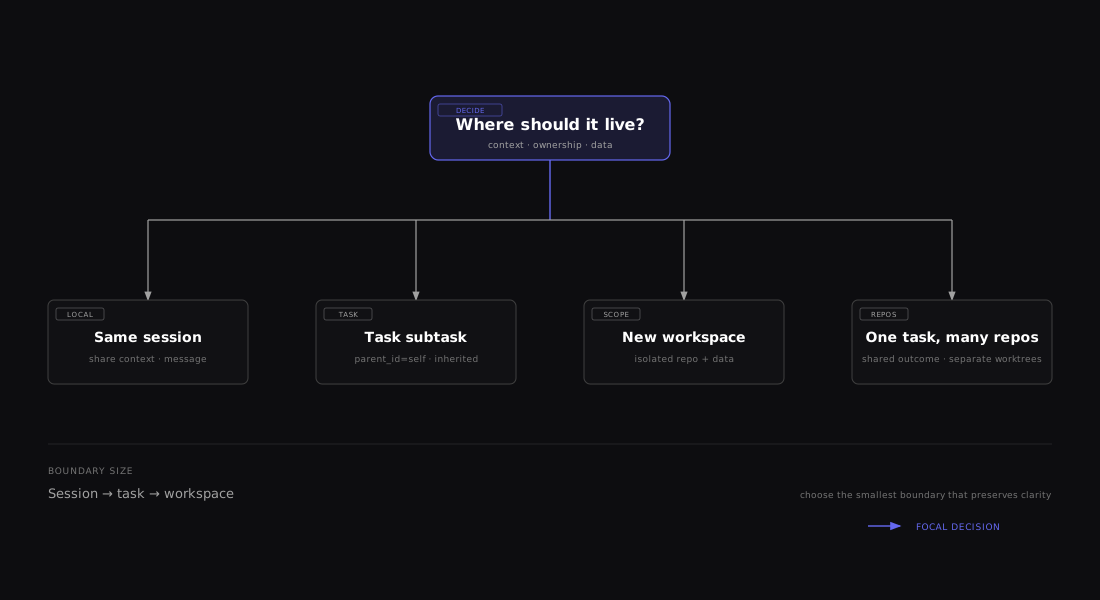

Start with the smallest boundary that preserves shared context. Increase the boundary only when workflow state, files, repositories, or credentials need isolation.
Choose a coordination boundary
| Need | Use | Filesystem relationship | Independent workflow state |
|---|---|---|---|
| Another agent on the same files and goal | Additional named session | Shares the task environment | No |
| A child deliverable that must see current uncommitted files | Subtask with Inherit parent workspace | Shares the parent's materialized workspace | Yes |
| A child deliverable needing isolated files or a different repository | Subtask with Create new workspace | Gets its own materialized environment | Yes |
| One deliverable spanning repositories | Multi-repository task | Separate worktree per attachment | No; one task workflow |
Shared files make handoff cheap but allow concurrent edits to collide. Separate environments isolate file state, but only the executor determines whether host processes and credentials are also isolated.
Run parallel sessions in one task
Use an additional session when agents need the same task, repository attachments, and materialized environment.
-
Open the task workbench.
-
Choose Add panel (+) → New Agent, or run New Agent from the command panel.
-
Select a compatible agent profile. Missing credentials link to the relevant Settings → Executors or Settings → Agents configuration.
-
Choose context:
- Blank starts without copied conversation context.
- Copy initial prompt copies the task's initial prompt.
- Summarize session asks the configured utility agent to summarize the current session. It is unavailable without a utility agent.
-
Enter the required prompt and select Start Agent.
The dialog shows the environment, branch, and executor the session will share. Two sessions can edit the same files concurrently; assign files or phases explicitly.
Additional sessions attach to the task's existing workspace. They do not create a second checkout, switch branches, pull, or run repository setup again, so uncommitted files remain visible to every session. If Kandev reports that the workspace is still preparing, wait for the first session to finish preparing and retry. If it reports that reuse is unsafe, restore or repair that existing workspace before retrying; starting another session never replaces it.
Right-click a session tab to Rename…, Set as Primary, stop, resume, delete, share, use Handoff to another profile, or Close Others, when that action is available for the session state. Names are trimmed and limited to 120 characters. Handoff creates another session; it does not move the task or transfer its workflow state.
Spawn a session from an agent
Task agents can call spawn_session_kandev with a prompt and optional name, agent_profile_id, and task_id.
- With no task ID, it adds a session to the current task.
- A target task must be in the same workspace as the spawning task.
- Profile selection prefers an explicit profile, then the spawner's profile for the same task, then the target task's primary-session profile.
- The spawned session receives hidden attribution context identifying the sender and reply route.
- A failure to apply the optional name does not fail an otherwise successful launch.
Use the returned task ID, session ID, and state for subsequent targeted messages.
Create subtasks
A subtask is appropriate when the child needs its own title, sessions, workflow position, history, or pull request.
Open it from either:
- the current task action beside New Task in the sidebar (New subtask of current task); or
- the task workbench Task split menu → Subtask.
The dialog proposes _Parent title_ / Subtask _N_. Title and prompt are required, and Create Subtask starts the agent immediately. When Agent-generated task titles is enabled, the title field is hidden and the prompt is required instead; Kandev derives the same six-word provisional title and lets the first session replace it. The subtask inherits the parent's workflow. Its profile starts from the active parent session's profile and can be changed, but the dialog does not filter profiles for executor compatibility.
Choose a workspace mode:
| Mode | Default and inheritance | Use it when |
|---|---|---|
| Inherit parent workspace | Default when the parent has an active worktree. Reuses the parent's executor, repositories, worktrees, branch, and current uncommitted files. Repository and executor controls are hidden. | The child is a focused collaborator on the same file state. |
| Create new workspace | Default when the parent has no active worktree branch. Lets you choose another configured/discovered repository, folder, remote URL, branch, and executor. | The child needs isolation, a different branch, or a different repository. |
The context choices are Blank, Copy initial prompt, and, when a utility agent is configured, Summarize session. Context supplies background; it does not create a shared conversation. Attachments and prompt enhancement are also available.
The subtask dialog includes an optional Autopilot switch. Use the info control
beside it for help: the child works independently and asks its parent only when a
critical decision blocks progress. The top-level task dialog does not show this
switch; use create_task_kandev when you need an autopilot root task.
The subtask dialog currently does not enforce agent/executor credential compatibility. For an isolated multi-repository subtask, choose Worktree, Local Docker, SSH, or Sprites; Local/Local PC creation remains gated and Remote Docker is not implemented. For every subtask, choose an agent profile configured on the inherited or selected executor; otherwise creation can succeed while agent launch or repository materialization fails.
Regular Kanban allows one subtask level: a root task can have children, but a child cannot have another child. Split further work into sibling subtasks, additional sessions, or a separate top-level task. Arbitrary-depth trees belong to the in-progress Office surface.
Detach a subtask
Open the subtask's action menu from its sidebar entry or Kanban card, choose Detach from parent, and confirm. The subtask becomes a top-level task without changing its workflow position, blockers, sessions, or descendants. The Office parent picker's No parent choice performs the same operation.
Detaching changes task hierarchy only. An inherited workspace remains shared with the former parent, and the confirmation dialog calls this out explicitly. Create a task with Create new workspace when the work needs isolated files or a separate branch.
Create a subtask from an agent
Call create_task_kandev with parent_id: "self". Omit workspace_mode to inherit the parent's materialized workspace/worktree, or set it to new_workspace for a separate workspace/worktree. The only explicit values are inherit_parent and new_workspace; inherit_parent requires parent_id. Send an exact value or omit the field: empty, whitespace-only, and padded strings fail MCP schema validation.
When the calling task is already a regular Kanban child, parent_id: "self" resolves one hop to the direct parent and creates a sibling under that common parent. The tool result identifies the requested and resolved parent and explains the depth-limit resolution. The common parent owns completion, parent questions, interrupt, and stop controls; the creating child keeps ordinary task messaging. An explicit child task ID keeps the strict one-level depth error, and this behavior does not change Office's deeper task trees.
For redirected calls, parent_resolution contains requested_parent_id, resolved_parent_id, reason: "kanban_depth_limit", and an explanatory message. If external_id returns existing work, the result explains that no task was created or reparented. Read the returned task's parent_id for its actual parent, which can differ from the parent resolved for this request.
start_agentdefaults totrue. A subtask or redirected sibling needs a detailedpromptwhen it is true. Set it tofalsefor a placeholder task.autopilotdefaults tofalse. Set it totrueto start an autonomous task. This choice is immutable and is not inherited by subtasks. An autopilot child receivesask_parent_question_kandevinstead ofask_user_question_kandev; an autopilot root receives neither question tool. See Agent Communication for the answer protocol.- The tool inherits the parent workspace, workflow, profile, executor, repositories, and base branches unless overridden.
- Inherited repository attachments deliberately do not copy an explicit checkout branch.
- An explicit same-repository child uses the inherited base branch. An explicit cross-repository child defaults to that repository's default branch unless
base_branchis supplied. - Every created task must resolve an agent profile, even with
start_agent: false. - Profile precedence when the task lands on a workflow step is the destination step's launch profile first (the step's pinned profile, or the workflow default when the step is unpinned), because that is what the orchestrator launches; it overrides an explicit
agent_profile_id, and the created task records it. With no explicitworkflow_step_id, the destination is the first Auto-start agent step forstart_agent: trueand the workflow's start step otherwise, so a workflow with steps still applies that step's launch profile. Off a workflow step, an explicit profile wins. Otherwise, the savedcurrent_taskpreference uses the verified creating session's profile and effective runtime settings before parent/current/source defaults;workspace_defaultuses workflow and workspace defaults. Sibling placement preserves this precedence, so the common parent's execution settings do not replace the creating session's profile or runtime settings where those take precedence. - If no executor or executor profile is explicit or inherited, task MCP uses the built-in git-worktree executor. It does not consult the workspace's Default Executor for this fallback.
- The one-level Kanban depth rule still applies.
- An ephemeral Quick Chat task cannot be a parent; omit
parent_idand create a top-level task instead.
For predictable top-level creation, pass repository_url, repository_id, or local_path, as the tool contract requests. repository_url may be a canonical repository URL, a GitHub pull request URL such as https://github.com/contributor/widget/pull/123, or a GitLab merge request URL such as https://gitlab.example.com/group/widget/-/merge_requests/123 on the configured host. For a pull request or merge request, Kandev validates the open source contribution, keeps the target repository as origin, and pushes future commits to the contributor's existing source branch after a write preflight; the existing provider change is reused rather than creating a duplicate. Provider-authored title, description, comments, and diff content are not trusted task context. If collaboration is disabled, enable the provider's edit-from-target setting and retry; if the write preflight reports missing credentials, configure the task's Git credentials and retry the launch. Kandev never falls back to pushing origin. In task mode, the backend currently inherits repositories from the calling source task when no locator is supplied; if that source is repository-free, it can create a repository-free task despite the stricter tool description. The regular UI's None source remains the explicit route for intentional repository-free work.
Set or change task priority from MCP
create_task_kandev uses medium when priority is omitted, even when the
parent has another priority. Use update_task_kandev to change priority
without changing task state:
{ "task_id": "task-uuid", "priority": "high" }See Set task priority through MCP for accepted values, omission behavior, validation, and retry behavior.
Coordinate with targeted messages
message_task_kandev sends a message to another task's primary session by default. Supply a session ID to target a particular sibling session on the current task.
| Target state | Result |
|---|---|
| Running or starting | Queues the message FIFO for a later turn. |
| Waiting, idle, or completed | Starts a new turn immediately. |
| Created but not started | Starts the session with the message. |
| Failed or cancelled | Returns an error. |
The default delivery mode is queued. Each session accepts 10 queued messages by default. An admin can change the install-wide limit under Settings > Preferences > Task Behavior > Runtime; 0 means unlimited. The saved value applies immediately to new admissions without removing messages already waiting. KANDEV_QUEUE_MAX_PER_SESSION has higher precedence, locks only the capacity field, and requires a restart when changed; zero or a negative value means unlimited. With Auto-run ON, one queued message runs per agent turn. At or above the cap, an eligible direct automatic fold into the pending tail may still succeed without creating another row. Other admissions return queue_full; staged attachments are rejected before any fold or attachment claim.
Automatically merge consecutive messages is enabled by default on the same settings card. Each session follows later changes to this install-wide value until its Auto-merge queue pill is changed. That first session change creates an explicit override that remains independent for the lifetime of that session, including across an empty queue and backend restart. For each new admission, Kandev resolves the effective session or global setting once. A compatible message may fold into the immediately preceding pending entry when both have the same strict source and compatible task, model, mode, metadata, attachments, and references. Otherwise it remains a separate FIFO entry. The earlier entry survives, so a successful admission may return an older queue-entry ID. The setting affects only later admissions and never sweeps rows already waiting. It is independent from Enable queued message merging, which controls the manual Merge with above action.
In the task workbench, expand the queue chip to manage pending messages. The compact header places the Auto-run and Auto-merge pills beside the queue count; these control queued-message delivery and folding, not pull-request Auto-merge. Every visible pending row has Remove, whether it came from a user, another agent, workflow automation, or a server action. Clear all removes all visible pending rows in that session and releases their capacity. After removal, merge, or drain, displayed positions compact to #1 through #N while FIFO order stays unchanged. Provenance still matters for editing and merging: only user-origin content can be edited. A row already reserved for delivery is hidden from the panel and cannot be cancelled there.
If another operation holds the session queue, queue changes wait up to 30 seconds to acquire it, respecting an earlier request deadline. This includes Remove, Clear all, Merge with above, reordering, editing, Auto-run, and Auto-merge. When the internal wait expires, the controls show retryable unavailable feedback and preserve pending messages. Retry after the competing operation finishes; this limit does not cancel work that already acquired the queue. Desktop and phone use the same retry behavior.
Use the queue controls according to the outcome you want:
- Auto-run is ON by default. ON runs eligible messages one at a time in FIFO order. OFF lets the current response finish, then holds every later message. The per-session setting survives an empty queue, reload, and backend restart. Turning it ON starts the head immediately when the session is promptable; clarification, workflow transitions, cancellation, and other lifecycle guards can defer delivery without changing the displayed ON state.
- Auto-merge shows the effective automatic-fold policy for this session. Changing it creates a permanent session override; untouched sessions continue to inherit the install-wide setting.
- Every row's Send Now targets that message. It sends directly when the session is promptable; when an agent turn is active, it waits for backend cancellation acknowledgement and replaces that captured turn. This includes a turn that Auto-run delivered from the FIFO queue after its prompt handoff completes. The handoff remains protected while it is completing, so a concurrent Send Now conflict keeps the rows pending for retry. A successful Send Now turns Auto-run ON, runs the selected row first, then continues the preserved remainder as separate FIFO turns. It does not record ordinary Cancel side effects, complete the cancelled workflow step, or move the task to review.
- Clear all removes every visible pending row without sending a prompt.
- Cancel in the chat toolbar stops the active turn immediately as a user cancellation. It may record the cancellation, complete an eligible workflow step, and move the task to review. It does not send queued content; when pending rows remain, Auto-run becomes OFF so they stay parked.
Choose the control by intent:
| Intent | Operation | Result |
|---|---|---|
| Send information that can wait | message_task_kandev with queued delivery or no delivery_mode | The current turn continues and the message waits FIFO. |
| Stop the current approach and give replacement work now | message_task_kandev with delivery_mode: "interrupt" | The direct parent requests immediate cancellation and redispatch. If that cannot proceed safely, the response reports the message as queued. |
| Halt all current work with no replacement prompt | stop_task_kandev | The direct parent requests logical cancellation and graceful teardown without creating or dispatching a message. |
Only a direct parent may interrupt its child. Halt-only stop is stricter: it accepts only a same-workspace direct child, while self, siblings, ancestors other than the parent, deeper descendants, unrelated tasks, and cross-workspace callers are rejected. Use interrupt for stop-and-steer work. Reserve stop for halt-only intent.
Stop a direct child's work
stop_task_kandev accepts the full ID of one direct child and has no session-specific option. Kandev inspects that child's active-session candidates and requests a graceful stop for every execution still observed as live, including non-primary sibling sessions. It does not recurse into descendants.
For each accepted execution, Kandev persists the session as CANCELLED before scheduling runtime teardown. A status: "stopped" response confirms that logical state and scheduled teardown; cleanup continues asynchronously and the process may not have exited yet. When no live execution is accepted, the call succeeds idempotently with status: "not_running" and changes no task or session state.
After at least one accepted stop, Kandev attempts to move a regular, unarchived, non-Office task from IN_PROGRESS or SCHEDULING to REVIEW, provided no session remains working. Office, archived, and already non-active tasks keep their state, and a failed secondary REVIEW reconciliation does not undo accepted session stops.
Stopping preserves the task record, worktrees, environments, commits, descendants, and existing queued messages. It sends no prompt, creates no replacement turn, and does not create a durable pause: a later user or workflow action can start the task again.
A cancelled session is terminal, so message_task_kandev cannot restart the child through it. To put a stopped child back to work, call spawn_session_kandev with the new prompt: it creates a fresh session on the same task and workspace, preserving the worktree and history.
Additional messaging boundaries:
- A task cannot message its own primary session through the default route, and a session cannot message itself.
- The default route targets the primary session, falling back to the newest session that can still take a message when the primary is cancelled or failed. A session named by
session_idis never redirected. - Normal targeted messages can cross workspaces when the sender has the exact task ID. Session spawning cannot.
- Sender metadata and content become part of the target conversation. Do not send secrets.
- Use bounded requests with the repository, branch, expected result, and reply target instead of treating messages as shared memory.
Use get_task_conversation_kandev to read a primary or explicit session conversation. It supports limits, before/after cursors, ascending or descending order, and message-type filters. When a task has more than one session, use list_task_sessions_kandev to list them (newest first, flagging the primary and your own) and pass the session_id you want. Use list_related_tasks_kandev to list a task's parent, direct children, siblings, stored blocker relationships, and associated GitHub pull requests. task_id defaults to the current task; another target is allowed only when it is an ancestor, a descendant, a sibling with a shared non-empty parent, or a blocker of the caller in the same workspace. Unrelated tasks are denied, including in the same workspace. Compact output is a presentation option, not a separate metadata permission: verbose adds descriptions and never widens access.
Replies close the loop: the receiving agent calls message_task_kandev back with the originating task's ID, turning a one-way notification into a genuine bidirectional conversation. This enables multi-turn negotiations between agents, for example, agreeing on an API contract before both sides implement. See Agent Communication for delivery semantics, discovery patterns, and a worked negotiation example.
Wait for child tasks
On the parent's current workflow step, configure When Child Tasks Complete to move next, previous, or to a selected step. It runs once when every active direct child is COMPLETED, FAILED, or CANCELLED and the parent has an active session.
It ignores archived and ephemeral children, ignores grandchildren, and does not run if the parent has no children. The qualifying parent-session states are CREATED, STARTING, RUNNING, and WAITING_FOR_INPUT; no session, IDLE, or a terminal session prevents the transition. Terminal child state means work stopped; it does not mean every child succeeded. Put a human Review step after the transition when failures, diffs, or pull requests must be inspected.
For a human gate, use On Turn Complete → Do nothing (wait for user) and require a person to review before moving the task or sending the next instruction. step_complete_kandev proves only that the agent emitted the configured completion signal.
Work across repositories and branches
Work across repositories and branches
Create a multi-repository task
In New Task, add more Repo or Remote rows and select a base branch for each. Multi-repository creation supports Worktree, Local Docker, SSH, and Sprites. Local/Local PC creation remains gated while its initial-launch path cannot project sibling repositories, and Remote Docker is not implemented. Kandev scopes Changes, review, and pull-request surfaces by repository.
Before starting, document:
- which repository owns each deliverable;
- the base and pull-request target for each attachment;
- which remote credential can fetch and push each repository;
- the merge order for dependent changes; and
- the test command required in each repository.
Fork pull requests and comparison targets
When a task branch is the head of a fork pull request, provider integration records both repository identities. Kandev applies the target only when the attached repository matches the PR head and the live checkout branch matches the PR source branch. This prevents an old fork PR from changing the comparison base of another attachment.
The target repository and branch are stored on that task-repository attachment. A live session uses
an exact comparison-only ref for the target. It keeps origin, checkout, and push routing unchanged.
Retargeting the PR refreshes the target. Changing the task base branch or removing the owning PR
association clears it. If the target is unavailable, Kandev fails closed and marks comparison
unavailable instead of using a same-named local or origin branch.
Add sources after creation
Adding sources details
For an idle, non-archived task with a prepared workspace, use Files → + → Add repositories or folders. Add repository offers a workspace repository, an existing local Git checkout, or a provider-backed/pasted remote URL. The workspace option shares task creation's saved/discovered selector, including refresh and create-repository actions. Add folder appears for Worktree and Local/Local PC tasks. Add multiple mixed sources together; validation, persistence, and materialization are atomic. Desktop uses a dialog and phones use a full-height drawer with a touch-sized repository menu.
Repository sources work on Worktree, Local/Local PC, Local Docker, Kubernetes, SSH, and Sprites. They use the current workspace root. Local/Local PC links host repositories and folders into that root without switching the current checkout; Docker, Kubernetes, SSH, and Sprites clone repositories inside the executor workspace and require a cloneable origin for local Git rows. Folder sources are live host links and work only on Worktree and Local/Local PC. They are unavailable to remote executors, where Upload folder remains a separate copy flow when supported. Remote Docker remains unimplemented.
Use a base branch for every repository attachment. Local/Local PC never changes the user-owned repository checkout.
Choose sources first, then review their locations. Additions within the current workspace show a brief continuity note. A prominent restart warning appears only when workspace-root expansion is selected. Cancel or closing the surface sends no attachment request and leaves the workspace unchanged.
On a single-repository Worktree task, a repository-only batch also shows a placement choice. Choose
kandev/ to group new repositories below the current root, or choose the current root to place each
one beside the existing repository files. The preview shows the exact relative paths. These nested
choices keep the agent CWD and workspace processes unchanged, and Kandev protects the outer Git
worktree from staging the nested checkouts. Parent-rooted tasks add repository siblings directly.
Workspace-root expansion stays disabled until explicit idle session recovery is available.
Kandev rejects the entire request if a source is invalid, duplicated, inaccessible, or cannot be materialized. A failure removes new source records and Kandev-owned materialization; existing task contents remain intact. Attachments persist across reload, relaunch, and reset. A missing persisted folder is surfaced during a new or reset environment rather than silently omitted.
When a second source promotes a single-repository workspace to the task root, Kandev restarts the idle Worktree or Local/Local PC agent there. Existing files, Git changes, task state, messages, plan, attached sources, model, and mode remain. Providers that support loading a conversation from a different working directory keep their native session; other providers receive a fresh session with recorded conversation context on the next prompt. Provider-private context that Kandev did not record may not carry over. This intentional restart is not reported as an agent failure.
That host rebind stops open task terminals, dev servers, the task editor server, and other agentctl-managed workspace processes. Save unsaved work first, then reopen or restart those processes after attachment. Local Docker, SSH, and Sprites instead clone the new repository under the current remote workspace and rescan it without changing the agent CWD or restarting the agent and workspace processes.
Task agents can call add_workspace_sources_kandev with the same mixed batch; task_id defaults to the current task, and the operation remains idle-only. A direct parent in the same workspace can use it to recover an idle child that is missing a repository or SDK; siblings and other task relationships cannot target that child. Exact retries are safe no-ops. add_branch_to_task_kandev remains the current-task-only Worktree legacy one-repository/branch path and may run during an active turn: it creates a sibling worktree under the task directory, promotes the Files root to that parent, and rescans without restarting the agent, terminals, or workspace processes. Its worktree_path is the exact new location, task_workspace_path is the Files root, and agent_cwd_changed is always false; the agent's current directory stays unchanged.
Use update_repository_base_branch_kandev with a task-repository ID to change the comparison base. The database update is authoritative. Resetting cached session bases, refreshing Changes, base commit, ahead/behind counts, and cumulative diff in a live tracker are best-effort side effects; a failure is logged without rolling back the new base, and the persisted value is rebuilt on the next session launch. The tool does not rewrite commits, switch the checkout, or change an existing pull request's target branch.
Separate worktrees isolate file state. They do not by themselves isolate host credentials, ports, background processes, or other machine resources.
Keep durable coordination state
Regular tasks have one versioned plan. Use the parent plan for the overall breakdown, then put each child's precise scope and file ownership in that child's description. A subtask does not share a second live copy of the parent plan.
Before handing work to another session or task, record:
- completed work and remaining scope;
- repository, checkout branch, and relevant commit;
- tests run and exact failures;
- pull-request state and required reviewers;
- blockers and expected input; and
- files another writer must not overwrite.
Commit before switching isolated branches when the repository process requires it. Conversation summaries are useful context, but plans, repository files, commits, and pull requests are the durable sources of truth.
Coordinator-led and human-led patterns
Coordinator-led and human-led patterns
A supported coordinator-led Kanban flow is:
- Inspect the workspace, workflow, repository attachments, available profiles, and related tasks.
- Record one parent plan with deliverables and ownership.
- Create parallel sessions for shared-file work and subtasks for independent workflow state.
- Use isolated subtask workspaces for concurrent writers or separate branches.
- Send bounded targeted messages and monitor conversations and pull requests.
- Let the direct-child completion event move the parent to Review.
- Have a person inspect changes and merge results in the documented order.
The coordinator has only the tools, filesystem access, credentials, and permissions exposed by its agent and executor profiles. It cannot bypass branch protection, provider approval rules, or human workflow gates.
A human-led flow uses the same primitives but keeps Do nothing transitions at planning, review, or release steps. Humans can create each task, approve agent-proposed subtasks, restrict credentials to narrow profiles, and decide what merges or ships.
Office dependencies and deeper coordination
Regular Kanban does not currently expose a dependency editor or blocker filter. Stored blocker data can appear through related-task MCP, but it is not a regular-board planning surface. For supported ordering, use parent/child structure, When Child Tasks Complete, explicit messages, workflow gates, and pull-request review.
When Office is enabled, it prototypes Blocked by and Blocking properties with same-workspace, self-reference, and cycle validation. Treat these as an evaluation surface rather than a production coordination contract.
The Office task guide covers its projects, assignments, deeper task trees, dependencies, and review/approval flow. Start with Office setup to enable that experimental surface.
Troubleshooting
- New Agent has no usable profile: configure credentials under Settings → Agents and a compatible executor under Settings → Executors.
- Summarize session is missing: configure a utility agent; otherwise use Blank or Copy initial prompt.
- Parallel agents overwrite work: stop one writer, assign disjoint files, or create an isolated subtask workspace.
- Subtask cannot be created: confirm the prompt (and title unless Agent-generated task titles is enabled), compatible profile, workflow, and the one-level Kanban depth limit. From a Kanban child, use
parent_id: "self"for the supported sibling placement; an explicit child ID still returns the depth error. - Subtask creates but its agent or repositories fail to start: the dialog does not enforce agent/executor compatibility. Confirm the agent is configured on that executor; multi-repository creation supports Worktree, Local Docker, SSH, and Sprites.
- Inherited subtask sees unexpected changes: it intentionally shares the parent's materialized files and branch.
- Message remains queued: the target is busy and only one queued message drains per turn. Check for
queue_fullbefore retrying. - Interrupt is rejected: only the target's direct parent may use interrupt delivery.
- Stop is rejected:
stop_task_kandevis task-mode only and accepts only a same-workspace direct child of the caller. - Stop reports
stoppedbut a process is still visible: the response confirms logical cancellation and scheduled graceful teardown, not process exit. - Agent cannot spawn on another task:
spawn_session_kandevis same-workspace only; create a task or use a normal targeted message instead. - Parent does not advance after children finish: the parent needs an active session in
CREATED,STARTING,RUNNING, orWAITING_FOR_INPUTin addition to terminal direct children. - A multi-repository executor is disabled: Local/Local PC creation is still gated, or Remote Docker is not implemented. Choose Worktree, Local Docker, SSH, or Sprites.
- Adding repositories is rejected: wait until the task has no active turn or tool call, check every source's locator and branch, and remove duplicate repository/branch pairs or folder paths. A Docker or remote task cannot attach a folder.
- Changed base did not refresh immediately: the database value is saved even when live tracker refresh fails; the next session launch rebuilds the comparison state.
- Changed base did not retarget the PR: the base-update tool changes Kandev's comparison context, not Git history or provider PR metadata.
Related: Tasks and workflows, Sessions and review, Automation and MCP, Agents and profiles, and Executors.