Kandev documentation
Git Operations
Use Kandev worktrees, commits, remote operations, change requests, and cleanup safely.
Kandev runs Git commands in the selected repository workspace for a task session. The Worktree executor gives a session a dedicated host worktree; Local uses the configured shared checkout, while container and remote executors use runtime-specific workspace behavior described in Executors. The browser sends a WebSocket request to the backend, which forwards it to agentctl in that executor. This keeps the command's filesystem, Git configuration, network access, SSH agent, and provider CLI in the same environment as the agent.
Use the task's Changes panel to inspect, stage, discard, commit, push, reset, or rename a branch. The task toolbar and command panel also expose Commit Changes, Push, Pull, provider-appropriate pull-request or merge-request creation, Rebase, and Merge when a Git-capable session is selected.
When a damaged workspace prevents a change check during task deletion, you can acknowledge the unknown changes and delete the task. Physical cleanup remains subject to ownership and Git identity checks. See delete a task when its workspace cannot be checked.
Quick path
- Inspect the selected repository in Changes.
- Stage only the files you intend to commit.
- Run required checks before pushing or opening a change request.
- Treat discard, reset, amend, force-push, and cleanup as irreversible or history-changing operations.
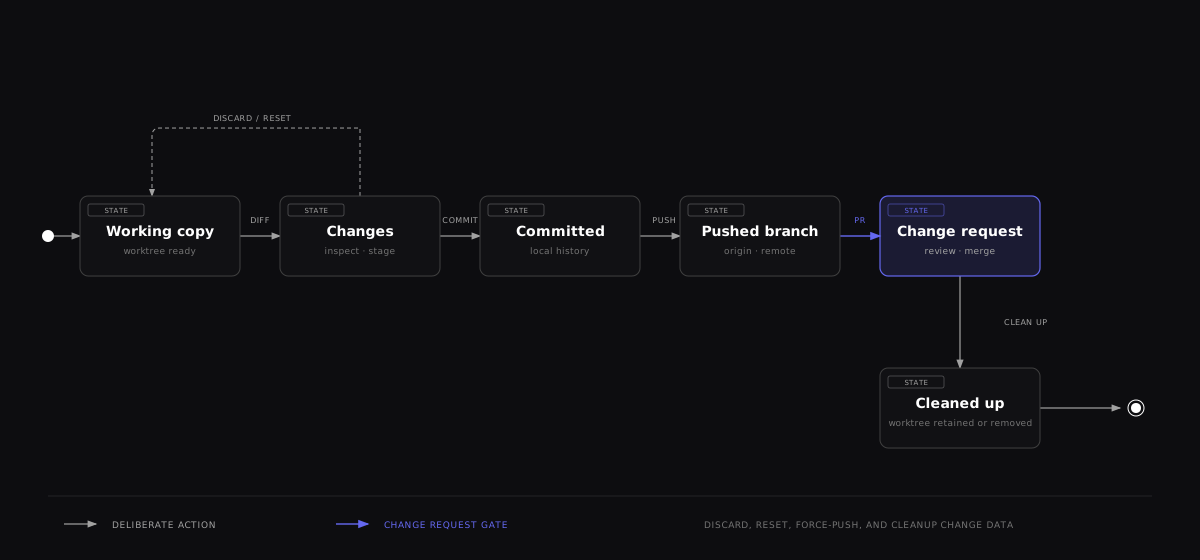

The state transitions are separate operations. Inspect the diff before staging, verify checks before pushing, and decide whether cleanup may remove a worktree or other local data.
When task and PR histories differ
For an associated pull request, Kandev keeps the task checkout and the published PR history separate when current evidence confirms that both histories contain commits absent from the other. Different head commits alone can also mean that one version is simply ahead. When cached upstream data cannot establish the relationship to the current PR head, Kandev keeps a unified history and withholds remote mutation actions until it has enough evidence. It may identify a completed local rebase when the current repository evidence supports that explanation. If the evidence is missing or incomplete, Kandev uses neutral wording instead of guessing which history changed.
Choose Compare versions first. Kandev opens Changes with the task and PR histories visible; the comparison does not fetch, rewrite, or publish Git history. Review the selected repository, branch, pull request, and both displayed heads before choosing a replacement action.
Publish task version... replaces the published PR history after an exact provider-head check and confirmation. Restore published PR version... replaces the task checkout history, creates a recovery branch at the current task head first, and requires a clean working tree. If the provider head changes before confirmation, Kandev leaves both versions unchanged and asks for a fresh review.
Seed ignored files into worktrees
Repository copy-file settings seed files before a new worktree's setup script
runs. Enter repository-relative paths or glob patterns separated by commas,
for example .env.local, config/{local,dev}.env.
Commas inside character classes and brace alternation belong to the pattern.
config/[a,b].env matches a.env, b.env, or ,.env in config.
Braces inside classes are literal: config/[{].env, .env.local selects
config/{.env and .env.local. On POSIX hosts, backslashes escape the next
character, including commas and braces. On Windows, backslashes are path
separators; use character classes for literal glob characters.
Append :symlink to share a source file through a relative host-worktree link,
for example .env.local:symlink. Remote executors copy its bytes instead.
Windows link creation can require extra privileges. The first entry wins when
patterns overlap, and existing destinations are skipped. Other colons remain
literal; use ::symlink for a filename ending in :symlink.
Prerequisites and trust boundary
The repository must be a valid Git checkout in the executor workspace and the session's agentctl must be reachable. Pull follows the current branch's configured upstream remote and source ref, even when the remote or branch name differs from origin or the local branch. Managed contribution tasks retain their validated source remote and branch. Configure the selected remote's URL and credentials in the executor where the command runs. Ordinary Push and change-request creation use origin, subject to the managed routing described below. Rebase and Merge use origin when it exists, or a local base branch when it does not. The workspace's provider automation identity does not replace the task's Git credential policy or executor-local SSH setup; see Executors.
Git commands from the agent shell and Git actions from the Changes panel use different permission paths. The Changes panel sends its Git action through Kandev to agentctl. It does not run the action inside the agent shell. The agent shell remains subject to the selected agent's permission mode.
In a restricted agent mode, git status can work while git add or git commit fails. These write Git metadata, including .git/index.lock.
If the error says that .git/index.lock already exists or is held, another Git process can own the lock. Stop other Git operations and inspect the lock before retrying. Remove a stale lock only after you confirm that no Git process owns it. The Changes panel uses the same worktree, so it does not bypass an active lock.
If the agent cannot create .git/index.lock because its permission mode blocks the metadata write, the repository and Kandev Git integration can still work.
To commit agent edits, use the Changes panel. No mode change is needed. If the agent shell must commit, select an agent mode that allows Git metadata writes. Mode names come from the installed agent. For example, Codex can expose Agent (default) and Agent (full access).
Managed Improve Kandev tasks are the exception to the ordinary single-remote push description. The
canonical origin still identifies kdlbs/kandev for pulls, base comparisons, issue lookup, and
the pull-request target. Before launch, Kandev prepares one exact fork remote for the task branch
and configures Git to use it for pushes. Run ordinary Push or git push; do not rename origin
or replace it with a fork. The PR workflow uses the canonical repository and an explicit
<fork-owner>:<branch> head. Other tasks keep the normal origin push behavior.
When its recorded checkout identity is complete, changing only the comparison base of an existing Worktree task, such as retargeting a stacked pull request to main, keeps its current checkout available for Resume and additional sessions. Incomplete identity evidence uses the existing guarded recovery flow. Kandev retains the checkout's recorded identity while using the updated base for comparisons. An explicit checkout-branch selection still requires the matching checkout.
Compare a fork pull request
When a linked pull request uses a fork, Kandev stores the provider-qualified target repository and target branch on the exact task-repository attachment. It fetches that branch into a comparison-only remote-tracking ref. Kandev uses the same repository identity when it prepares a worktree. Kandev checks the fetched commit against the pull request's reported base commit. It fetches the pull request head from the base repository. This comparison ref is read-only and is authoritative for Changes, commits, cumulative diff, and ahead/behind counts.
The comparison target does not replace origin, the checked-out branch, or the push route. Kandev
shows the target as <owner>/<repository>:<branch> without credentials. If the target cannot be
validated, fetched, or resolved, Kandev marks comparison as unavailable and does not substitute a
same-named branch from origin. Numeric comparison totals are hidden until the exact target is
available.
When a provider retargets the pull request, Kandev refreshes the stored target and the live session
comparison. If Kandev cannot fetch the required target or the fetched commit differs from the
provider response, task preparation stops. A stale provider response or a retarget during preparation
can cause this mismatch. Select Retry launch to refresh provider data and try preparation again.
If the failure is caused by access or connectivity, restore access or connectivity before retrying.
Kandev does not use an origin branch with the same name or start from the repository default.
The qualified target does not replace origin or change push routing. A fork PR continues to use
the configured fork for pushes. An explicit cross-repository PR target blocks Retry with the
default branch. To retry the same PR base, select Retry launch. To clear the PR target, select
a task base branch or remove the owning pull-request association. Kandev does not guess incomplete
fork identity or apply it to another repository.
These UI operations enter through Kandev's /ws endpoint. With authentication disabled, anyone who can reach an unprotected backend receives the synthetic administrator identity and can invoke destructive Git actions with the executor's permissions. Experimental authentication adds user and workspace authorization, but it does not restrict the executor's filesystem or credentials. Keep Kandev on loopback or behind an authenticated, origin-protected TLS proxy; see WebSocket API.
Credentials are resolved where agentctl runs. A host SSH agent, credential helper, gh login, or az login is not automatically available inside every Docker, SSH, or remote executor. Give the executor only the repository access it needs and test with a disposable branch. See Executors for executor-specific credential handling.
When the Worktree executor is selected, its filesystem separation is not a security sandbox. Host worktrees share the repository's Git object database and local refs, and agents can run arbitrary repository commands allowed by their executor.
Managed worktree and branch lifecycle
This section describes Kandev's Worktree executor and other executor paths that create managed Git workspaces. Local, Docker, remote Docker, SSH, and Sprites have executor-specific checkout, mount, and cleanup behavior; see Executors before assuming these host paths or isolation properties apply.
By default, managed worktrees live under the configured task-data directory, commonly:
~/.kandev/tasks/{task-directory}/{repository-name}
~/.kandev/tasks/{task-directory}/{repository-name}-{branch-slug}
Additional branches are siblings of the primary repository worktree, not directories nested inside it. Multi-repository tasks have one worktree per repository. Kandev reuses a valid session/repository worktree; if its directory is missing, it attempts to recreate it from the recorded local or remote branch.
Managed worktrees can remain registered to an older repository clone after the repository path changes. For supported GitHub and GitLab repositories, Kandev checks the provider origin, linked-worktree registration, branch, and commit. When the worktree is clean, Kandev moves it to the current workspace clone before it starts an agent and retains a recovery snapshot of the old checkout.
If a worktree contains local changes, Resume or Restore workspace stops before agent startup and offers Move files and resume. Kandev leaves the original worktree untouched until you confirm. It then preserves a recovery snapshot and copies tracked, untracked, and ignored file content, deletions, file modes, and symbolic links to the replacement worktree. Git's index and staging choices do not transfer, so stage the files again before committing. Review the changes after recovery. Kandev blocks worktrees with unsupported filters, sparse checkout, or submodules.
After Kandev completes the relocation, keep using the replacement worktree. New commits, amended commits, rebases, and local edits stay there. A completed relocation record does not pin the branch to the commit from transfer. Resume, Restore workspace, and a backend restart use the current worktree. Kandev checks its Git and managed-clone identity before startup.
If an older Kandev version shows published replacement commit could not be verified after you continue work, upgrade Kandev. Then select Resume or Restore workspace. The corrected version checks the current branch and managed-clone identity. It does not reset the branch or discard changes.
If an older task still shows a generic recovery error, use Resume or Restore workspace once to check the current workspace and reveal the relocation action. A busy inspection leaves every checkout unchanged. Wait for it to finish, then retry manually.
After upgrading, select Move files and resume to retry an older blocked snapshot caused only by lost file permissions. Kandev checks the original checkout and retained snapshot again. It then creates a new snapshot and resumes the existing provider conversation. The retry keeps the failed snapshot and original checkout for inspection. Git's index and staging choices do not transfer; stage files again before committing.
Kandev refuses this retry if content, entry names, symbolic-link targets, the required set-ID identity changes during verification, or the new snapshot or replacement cannot preserve that identity. A retained set-ID bit in the old snapshot must also have the same required identity as the original. When an old snapshot lost the bit, its copied owner does not determine the original identity. Kandev reads the required UID or GID from the verified original and checks it for changes before preserving it on the new snapshot and replacement. The host must support preserving each required UID or GID.
Keep both copies and inspect them manually when verification refuses the retry. An upgrade does not retry a blocked snapshot automatically.
For a new task branch, the repository default template is:
feature/{title}-{suffix}{title} is an ASCII-safe, lower-case task-title slug and {suffix} is a short collision-avoidance value. Repository settings can change the template. When registering a repository, an omitted pull_before_worktree defaults to true: Kandev attempts to refresh and verify the base branch before creating or recreating the worktree. Later repository settings saves preserve the current default branch and refresh choice when those fields are omitted, including when another save changes them before a rename finishes. The public configuration defaults both fetch and fast-forward pull timeouts to 60 seconds. When a usable local base exists, authentication, network, timeout, missing-ref, divergent-ref, and uncertain-ancestry errors produce a credential-safe warning and Kandev creates the worktree from that local base. The warning states that remote changes may be missing. When no usable local base exists, Kandev must materialize the requested branch from the remote; a failed refresh or missing remote ref stops task preparation with a repository-specific launch error. Explicit remote-only refs and remote executors keep this strict materialization behavior.
Without an explicit cross-repository target, Kandev uses the current base branch for a numbered GitHub PR. If Git proves that the requested base branch was deleted, Kandev can use a configured fallback branch, often the repository default, only after it refreshes and verifies that fallback. Kandev shows a warning with both branch names. Other PR refresh errors stop preparation.
An explicit fork target has no default fallback. Kandev stops preparation if it cannot fetch or verify that target. Kandev does not create a worktree from an unverified local or remote-tracking branch.
If the repository is intentionally offline, open its workspace repository settings and disable Always pull before creating a new worktree. This skips the refresh attempt for host worktrees, but it is not required for a normal local-only base. Keep the setting enabled when remote freshness is important for later task launches.
Branch names in executor scripts
The repository.branch placeholder supplies an upstream branch name to executor scripts.
For example, origin/main and refs/remotes/origin/main both produce main for clone and fetch commands.
This applies to current and saved scripts that use the placeholder.
Kandev removes one recognized prefix. Names such as feature/login and upstream/main remain unchanged.
Use refs/heads/origin/topic to identify a literal upstream branch named origin/topic.
The stored task base reference and worktree.base_branch remain unchanged.
A missing upstream branch still fails preparation.
Review a PR in a remote workspace
When you select a GitHub PR for a new remote workspace, Kandev checks out the fetched PR head before the agent starts. This includes fork PRs on Sprites, Docker, SSH, and Kubernetes. Kandev fetches the PR head from the base repository and keeps the selected base branch for comparison.
Review checkout does not require permission to push to the fork. It does not configure a fork push destination or grant edit access. If the selected PR or branch cannot be fetched, preparation fails instead of starting on the base branch.
Resuming an existing workspace preserves its branch, local commits, and uncommitted changes. A newly recreated workspace fetches the selected PR again. Existing workspaces that previously started on the wrong branch are not reset automatically.
In the Review dialog, choose Preview markdown for a changed Markdown file to render its changed content in place. Show diff returns to the textual diff. The selected view stays in place if the file list briefly refreshes while Review remains open.
Files remain, but Git metadata is missing
A linked worktree stores its files separately from its Git administrative
directory. Its .git file points to an entry under the main repository's
worktrees directory.
An incomplete backup restore or manual metadata removal can break this link without removing the checkout files. Git pruning can also remove administrative data while a worktree drive is unavailable. This is different from a missing checkout or a lost branch.
Checkout files alone do not contain the complete Git state. They cannot restore a lost index, previous staging choices, or commits absent from the object database. Ignored files can include credentials and require the same protection as source files.
CAUTION: Do not remove the remaining checkout to clear a metadata error. It can contain the only copy of uncommitted work. Stop active sessions before manual recovery, and preserve the checkout and available repository metadata first.
For remote or container executors, the relevant filesystem belongs to that executor. An identical path on the Kandev host does not identify the same checkout.
Automatic recovery of missing linked-worktree metadata
For a selected host Worktree environment, Kandev can recover a checkout when the checkout directory still exists, its linked Git administrative directory is missing, and the recorded branch still resolves in the source repository. Local, container, SSH, Sprites, Kubernetes, and other remote executor workspaces keep their own recovery behavior. A remote Git origin does not make an executor remote.
A main repository can also be the selected host Worktree checkout. Its .git
directory does not require linked-worktree recovery. When Git metadata is valid,
Kandev keeps using the same checkout and does not create recovery artifacts. A
successful relaunch clears the matching task-level launch error.
A healthy checkout can keep using an older managed clone while that clone remains the repository's registered source. Resuming does not require a newer workspace clone to exist or move your files. If the registered source changes, Kandev validates the old and new clone identities before offering or performing relocation.
For missing linked-worktree metadata, Kandev checks every selected repository
slot before it changes any slot. It keeps the original checkout and creates a
sibling recovery worktree with a branch named
{recorded-branch}-recovered-{operation-prefix}. It copies tracked, untracked,
and ignored files, deletions, modes, and symbolic links. It does not restore the
old index, staging choices, or commits that are no longer available.
If the checkout directory itself is missing, Kandev uses a separate guarded recovery path. It requires the selected environment's active worktree record and the exact recorded branch identity to still resolve in the source repository. It recreates the original checkout path and branch from that local branch, its recorded recovery commit, or the matching remote-tracking branch. It does not substitute the task base branch, fetch a different branch tip, or create a replacement during attach-only workspace reuse.
If both the local branch and its remote-tracking ref are absent, Kandev checks the configured origin for the exact recorded branch. It fetches only the advertised commit and verifies the head before it creates the checkout. A failed origin check blocks automatic recovery. Confirmed branch loss still requires the explicit Resume on a new branch recovery action.
If recovery stops before the checkout is complete and only the origin branch remains, Kandev checks that exact branch again on retry. It records the newly advertised head before fetching it. If the branch advances between that check and the fetch, the current attempt stops and a later retry checks the branch again. A surviving local branch stays at its recorded commit.
Before restoring a missing checkout, Kandev verifies every selected repository slot, confirms the Worktree environment still has exclusive ownership, and checks that no session or runtime is using it. A live requester, sibling session, or borrower makes recovery fail before startup. The checkout path and worktree record stay the same after recovery. Files that existed only in the deleted directory, including uncommitted, untracked, and ignored content, cannot be recovered by this process.
Kandev refuses automatic recovery when metadata is ambiguous, the recorded branch is confirmed unavailable, the environment is busy, the environment owner changed, or the recovery claim is not current. A multi-repository recovery can retain an earlier completed slot when a later slot fails, but Kandev does not start an agent with an incomplete inventory. Recovery records and snapshots remain beside the original checkout for inspection and can contain ignored files, including sensitive data.
Inspect cleanup identity conflicts
A worktree cleanup can refuse to remove a checkout when Git still registers a different branch or commit at that path. The cleanup job records the exact worktree, stage, reason, recorded-versus-current comparison, and a read-only inspection action. Use that evidence to inspect the recorded registration or compare the recorded commit with the current branch before you change anything. The diagnostic does not authorize deletion and does not expose paths, commit IDs, branch names, repository contents, or raw Git output.
A confirmed identity conflict reports cleanup_condition=reconciliation_required
while cleanup follows its effective retry policy. Cascade cleanup without
unverified-change consent keeps its capped retry schedule across restart;
cascade cleanup that allows unverified changes becomes failed after eight
attempts and is not retried automatically. Each attempt checks the original
immutable snapshot against current Git state again. An independent healthy
worktree can still be removed in the same batch.
Do not force-delete a checkout, reset a branch, or edit the cleanup snapshot to make a conflict pass. Use the inspection action first. If the evidence shows an inventory defect, follow the explicit repair procedure below. Keep the original checkout and its files until a verified repair or an authorized cleanup removes them.
Repair inconsistent worktree inventory
Use the source maintenance utility when healthy Git checkouts disagree with saved worktree ownership, branch, repository, or task-root records. Duplicate physical-worktree claims now stop normal admission and cleanup with an ambiguous inventory ownership error. Repeated resume or cleanup attempts do not repair them.
The utility supports local SQLite installations and the host Worktree
executor. Apply and rollback require Linux and permission to inspect processes
across all users through /proc. PostgreSQL, remote executors, and non-Linux
application are unsupported. Discovery, preview, and verification only read state.
Use a backend build with the repair startup guard before applying a repair.
-
Build the utility from
apps/backend:go build -o worktree-inventory-repair ./cmd/worktree-inventory-repair umask 077 -
Discover duplicate claims using the installation's absolute paths:
./worktree-inventory-repair --discover \
  --home /srv/kandev --database /srv/kandev/data.db \
  --tasks-root /srv/kandev/tasks --limit 50 > discovery.json
Discovery reads database claims without electing an owner or changing Git. Continue with
--afterset to the returnednext_aftercursor until no cursor remains. The default page has 50 physical IDs, with a maximum of 100. Oversized groups are reported without partial selections. Do not treat discovery as authorization to remove a row. -
Prepare an explicit private plan. Use the repair plan fields and a unique
operation_id. Setdrivertosqliteand provide absolutehome,database, andtasks_rootpaths.Use
version: 2for duplicate ownership. Eachrepairsentry names the exact physical ID, canonical environment and repository, attached branch, HEAD, repository path, checkout path, and marked root owner. Setsource_pathandpathto the same existing checkout. Each correspondingaliasesentry names itsworktree_id, onecanonical_row_id, and the completealias_row_idslist:{ "worktree_id": "physical-worktree-id", "canonical_row_id": "canonical-inventory-row-id", "alias_row_ids": ["legacy-root-alias-row-id"] }The canonical checkout must agree with Git registration, the branch and HEAD, the repository record, and the enclosing task's ownership marker. A root alias must belong to that same environment and have no root
.gitmetadata.For a copied child environment, also provide
redundant_environmentswith itsenvironment_id,canonical_environment_id, savedgroup_id, and completesession_idsandsnapshot_idslists. Every copied slot must refer to a proven canonical checkout. The saved sharing policy, group ownership, and membership must agree. Includeworkspacesonly for explicit workspace-path corrections. Unmatched slots, unknown references, mixed active/deleted claims, and incomplete selections refuse the entire repair.Version 2 does not move files or supersede cleanup jobs. Use the existing version-1 plan for a branch correction or explicit relocation. A version-1 relocation requires a matching
workspacesentry with every bound session. Include an old cleanup job only when its incomplete snapshot needs a linked successor. Never edit the old snapshot to make cleanup pass. -
Stop consumers and produce a fresh preview. Stop the backend through its normal service or launcher, and stop processes using the selected task roots. Omit
expected_rows,expected_git, andexpected_consumer_pathsfrom the initial input. Preview supplies these exact observations:./worktree-inventory-repair --plan input.json > preview.json jq '.plan' preview.json > repair.jsonReview the selected rows, dependent records, and
blockers. Keep the complete returned plan. A version-2 repair can preserve an idleCREATEDorWAITING_FOR_INPUTsession only after proving that no runtime or host process still uses the workspace. A cleanup job must be cancelled or succeeded. Changed observations require a new preview and review. -
Apply and verify before restarting:
./worktree-inventory-repair --plan repair.json --apply
./worktree-inventory-repair --plan repair.json --verify
Version 2 removes only selected alias slots, rebinds proven sessions and Git snapshots, and removes fully redundant environments in one transaction. It preserves conversation and resume identities, session states, commits, staged changes, tracked, untracked, and ignored files, refs, and root markers. Existing cancelled cleanup snapshots retain their original bytes.
A held backend lock means an instance still owns the installation. A process inspection permission error means the utility cannot establish that consumers are absent. Use an authorized account with sufficient visibility. Neither error is a stale-lock signal. Do not delete ownership locks or bypass these checks.
The command retains a private SQLite backup and journal under
<home>/inventory-repairs/<operation_id>/. Version 1 moves explicitly selected
checkouts with git worktree move. When it supersedes a cleanup job, the original
snapshot stays on the cancelled predecessor and the linked successor captures
new source evidence through the normal worker.
If interrupted, rerun the same saved plan with --apply to finish or
--rollback to restore the original records. Rollback restores parent records
before their dependents. Changed inventory or checkout content prevents recovery.
An unresolved journal blocks backend startup. Retain its journal and backup,
resolve the interrupted operation, and verify before restarting.
After restart, resume the affected session or retry archive or confirmed delete through the normal task controls. Check the resulting cleanup job separately. Metadata verification does not mean cleanup completed. Dirty-file, branch, commit, ownership, and deletion-consent checks still apply. A borrowed workspace stays protected while the borrower can still use it: a live borrower, or one whose runtime stop failed, holds a shared checkout. Archiving the borrower releases that hold once its session is terminal and no runtime remains. Releasing the hold removes nothing while the owner is live. When the owner's archived worktree is reclaimed, the shared checkout and any uncommitted borrower files in it are removed. If the owner was archived first, reclaim runs on the next 24-hour recheck or after a backend restart. A cascade delete can report pending cleanup after deleting the task rows. Inspect the durable cleanup jobs and workspace-group status separately; a completed task cleanup job does not clear an older group cleanup error.
Named branch policies
Open Settings → Workspaces → workspace → Repositories, edit a repository, and expand Branch policies. A policy names the base branch, branch-name template, and pull-request target. Policies belong to that repository. Create, edit, and delete actions take effect immediately. The branch controls list local and remote branches. You can search the list or refresh it from Git.
Partial policy updates preserve fields they omit, including the saved pull-request target when only the base changes. Independent edits to different fields both survive. Supplying an empty or whitespace-only target resets it to the policy's effective base branch at the time of the update. An omitted target on creation defaults to the base branch.
The base branch is the starting point for the new task branch. The pull-request target is its merge
destination. These values are usually the same. A Gitflow Release policy can start from develop
and target main.
In New Task or New subtask, the repository branch picker shows saved policies before raw branches. Select a policy to create a fresh task branch from its base branch. The policy template controls the branch name. Raw branches keep their existing checkout behavior. Each policy uses one line in the picker. Point to or focus its information icon to see the saved values. On touch devices, tap the icon.
The Gitflow starter can create Feature, Bugfix, Hotfix, and Release policies in one operation. It requires two different existing branches and an empty policy list. Concurrent starters admit one complete set; the other receives an already-seeded conflict. An ordinary policy added before the starter's admission also makes it reject. You can add custom policies after initialization. The starter does not change Git branches. A task stores the selected policy values when it is created. Later policy edits or deletion do not change that task's branch or pull-request target. Kandev's pull-request dialog uses the saved target by default. You can select a different target before creation.
Kandev adds the saved target to the agent's task context. The instruction tells the agent to pass the
target to the provider CLI. For example, a GitHub agent uses gh pr create --base <target>. Kandev
does not add a separate shell environment value, and it does not prevent the user from changing the
target.
Policies are not available in Quick Chat, Remote, Add Sources, or Add Branch flows.
When a task opens an existing branch or GitHub PR, Kandev fetches that branch; for a numbered GitHub PR it can fetch refs/pull/NUMBER/head, including fork PRs. At materialization, Kandev uses the PR's current GitHub base when available. Polling also keeps the task's stored comparison base aligned after GitHub retargets a stacked PR. If the intended branch is already checked out in another worktree, the new worktree uses a suffixed local branch and tracks the original origin branch when available. The required-refresh rule still applies before that new worktree is created.
Tasks created without an initial title can expose the one-shot set_task_title_kandev handoff when
Settings → Preferences → Task Behavior → Tasks → Agent-generated task titles is enabled. After the owning
session accepts its final title, Kandev regenerates Kandev-managed branch names from that title and
updates the stored branch snapshots. It never renames a repository row with an explicit checkout
branch (for example, a GitHub PR branch) or a Local/Local PC checkout. A branch manually selected
before the title call is preserved as well. Multi-repository tasks apply these rules independently to
each repository, and a Git or snapshot persistence failure does not undo the accepted title.
Kandev verifies the recorded generated branch at the Git boundary before it renames anything. The
change comparison for the turn that accepted the title keeps its original interval across that
verified rename. A rename-only turn therefore stays a zero-file result, and local edits keep their
captured files and historical content. A manual or external branch switch is not a verified rename,
so its history remains unavailable. If the agentctl process is replaced after the start receipt
and before the end receipt, history is also unavailable for that turn.
After creation, Kandev copies any repository-configured files and runs its setup script. Setup-script failure is non-fatal: the worktree remains and the session surfaces a warning. Cleanup scripts run before worktree removal, but their failure also does not prevent removal.
Deleting a task with local worktree changes
Normal task deletion checks every owned worktree before it changes the task or starts cleanup. If Git reports tracked or untracked changes, deletion stops and the task remains visible. The confirmation dialog lists the affected worktrees and requires an explicit choice to permanently discard those changes before a retry.
With that choice, Kandev removes the worktree and its local changes only after it passes the normal path-ownership, Git-registration, checkout-identity, shared-reference, and branch-safety checks. A branch with unique commits is preserved. If the checkout becomes dirty after admission, cleanup preserves the checkout and records a terminal failure instead of retrying the destructive operation automatically.
To remove the task while preserving its files and branches, select Keep workspace files. This option also works when workspace inspection fails. See Delete a task when its workspace cannot be checked for the recovery steps and retention limits.
Everyday operations
All operations below run in the selected repository workspace.
| UI operation | Effective Git behavior | Important consequence |
|---|---|---|
| Pull | git pull REMOTE SOURCE_REF, optionally with --rebase. | Uses the configured upstream's remote and source ref; managed contributions retain their validated source. With no upstream it falls back to origin/main, then origin/master, then the current branch on origin. Pull leaves upstream configuration and push routing unchanged. |
| Push | git push origin CURRENT_BRANCH; adds --set-upstream when requested or no upstream exists. | Force Push uses --force-with-lease, not unconditional --force. It still rewrites remote history when the lease is valid. Managed Improve Kandev tasks use the branch's prepared fork push remote instead of origin. |
| Rebase | If origin exists, fetches origin BASE and rebases onto origin/BASE. Without origin, rebases onto the local refs/heads/BASE. | Rewrites local commits. If conflict files are detected from Git output, Kandev attempts git rebase --abort automatically and returns the file list. |
| Merge | If origin exists, fetches origin BASE and merges origin/BASE. Without origin, merges the local refs/heads/BASE. | Conflicts are deliberately left in the worktree. Resolve and commit them, or use Abort Merge. |
| Abort | Runs git merge --abort or git rebase --abort. | Fails when that operation is not in progress or the repository cannot be restored. |
| Stage | With paths, git add -- with each path selected literally; with an empty path list, git add -A. | Named files select only those files. Actual directories select their subtrees. Empty means all changes, including deletions. |
| Unstage | With paths, git reset HEAD -- with each path selected literally; with an empty path list, git reset --. | Works before the first commit and keeps working-tree content. Named files and actual directory subtrees use the same literal selection as Stage. |
| Commit | Optionally runs git add -A, then git commit -m MESSAGE; Amend adds --amend. | The normal UI defaults to staging all when it invokes this helper. Amend rewrites HEAD. |
| Discard | Restores tracked paths from HEAD; added and untracked files are unstaged and deleted. A recognized staged rename destination restores the committed source and removes the destination. | Removes both staged and unstaged work. Named files select literal filenames in the selected repository, including both endpoints of an eligible staged rename. An occupied source or unsupported or ambiguous rename is refused before any selected file changes. Explicit non-empty paths are required; deletion is not recoverable through Kandev. |
| Edit branch | git branch -m NEW_NAME for the current local branch. | Does not rename/delete the old remote branch or automatically repair every external reference. Push the new branch explicitly. |
Only one Git operation can run at a time for a given repository operator. A second concurrent request is rejected as “another git operation is already in progress.” Different repositories in a multi-repository workspace have separate operators.
Most Git command failures are normal responses with success:false, error, and sometimes conflict_files; they are not WebSocket transport errors. Read the result body even when the request itself completed. The web client waits 60 seconds for an ordinary Git operation.
Dismiss on a Git push error card hides only that historical message and does not change Git state; later push failures remain visible.
Multi-repository tasks
In a multi-repository task, every wire request must identify one repository with its repo subpath. The workspace root is not itself a Git repository, so omitting repo normally fails. The UI handles this for you:
- Per-file Stage, Unstage, and Discard are routed to the file's repository.
- Stage All and Unstage All fan out to repositories that have files.
- Commit fans out only to repositories with staged changes.
- Push fans out only to repositories that are ahead.
- Pull, Rebase, Merge, and Abort fan out to all listed repositories.
- The multi-repository toolbar lets you select an individual repository for Commit, Push, Create PR, Pull, Rebase, Merge, or Force Push.
A fan-out can partially succeed. The UI continues after a failure and reports per-repository outcomes; inspect each repository before retrying a history-changing action.
Background status freshness
Focused tasks keep their normal frequent status updates. Unfocused task tracking starts at 30 seconds and, after unchanged scans, can back off to five minutes. An unfocused change badge can therefore show a change up to five minutes late following a quiet period. Detected changes and polling-mode updates reset the interval. Failed reads do not advance the backoff.
Focusing a task requests an immediate scan. Explicit Refresh also scans directly, and a completed agent turn requests a final file and Git refresh before idle polling is paused. These actions do not wait for the background interval.
Commit history and reset behavior
The Changes panel's session history is calculated relative to the session's recorded base commit or current merge base, so it focuses on commits created on the task branch. Kandev refreshes status and emits session Git updates after mutations, but the underlying Git repository remains authoritative.
Turn changed-files cards show the repository interval for one agent turn. Kandev captures the start and end in the executor. Local turns read the exact accepted objects from the surviving common Git directory; disposable and remote turns transfer missing objects into Kandev-owned storage before cleanup. A removed worktree or disposable executor does not change the historical view.
Kandev does not rebuild an earlier diff from the current HEAD or working tree. Later edits, commits, and branch changes do not alter that turn's summary. History compaction keeps the turn summary and shows that the historical diff expired when it removes owned checkpoint refs. Backend-owned archive objects are reclaimed only after every retained reference releases them; user branches are never force-cleaned. See Tasks and Workflows for the user preference and navigation steps.
The Changes toolbar shows a spinner while Git status or inline commit details load. If a read fails, it shows a warning and retries automatically with increasing delays. The panel keeps the last available file and history data visible while it retries. Diff viewers continue to show their own loading state until their details arrive.
Two similarly named actions have very different semantics:
- Revert latest commit (
worktree.revert_commit) is notgit revert. It accepts only the exact currentHEADSHA and runsgit reset --soft HEAD~1, moving the branch back one commit while leaving its changes staged. It creates no inverse commit. - Reset to commit moves
HEADto an existing 4–40 character hexadecimal commit SHA.softleaves changes staged,mixedleaves them unstaged, andharddiscards tracked working-tree and index changes. The current UI offers Soft and Hard and requires the short SHA before Hard; the wire handler also accepts Mixed and defaults a missing mode tomixed.
Do not reset or amend commits already consumed by other users unless you intend to rewrite and force-push the branch. Kandev hides some revert/reset actions for commits it knows are pushed, but that UI guard is not a repository policy or API authorization boundary.
Create a pull request or merge request
Submitting closes the creation dialog immediately. If you reopen it while an earlier request finishes, that result keeps its original task and repository association and preserves your new title, description, and draft choice. A partial failure reopens the original form for retry only when you have not replaced that form.
For an ordinary task, Create PR first runs:
git push --set-upstream origin HEADFor a managed Improve Kandev task, the prepared branch push remote replaces
origin for this push. Keep origin canonical and create the GitHub pull
request with the explicit fork head shown below.
It then selects a provider from the origin hostname:
| Provider | Required runtime tools | Creation behavior |
|---|---|---|
| GitHub | Authenticated gh CLI | gh pr create with title, body, current head, optional base, and optional --draft. Managed Improve Kandev uses --repo kdlbs/kandev and an explicit <fork-owner>:<branch> head. |
| GitLab | Authenticated glab CLI or the active workspace's matching GitLab PAT | Reuses an existing open MR for the same source/target or creates one with title, description, current source, explicit or project-default target, and optional draft state. The configured GitLab origin must match the HTTPS or SSH origin. |
| Azure Repos | Authenticated az CLI plus the azure-devops extension | az repos pr create with parsed organization, project, repository, source, optional target, and optional draft. |
Other remote providers are rejected by this action. A normal Git push can still work with another provider. A returned GitHub PR or GitLab MR is asynchronously associated with the originating task repository. Azure creation returns a URL but does not create a provider review association.
Title is required. Body and base branch may be empty. GitHub and Azure delegate an empty base to their provider CLI; GitLab resolves the project default branch before creation. The web UI defaults new change requests to draft and waits up to 120 seconds. Provider credentials and remote push permission must exist in the executor, and Git hooks or branch policies can still reject the push or change request.
For GitLab, Kandev preserves a self-managed connection's scheme and never retries against another host. It prefers glab when installed and uses the workspace-injected GITLAB_TOKEN REST path when the CLI is absent or its create command fails. The successful WebSocket payload keeps the compatibility field name pr_url and adds provider:"gitlab". Association runs after that response; use Link GitLab merge request if the MR was created but the link is missing.
WebSocket operation reference
These are the registered Kandev WebSocket actions. Every payload requires session_id; repo is optional only for a single-repository workspace.
| Action | Additional payload |
|---|---|
worktree.pull | rebase boolean |
worktree.push | force and set_upstream booleans; optional remote (configured remote name or exact configured push URL) and expected_branch (current-branch precondition) |
worktree.rebase | required base_branch |
worktree.merge | required base_branch |
worktree.abort | operation: exactly merge or rebase |
worktree.commit | required non-empty message; stage_all; amend |
worktree.stage | paths list of literal repository-relative files or directories; empty means all |
worktree.unstage | paths list of literal repository-relative files or directories; empty means all |
worktree.discard | required non-empty paths list of literal repository-relative files in the selected repository; an eligible recognized staged rename destination selects both endpoints |
worktree.create_pr | required title; body; base_branch; draft; response can include pr_url and provider (github, gitlab, or azure_repos) |
worktree.revert_commit | required commit_sha, which must be exact HEAD |
worktree.rename_branch | required new_name |
worktree.reset | required commit_sha; mode is soft, mixed, or hard |
The optional push target fields apply to the WebSocket action and the backend API. An explicit target uses the expected branch as the destination and does not set upstream tracking. A branch mismatch returns the expected and current branch values. Existing contribution routing takes precedence over an explicit target.
Example request and normal operation result:
{
  "id": "pull-1",
  "type": "request",
  "action": "worktree.pull",
  "payload": {
    "session_id": "SESSION_ID",
    "rebase": false,
    "repo": "kandev"
  }
}
{
"id": "pull-1",
"type": "response",
"action": "worktree.pull",
"payload": {
"success": true,
"operation": "pull",
"output": "Already up to date."
},
"timestamp": "2026-07-16T10:00:00Z"
}Read-only Git actions used by the Changes panel include session.commit_diff, session.git.commits, session.cumulative_diff, and session.git.snapshots. See WebSocket API for transport and subscription behavior.
Commit details and cumulative Review take each file's added, deleted, renamed, or modified status from Git change metadata; matching words in a filename or patch content do not change its status.
agentctl also implements /api/v1/git/* HTTP routes inside the execution runtime. Those routes are an internal backend-to-runtime control surface, not the public Kandev backend API. External clients should not discover or expose executor-local agentctl ports; use the registered Kandev WebSocket actions.
Cleanup and data loss
Worktree cleanup audits the Git worktree and checkout before it runs the repository cleanup script. It then removes the Git worktree directory and may remove the local branch:
- Normal task deletion audits each owned worktree before mutation. Tracked or untracked changes stop deletion and keep the task, checkout, and local branch in place until the user explicitly consents to discard them. With consent, cleanup removes the checkout only after the normal ownership and identity audits pass. A clean branch is removed only when its current commit is already contained by the recorded base or repository default; a clean branch with unique commits is preserved after its checkout is reclaimed. Remote branches are never deleted.
- Reset Environment is allowed only when no task session is
STARTINGorRUNNING. It can optionally push first; a failed requested push aborts the reset. Teardown removes the worktree, preserves unpublished or ambiguous local work, and removes a Kandev-owned local branch only when its exact head is already contained in the recorded integration ref. The next launch materializes a fresh environment. - Office handoff cleanup uses the same fail-closed local-branch policy when it releases a worktree.
Archive removes eligible Kandev-owned worktree directories and their staged, unstaged, untracked, and ignored files during background cleanup. Commit and push work you need before archiving; archive does not wait for a clean checkout or make an automatic commit. Runtime and ownership checks still apply. Ordinary local executor repository folders are left in place.
Archive cleanup uses that policy too. If a task is archived before integration, the branch remains. A later full storage-maintenance run can revisit a bounded set of those archived rows and remove the exact local ref after integration is proven. Ref deletion includes the expected head SHA, so an external branch update causes retention instead of deleting the changed ref. Kandev never removes a remote ref through this cleanup.
Before deleting a task or performing a hard reset, commit and push anything you need. Without discard consent, Kandev does not start a cleanup job when the audit finds uncommitted or untracked work. With consent, cleanup scripts run only after the normal worktree audit and perform transient teardown; files they create are removed with the audited checkout. If an audited cleanup script fails, Kandev logs the failure and continues with the same recorded worktree. An audited directory is removed through its pinned no-follow handle, and un-audited fallback cleanup can remove a managed directory without following replacement links. Git metadata is then pruned. Registration pruning and local-branch deletion are verified before the durable cleanup job succeeds; a partial failure remains retryable.
Troubleshooting
- No agent/client available: launch or prepare the session and confirm its executor is healthy. Workspace Git actions can reconstruct runtime control after a backend restart, but still need a valid task environment.
- Remote/authentication error during worktree preparation: test
git fetch origininside the same executor workspace. Verify the remote URL, SSH agent or key, known-hosts entry, token or credential-helper availability, DNS, and firewall access there. Do not paste command output containing tokens or authenticated URLs into a task or issue. - Noninteractive Git authentication failure: Kandev-owned Git commands finish with a bounded error when the selected executor credential source cannot authenticate. Repair the SSH, credential-helper, or eligible host GitHub access in that same executor and retry the operation. Kandev does not replace credentials or switch transports after the failure. Existing host bridge registration can recover on a later operation; when registration was skipped, launch, resume, or prepared-start re-evaluates it. See Choose task Git credentials for the credential scope.
- Comparison target unavailable: local Changes and local file status remain usable while a fork comparison target is unavailable. The target's commits, diff, ahead/behind values, and numeric totals remain unavailable until authentication recovers. Refresh Changes or request fresh status to trigger the one explicit re-evaluation; Kandev does not substitute a same-named
originbranch. - Host GitHub SSH setup: for host-based Git credentials, run
gh config set git_protocol ssh --host github.com, restart Kandev, and retry the task. For Docker, SSH, or Sprites, configure the same Git and SSH access in that executor instead of relying on the host. - Merge or Rebase without
origin: the selected base branch must exist locally. If it does not, Kandev returnsbase branch "BASE" does not exist locallybefore changing history. Iforiginexists, Kandev does not fall back to a local branch after a fetch or authentication error. - Unexpected Pull source: inspect the current branch's upstream with
git rev-parse --abbrev-ref --symbolic-full-name '@{upstream}'in the selected executor. Pull uses that upstream's configured remote and source ref. For example, localtask-localtrackingupstream/reviewpullsreviewfromupstream. Managed contribution tasks use their validated source binding. Without an upstream, Pull uses theoriginfallback described above. - Rebase failed but no rebase remains: detected rebase conflicts are auto-aborted. Use the returned
conflict_files, resolve with a manual workflow, or merge instead. - Merge remains conflicted: this is expected. Resolve and commit, or choose Abort Merge. Do not start another Git operation until the repository is consistent.
- Change-request creation failed after push: the branch may already be remote. Fix
gh,glab, GitLab workspace-token, orazauthentication as applicable, then retry without assuming the push was rolled back. GitLab retries reuse an existing open MR with the same source and target. - Operation timed out: inspect status before retrying. A client timeout or lost WebSocket response does not prove the underlying command did nothing.
- Multi-repository operation failed at workspace root: choose the repository in the toolbar or include its exact
reposubpath in the request. - Missing work after cleanup: inspect a retained local branch or the remote branch if it was pushed. On unarchive, Kandev recreates a safely compacted managed branch from its recorded exact head before trying remote recovery. Task deletion may already have force-deleted the local branch.
Adopt a prepared independent checkout
An administrator with workspace management access can explicitly adopt an existing independent clone into a damaged host Worktree repository slot. This is separate from ordinary healthy-checkout admission and automatic metadata recovery. The server may run in Docker; the action still concerns a host Worktree environment, not a task using the Docker executor.
Before you preview an adoption, confirm these prerequisites:
- Authentication is enabled, and the request uses an administrator session or personal access token. Auth-disabled requests are refused (403).
- Every runtime consuming the environment is stopped through its normal lifecycle.
- The existing session is waiting for input.
- The prepared clone is a direct child of the same owned task root with independent Git metadata.
- The clone uses the registered origin and the selected branch on an existing commit.
- Its history contains the registered source branch commit as a real ancestor; replacement refs cannot provide proof.
- The original pointer identifies missing administration in the registered source.
- The source Git administration parent is a real directory, or is absent; a symlinked parent is refused.
Escaped ref/object metadata, symlinked Git configuration, legacy grafts, promisor packs and external alternate object storage are refused in both the registered source and the prepared clone. Ordinary packed refs are supported.
After adoption, archive and deletion retain the validated checkout identity in the durable cleanup job, including across backend restart and task-row deletion. Discarding an independent task checkout requires explicit discard consent. Cleanup removes that task-owned clone while preserving the registered project clone and its branches. Changed ownership, replaced paths or missing provenance stop cleanup.
Use the operator HTTP API:
- POST
/api/v1/tasks/:id/workspace-adoption/previewwithsession_id,slot_idand the absolutecheckout_path. Preview is read-only and returns an exact selection, filesystem proof and token. - POST
/api/v1/tasks/:id/workspace-adoption/applywith the complete response aspreviewand a fresh UUIDoperation_id. Reusing that UUID with the identical preview returns the original receipt while its authority remains valid. - GET
/api/v1/tasks/:id/workspace-adoption/:operation_idto validate the receipt.
Apply preserves the task, session/incarnation, environment, repository attachment, slot and logical worktree identifiers, selected branch, task root and ordering. For a native single-repository session working inside the selected checkout, the environment and bound session working directories move to the candidate in the same transaction. Sessions working at the task root retain that directory. Both directories and their Git/file contents stay untouched. It does not clone, reset, copy files, reconstruct a lost index, create a session or replay a prompt.
Stale selection or filesystem proof returns WORKSPACE_ADOPTION_REFUSED (409).
Malformed requests return WORKSPACE_ADOPTION_INVALID_REQUEST (400). Administrator
and workspace authorization still apply; agent-origin requests are refused.
The server refuses platforms where it cannot prove stable filesystem identity.
The receipt records exact obsolete marker provenance. Changed ownership, origin, branch, marker identity or restored administration invalidates it. It grants no filesystem permissions or exemption from an external guard. Deployment SQLite repair scripts, existing local receipts and outer guard integration stay local.
Related guides: Configuration, Executors, Operations, and WebSocket API.