Kandev documentation
Authoring a Plugin
Discover the current Kandev plugin contract, choose a recipe, build a package, and smoke-test it safely.
This is the canonical developer entry point for Kandev runtime plugins. Use it to choose a supported surface, edit manifest.yaml, implement the backend, native UI, or isolated web app, package it, and test it against a disposable development instance. The plugin manifest reference owns field-by-field schema details; Plugins covers operator installation and lifecycle.
The official scaffold is kdlbs/kandev-plugin-template. Production plugins live in their own repositories. The in-tree fixture is test support, not a starter repository.
Quick workflow
- Choose the closest recipe in this page.
- Copy the template and edit manifest.yaml: identity, runtime executable or
ui.web_apps, UI paths, capabilities, events, webhooks, and config. - Implement through the Go pluginsdk, the native frontend registry/Host API, or the relative canvas protocol for an isolated web app.
- Run the plugin repository tests, vet/lint, and build.
- Stage the package, run plugin-pack, inspect the archive and generated checksums, then install it in a disposable Kandev instance.
- Smoke-test every declared hook and capability, then bump the version for the next iteration.
Install and migrate SDK dependencies
The standalone SDK starts at 0.1.0. This source change does not establish public availability: wait for a successful Stable SDK publication and its verified host mapping before running the public installation commands below. The general and coordinator templates have separate migration handoffs.
The Go and npm packages share an SDK version, independent of Kandev's version.
Each package includes sdk-release.json: host_release names the originating
Stable host, min_kandev_version is the SDK-wide host floor, and api_versions
lists supported manifest API versions. A package version is not a manifest
api_version, a handshake version, or a plugin's own version.
After the selected SDK version is publicly verified:
-
Change Go imports from
github.com/kandev/kandev/pkg/pluginsdktogithub.com/kdlbs/kandev/pluginsdk. Generated wire imports move fromgithub.com/kandev/kandev/proto/kandev/plugin/v1togithub.com/kdlbs/kandev/pluginsdk/proto/kandev/plugin/v1. -
Remove the old backend requirement and its local replacement from
go.mod. Install the exact SDK release, then regeneratego.sum:go get github.com/kdlbs/kandev/[email protected] go mod tidy -
Replace frontend
file:,link:, or workspace SDK dependencies with an exact registry version and commit the generated lockfile:npm install --save-dev --save-exact @kdlbs/[email protected] -
Set
manifest.yaml'smin_kandev_versionto at least the highest floor of the SDKs actually installed. Select anapi_versionsupported by all of them. Use a complete Stable host version without prerelease or build suffixes. Inspect the installed npm record withnode -p 'require("@kdlbs/plugin-sdk/sdk-release.json")'. Do not invent the initial host number from these examples. -
Add the compatibility check before build/package in CI, after dependency installation. Run it from the plugin's Go module and manifest directory:
go run github.com/kdlbs/kandev/pluginsdk/cmd/[email protected] \
  --manifest manifest.yaml --frontend-sdk node_modules/@kdlbs/plugin-sdk
Omit --frontend-sdk for Go-only plugins. Add --frontend-only for a project
that only checks frontend dependencies. The checker reads the Go module version
selected by Go, which can be higher than the direct requirement. It checks the
installed frontend package against npm lockfile v2/v3 or pnpm lockfile v9.
Run frontend checks from that package's project root; use --manifest to select
a manifest elsewhere. For npm workspaces, the same --frontend-sdk argument
finds a hoisted SDK up to the nearest lockfile root and checks its exact lock
entry. A closer installed package takes precedence. Checkout-directory symlinks
and normal pnpm store links are supported, including aliases directly to workspace
members. Lockfiles can be up to 32 MiB;
package manifests, plugin manifests, and SDK release records can be up to 1 MiB.
The checker rejects SDK replacements, links to substituted SDK packages, local
lockfile resolutions, missing metadata, insufficient host minima, and unsupported
API versions. It does not rewrite project files.
Keep exact pins and upgrade deliberately. Before committing an upgrade, install the new versions, rerun the checker and plugin tests, and test on the declared minimum host. A plugin that uses only a small part of an SDK still inherits that SDK's whole host floor. The local Kandev workspace replacement is for host contributors; it is not the external plugin release path.
Support for existing plugins
Moving source packages does not change the plugin wire protocol or handshake. An already built plugin does not need a rebuild just because the import path changed. Its existing manifest, API, permissions, and host compatibility still apply. The extraction includes a legacy-binary handshake and Host roundtrip test; that test is not a certification of every third-party plugin.
Source builds that still import the old path will fail against the new checkout. Keep their previously tested Kandev commit pinned until migration is possible. There is no forwarding package at the old path. Migrate dependencies and rerun tests before publishing a new plugin release; a higher declared host minimum can intentionally exclude older hosts.
SDK publication removes the sibling checkout requirement for SDK compilation
and typechecking. plugin-pack remains a backend-owned packaging tool. A
repository that uses it must retain a separately pinned tooling checkout or
provide an equivalent validated packaging path. Do not delete all checkout steps
without inspecting their purpose. See SDK release and recovery
for maintainer prerequisites and artifact verification.
Lifecycle
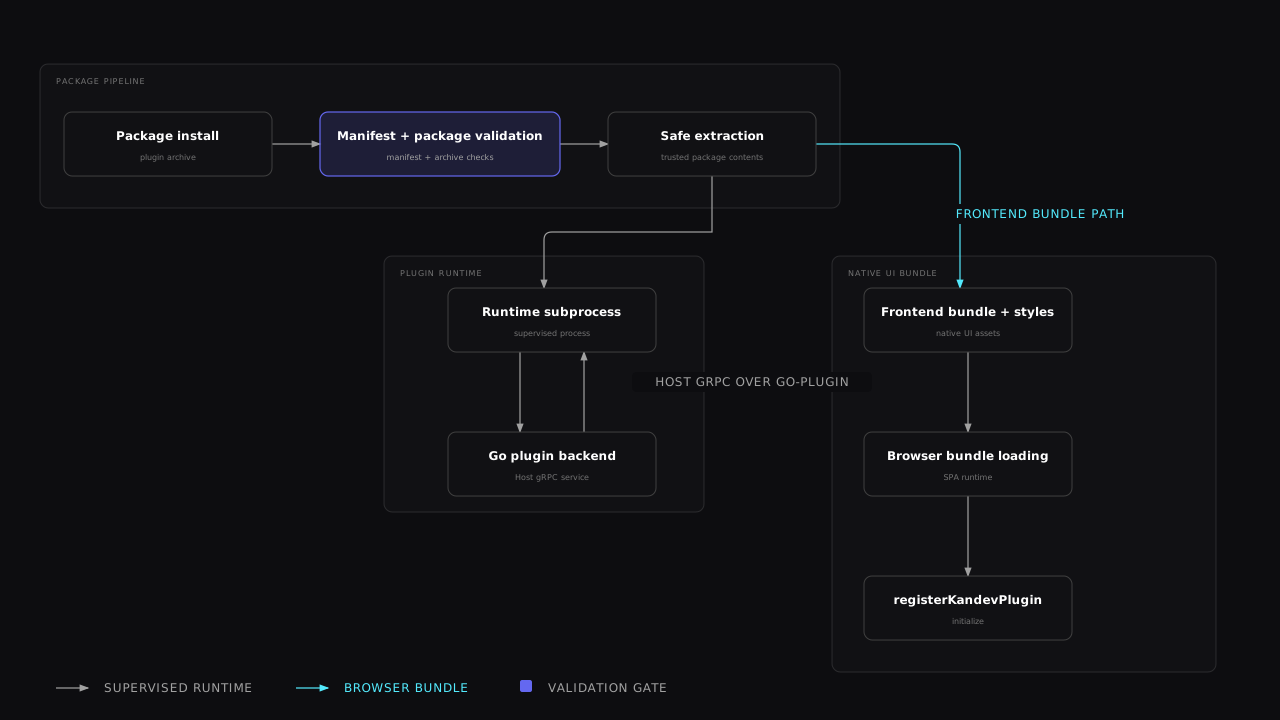

The two lower paths are intentionally separate: the Go subprocess uses the
host gRPC connection, while the browser receives static bundle assets and then
calls registerKandevPlugin.
Installation validates the manifest, archive paths, checksums, managed runtime,
and the current host executable before extraction. Kandev then supervises the
declared subprocess and injects a Host connection. Installing a new version
does not remove the one it replaces: that version stays on disk as the rollback
target, and only the versions before it are deleted, once the new one is
confirmed running. Two extracted versions is therefore the steady state for a
plugin that runs; a plugin that is disabled or failed to start keeps every
version it has, and data/ is never part of that cleanup. The UI bundle is static
package content loaded by the browser; it does not run inside the backend
subprocess. On disable or uninstall, the host calls destroy when present and
bulk-revokes registrations, styles, routes, handlers, and navigation. Reloads and
updates are generation-safe: a slow or failed initialization is not treated as a
definitive revocation, while a successfully ready generation can remove panels it
no longer registers. Each attempted generation owns its requests, subscriptions,
modals, task-link dialogs, toasts, and review surfaces. Timeout, failure, reload,
disable, or uninstall aborts and cleans those resources before calling destroy
exactly once; late callbacks from an expired generation are fenced from host state.
Package and data layout
<id>-<version>.tar.gz
├── manifest.yaml                         # required, validated first
├── server/
│   └── plugin-<goos>-<goarch>[.exe]      # one or more declared binaries
├── ui/
│   ├── bundle.js                          # optional native ES module
│   ├── plugin.css                         # optional styles
│   └── assets/                            # optional files referenced by UI
├── assets/                                # optional manifest icon/assets
├── checksums.txt                          # generated by plugin-pack
└── checksums.txt.sig                      # optional signature
runtime.executables maps a platform key such as linux-amd64 to a clean
package-relative path such as server/plugin-linux-amd64. Windows values must
end in .exe. The host platform's key must be present at install time.
A UI-focused native plugin still ships a managed backend executable because the
current installer requires runtime.type: binary. That executable can be a
no-op pluginsdk.UnimplementedPlugin server.
An isolated web-app package can omit runtime. It contains a static entry
document and the files that document imports. Use the ui.web_apps fields in
the manifest reference.
Kandev injects KANDEV_PLUGIN_DATA_DIR into the subprocess. It is the durable, per-plugin directory for arbitrary files or a plugin-owned database:
~/.kandev/plugins/<id>/data/The directory is shared across installed versions, survives restarts and upgrades, and is removed on uninstall. Keep small structured values in Host state instead, and never write arbitrary files elsewhere in the Kandev data directory.
Choose a plugin shape
| Shape | Package contents | Typical contract | Minimal capability set |
|---|---|---|---|
| Backend plugin | Go binary and manifest | events, webhooks, Host data, state, secrets, or utility-agent calls | only the capabilities used by the backend |
| UI-focused plugin | no-op managed binary, ui/bundle.js, optional styles/assets | routes, nav, named slots, WebSocket handlers, keybindings, shared store | ui.bundle; add ui.keybindings when declaring shortcuts |
| Combined plugin | Go binary plus UI bundle | UI calls a declared webhook or backend API; backend uses Host | union of the two surfaces, kept least-privilege |
| Isolated web app | manifest plus static HTML, CSS, JS, and assets | task or workspace canvas inside a sandboxed iframe | only the Kandev data, event, state, and network access it needs |
Build an isolated web application
Use this shape for a canvas app that runs packaged browser code. The package does not need a Go backend or an injected Kandev JavaScript API.
- Add one or more
ui.web_appsentries with a package-relative HTML entry. - Set
placementstotask-canvas,workspace-canvas, or both. - Build the app with relative
./_kandev/v1requests. - Declare only the Kandev capabilities and exact HTTPS
network_originsthat the app needs. - Package the manifest and static files as a gzip-compressed tar archive.
For a new owner-authorized task canvas, the first valid release can receive
only its declared supported permissions through the initial permission policy.
Kandev data access is limited to the current workspace while the canvas stays
placed in its creating task. Imported packages and later permission increases
need human approval. Keep network_origins as exact HTTPS origins. Do not use
wildcards, paths, credentials, query strings, or fragments.
For example, a page can read task data with the browser Fetch API:
const response = await fetch("./_kandev/v1/data/tasks");
if (!response.ok) {
  throw new Error("The task data request failed");
}
const tasks = await response.json();
Use ./_kandev/v1/events for the event stream. Read both scope_kind and
data_scope_kind from ./_kandev/v1/context: the first describes placement,
and the second describes the Kandev data boundary. Keep all protocol paths
relative so the same package works in task and workspace placement. For task
lists, follow page_info.next_cursor to load every page. Do not set
workspace_id to another workspace or copy a capability URL from the host.
For recorded workflow movement, the browser can GET
./_kandev/v1/data/tasks/{task_id}/step-transitions with
api_read:tasks. With data_scope_kind: task, a canvas can read only its own
task's history. With data_scope_kind: workspace, it can read any task's
history in the current workspace, even with scope_kind: task.
With data_scope_kind: workspace, a canvas can GET
./_kandev/v1/data/workflows/{workflow_id}/transition-groups with both
api_read:tasks and api_read:workflows. This route requires workspace data
access, regardless of canvas placement. Both routes return bounded
{items,page_info} pages with an opaque page_info.next_cursor for the next
page.
Backend plugins can use the optional Host SDK extension
pluginsdk.TransitionHistory(host). Its ListTask and ListWorkflowGroups
readers use the same fields and declared read grants. They do not enforce a
canvas's data scope or workspace boundary.
Kandev injects a reserved startup bootstrap into the packaged entry document.
It runs before authored scripts, reports an initial document error when one is
observed, and checks ./_kandev/v1/context after the document loads. The host
reveals the frame only after it receives a versioned acknowledgement for the
current startup attempt. A missing acknowledgement or context failure makes
the canvas recoverable after 15 seconds. Keep the entry document and its
relative assets valid HTML, and make the app render its own loading and error
states after startup.
The frame is same-origin with Kandev and canvas code is trusted with the
viewing user's ordinary user-session authority. It can use localStorage,
sessionStorage, IndexedDB, same-origin cookies, and the host DOM. Keep
Kandev protocol requests relative and do not copy capability URLs or tokens.
Use the state protocol for small app-specific shared values and JavaScript
memory for temporary values. Capability URLs, release bindings, scope checks,
and declared grants still govern every Kandev protocol operation.
Network access uses exact HTTPS origins that a user approves. Wildcards, origin paths, query strings, credentials, and remote scripts are not allowed. Keep scripts, styles, fonts, and images in the package.
Forms cannot submit to external origins. The runtime sets form-action 'none'.
External requests to approved origins are sent directly by the browser. Kandev
cannot inspect them after they leave the browser, so a release, grant, scope,
archive, disable, or removal notification immediately tears down the matching
iframe. A replacement iframe gets a fresh runtime binding.
The validator rejects unsafe paths and unsupported files. It also limits a package to 10 MiB compressed, 25 MiB expanded, 512 files, and 5 MiB per file. The manifest limit is 64 KiB and the normalized path limit is 240 bytes.
Build and test the archive outside Kandev. Kandev validates the archive before it stores or runs a release. Use Agent-authored Canvases for creation, permission review, promotion, Quick Chat editing, and recovery.
Share a portable canvas
For a canvas that another workspace can install, add the distribution block
described in the manifest reference.
Choose static when the packaged application is the only source you want to
share. Choose project when you retain a bounded editable project under
distribution/source/. Do not put screenshots in the package.
After a valid release is active, use Share canvas in the host or workspace canvas list. Prepare and download the bundle and source archive, inspect them for private content, and share them as files or HTTPS links. This action does not create a repository, release, registry entry, or pull request.
To list the canvas, publish the exact bundle as a versioned release asset and
add a kind: canvas entry with one to eight ordered previews objects to a
trusted registry. The first preview is the cover. Preview URLs and alt text
are registry metadata and are not part of the package manifest.
There is no separate HTTP server to launch. pluginsdk.Serve owns the go-plugin/gRPC handshake and Host injection. The backend implements pluginsdk.Plugin (OnEvent and/or HandleWebhook) and embeds pluginsdk.UnimplementedPlugin for no-op defaults.
Contribute an agent tool
A managed plugin can contribute task-aware MCP tools through the same supervised
gRPC process. Add an agent_tools declaration to manifest.yaml and implement
the optional pluginsdk.AgentToolPlugin interface:
agent_tools:
  - name: add_tag
    description: Add an existing tag to the current task.
    surfaces: [kanban-task]
    input_schema:
      type: object
      properties:
        tag_id: { type: string }
      required: [tag_id]
      additionalProperties: false
    annotations:
      read_only_hint: false
      destructive_hint: false
      idempotent_hint: true
The host exposes the readable canonical name
kandev_<plugin-id-slug>_<local-name> (for example,
kandev_task_tags_v1_add_tag). Punctuation in the stable plugin ID becomes an
underscore. Very long names receive a short stable hash suffix after the slug
is truncated. Tool names are host-owned; the plugin-local name is used for
the gRPC dispatch.
For a managed conversation, declare the restricted surface and its capability:
capabilities:
  api_write: [managed_agent_tools]
agent_tools:
  - name: read_task
    description: Read the current task summary.
    surfaces: [managed-conversation]
    input_schema:
      type: object
      additionalProperties: false
Task tools may target kanban-task, office-task, or both. A tool that targets
managed-conversation is separate: the manifest must include
capabilities.api_write: [managed_agent_tools], and each retained conversation
selects up to 16 declared tools through ManagedAgentConversationSpec.AgentToolNames.
The workspace must grant host.v2.write:managed_agent_tools. The broker exposes
only that instance's selected tools and rejects native tools, ambient MCP
servers, and other plugins for the restricted turn.
A tool that targets automation is opt-in per private automation:
agent_tools:
  - name: complete_report
    description: Record a completed report.
    surfaces: [automation]
    input_schema:
      type: object
      additionalProperties: false
      required: [report]
      properties:
        report: { type: string }
Declaring the surface does not grant access. The workspace owner selects exact
tools in the automation editor, and saving that selection approves the plugin
installation and policy version that were displayed. The handler receives the
trusted task, session, workspace, and surface identity; it must accept the
automation surface explicitly. A plugin reinstall or configuration save
invalidates earlier approvals. Automation tools have no managed-conversation
capability requirement and receive no additional Host API capability.
An instance read declares invocation_scope: instance and adds the
coordinator and external surfaces when the operation needs no task identity:
agent_tools:
  - name: get_provider_usage
    description: Read the cached provider usage snapshot.
    surfaces: [kanban-task, office-task, automation, coordinator, external]
    invocation_scope: instance
    input_schema:
      type: object
      properties: {}
      additionalProperties: false
    annotations:
      read_only_hint: true
      destructive_hint: false
      idempotent_hint: true
coordinator and external require both instance scope and
read_only_hint: true; a missing or false hint rejects the install. External
calls arrive only through the configured external MCP endpoint over its
trusted in-process transport, follow the endpoint authentication setting, and
have empty task, session, and workspace context, so
invocation_workspace_id must be the empty string. A coordinator conversation binds eligible tools by exact
reference, including the installation and policy version, when it opens. A
phase-1 conversation or a version-1 binding exposes no plugin tools; reopen the
conversation after installing or changing a plugin to gain a new binding.
The first host release with instance-read contexts is 0.99.0. Set
min_kandev_version: "0.99.0" before publishing a declaration that uses them.
An older host must not install the package.
Managed tool calls are not available on any agent provider yet. Kandev rejects the launch before creating an execution until an adapter passes the complete restriction tests and a real provider smoke. Do not treat the manifest surface or an approved capability as evidence that a provider is supported.
Kandev lists a plugin's tools only while the plugin is active and every field in
its config_schema.required list has a value. A required field counts as unset
when it is missing, null, or a blank string; false and 0 count as set. A
connector that needs a URL or token therefore stays out of the agent tool list
until the operator saves its settings, and its tools appear right after the
save, without restarting the agent or task session. Saving config still restarts
a running plugin subprocess. A plugin without required fields is listed as soon as
it is active.
Plugin tools are never exposed to configuration MCP clients. Kandev validates the input and optional output JSON Schemas, supplies task/session/workspace/surface context, enforces a 30-second deadline and 1 MiB result limit, and does not retry calls. External calls have no task identity; coordinator and automation calls keep the host-resolved identity. For managed calls, Kandev also supplies the current installation, conversation and approval revisions, manifest digest, selected names, and execution ID from the authenticated broker context. Tool arguments cannot set these values. Approval changes invalidate retained policy and request normal runtime cancellation; the plugin must refresh the conversation policy before a new managed turn can start.
The optional SDK method is:
InvokeAgentTool(context.Context, *pluginsdk.AgentToolRequest) (*pluginsdk.AgentToolResult, error)The request includes immutable invocation, task, session, workspace, and
surface context. Managed calls also include installation ID, conversation and
approval revisions, manifest digest, selected tool names, and the current
execution ID. Kandev derives these fields from its authenticated broker and
retained task state; the agent cannot set them in tool arguments. Return required
fallback text, optional structured content, and IsError when the operation
failed. Declaring a tool does not grant Host API capabilities; use the existing
capabilities fields for those permissions.
Security and capabilities
Plugins are privileged installed code. The capability list gates Host RPCs; it is not an operating-system sandbox. A backend subprocess inherits the Kandev process environment, and a UI bundle runs as same-origin JavaScript with the curated React, UI, and app-store surface.
- Plugins do not receive direct database access. Use typed Host readers/writers, Host state, secrets, events, and the data directory. Do not import Kandev internal/... packages or call undocumented REST endpoints.
- state gates Host state; secrets gates RevealSecret and plugin-owned secret methods; each api_read resource gates its reader; api_write gates task/message mutations, interaction responses, and linked issue writeback; agent_invoke gates utility-agent calls; and capabilities.events controls event delivery.
- GetConfig and EmitEvent are ungated. GetConfig returns this plugin's own config, including cleartext secret fields, so do not log or commit it.
- When workspace collaboration is enabled, Host calls that read or mutate conversation data require the server context from the handler that produced them; plugin-owned capability operations keep their native behavior. Never synthesize a caller context or store one principal in a shared Host field.
- Declared webhook keys default to public. Set
webhooks[].access: authenticatedfor browser UI and billable operations. Kandev does not enforcewebhooks[].method; public integrations must still validate the provider signature and replay/timestamp rules before side effects. - An authenticated webhook is reachable from your panel with any method,
GETincluded:host.api.fetchis same-origin (or carries an acceptedOriginin a split-origin install), which is what the host checks. You do not need to force a read ontoPOST. - capabilities.auth is the highest-risk capability. A webhook response may assert a verified external identity with X-Kandev-Auth-Login; only assert an email the IdP verified as owned by the subject. See ADR 0050.
- Plugin installations also carry a host-minted opaque installation identity and a workspace-scoped capability-approval ledger. A workspace manager can grant a subset of declared Host v2 capabilities from Settings > Plugins > the installed plugin's Workspace access section. Each change needs a reason, uses an exact approval revision, and appears in the audit history. Revoking access blocks later Host v2 commands. A plugin cannot grant or renew its own access. After an upgrade changes the declared capabilities, a workspace manager must review and save the approval again.
An isolated web app has a separate iframe and sandbox boundary. Kandev loads it same-origin with the host, so its trusted source can use the viewing user's ordinary browser authority, including cookies, storage, and the host DOM. It still cannot open popups or navigate the top-level page, and it receives no global Kandev JavaScript API. Capability URLs and grants remain required for Kandev protocol operations. See Security and trust for the runtime boundary.
Storage decision table
| Need | Use | Scope/lifecycle | Capability or rule |
|---|---|---|---|
| Small JSON object owned by this plugin | Host state: GetState, SetState, DeleteState, ListState | instance, workspace, task, or agent; survives restart/upgrade and is included in Kandev state backups | capabilities.state: true; values are JSON objects, not bare scalars |
| Canvas app shared state | Relative ./_kandev/v1/state protocol | Canvas instance; survives restart while the instance remains | state grant, store app-specific shared values, not duplicate task data |
| Per-user browser/plugin storage | host.storage: get/set/delete/list/subscribe | instance, workspace, task, session, or repository, scoped per user | capabilities.user_state: true; set/delete accept ifUnmodifiedSince and writerId |
| Temporary canvas app value | JavaScript memory inside the iframe | Current document only | Use browser storage for user-scoped client data; keep shared app values in canvas state |
| Operator configuration | Host.GetConfig and manifest config_schema | Plugin-owned settings; config changes restart an active subprocess | Ungated GetConfig; secret fields arrive cleartext in the subprocess |
| Plugin-owned credentials | Host.GetSecret/SetSecret/DeleteSecret, or secret: true config fields | Encrypted Kandev vault, namespaced to this plugin | capabilities.secrets: true; never log values |
| Files, caches, or plugin-managed database | KANDEV_PLUGIN_DATA_DIR | Shared across versions, removed on uninstall | Write only below the injected directory; own schema, locking, and migrations |
Host state is not host.storage: Host state is plugin-scoped backend state with no transaction primitive, so design updates to be idempotent; host.storage (below) is per-user, per-scope frontend storage with an optional ifUnmodifiedSince compare-and-swap.
host.storage belongs to the native plugin frontend contract. An isolated web
app does not receive that API. Use the canvas state protocol instead.
Authoritative contracts
The guide summarizes the contract for discovery. These files remain the source of truth and must be updated together when the contract changes:
- Versioned frontend author contract:
@kdlbs/plugin-sdk, sourced fromapps/packages/plugin-sdk. Import it withimport type; the package has no dependency on Kandev, React, Zustand, or private@/modules, so it also typechecks when consumed from an isolated or sparse checkout. - Frontend host implementation: docs/plans/plugins/PLUGIN-API.md and apps/web/lib/plugins/types.ts. These may contain compatibility-only host details that are deliberately absent from the public SDK.
- Concrete frontend Host exports: apps/web/lib/plugins/host-api.ts.
- Backend author API: pluginsdk.
- Wire contract: pluginsdk/proto/kandev/plugin/v1/plugin.proto.
- Manifest model and semantic validation: apps/backend/internal/plugins/manifest.
- Package integrity and installation: apps/backend/internal/plugins/pkgtar.
- Durable decisions: ADR 0043, ADR 0047, ADR 0048, ADR 0050, explicit plugin utility selection, and Browser conversation facade ADR.
The source reconciliation design
defines the current storage and transport behavior. Requirements define
observable behavior, and PLUGIN-API.md defines the browser API and Host-only
v2 wire contract.
Frontend contract
Loading and cleanup
The package's ui.bundle is a hand-written ES module. When active, Kandev loads it and the bundle calls:
window.registerKandevPlugin("my-plugin", {
  initialize(registry, host) {},
  destroy() {},
});
initialize receives a registry scoped to this plugin and a PluginHostApi. The host may call initialize more than once across disable/enable cycles. Make it repeatable; return a cleanup function from subscriptions and timers, and use destroy to remove side effects that are not registrations. The host revokes all registry entries, closes plugin modals, and removes plugin styles on disable/uninstall. Reloads can temporarily leave a plugin in a loading or failed state; open and saved panels remain until the current generation is ready. A ready generation that no longer registers a panel closes it, while an explicit disable or uninstall closes every panel owned by the plugin. This lifecycle bookkeeping is host-internal; plugins do not call lifecycle methods.
Type frontend bundles against the versioned, runtime-free SDK rather than copying host interfaces or importing Kandev application files:
import type { PluginHostApi, PluginRegistry } from "@kdlbs/plugin-sdk";Official code-host plugins use host.context for provider-neutral workspace,
task-creation, and exact repository-identity reads. getWorkspaceIds() and
subscribeWorkspaces() let a plugin republish workspace-scoped integration
state after load or when the workspace list changes. If a required read is
missing, extend this typed context contract; do not reverse-engineer Zustand
slice shapes in a released plugin.
Users configure a plugin's declared shortcuts on that installed plugin's detail
page at Settings > Plugins > <plugin>. These overrides are personal to
the signed-in user. The plugin's schema-driven configuration and lifecycle
controls remain install-wide and administrator-only.
If a bundle registers a component at its exact plugin detail route, Kandev keeps that component and renders the host-owned shortcut card alongside it. Nested plugin settings routes remain fully plugin-owned.
Browser conversation facade
Native UI plugins read prompt history through host.conversation, not through
host.store, raw WebSocket frames, first-party /api/v1 URLs, or the Go Host
reader. The facade requires capabilities.api_read: ["messages"], and every
manifest declaring that capability requires min_kandev_version: "0.91.1" or
later. The same floor applies to Go host.Messages().List plugins. It returns
sanitized public SDK DTOs. Inside a task panel, prefer the injected
conversation.history handle so the read stays bound to that panel's task,
session, and plugin generation:
function PromptHistory({ sessionId, conversation }: PluginTaskPanelProps) {
  const { messages, loading, loadMore } =
    conversation.history.useSessionMessages({ sessionId });
  return <PromptList messages={messages} loading={loading} onLoadMore={loadMore} />;
Panel handles are independently scoped and become inert on unmount, identity
change, disable, or reload. host.conversation is the equivalent nearest-scope
accessor; outside a panel it returns stable empty state. Use the canonical
PLUGIN-API contract for DTOs, pagination,
revision-bound updates, lifecycle, recovery, and retryable errors. A complete
source mutation sends a transient revision receipt after commit. An incomplete
or uninstrumented mutation sends a reset marker, and the Host reads current
source rows to repair the panel. The transport does not retain a payload
journal or provide a replay guarantee.
Browser route errors use unauthenticated/non-retryable for 401,
not_found/non-retryable for 404, invalid_query/non-retryable for 400,
and upstream_failure/retryable for every authorized 5xx.
Within a task panel, omitted taskId inherits the panel task, explicit
null reads the whole selected session, and an explicit task ID must match the
panel task. loadMore() resolves to the number of newly projected messages;
joined, exhausted, closed, and removed calls are deterministic, while
transport failures reject with the typed error and preserve committed state.
The turns hook follows the same scope and lifecycle rules, favorites remain
read-only and reactive, and session.removed retains visible rows while
closing future reads.
| Need | Browser facade | Go Host API |
|---|---|---|
| Surface | host.conversation or conversation.history | host.Messages().List |
| Runtime | Native UI bundle | Plugin server process |
| Data | Sanitized browser DTOs and revision-bound updates | Typed paginated reader |
| Forbidden shortcut | host.store, raw WS, /api/v1 | Private application imports |
Managed conversation and task surfaces
Use the shared Host components for an installation-owned conversation. Import
the prop and controller types from @kdlbs/plugin-sdk; the plugin owns the
controller adapter and calls its declared workspace actions.
return host.jsx(host.ui.WorkspaceAgentChat, {
  conversation: status,
  controller,
  instances,
  tasksPanel: host.jsx(host.ui.WorkspaceTaskStatus, { taskId: status.taskId }),
});
WorkspaceAgentChat renders a desktop chat/task split and phone Chat, Tasks,
and Outcomes tabs. It owns the ordered transcript, stable retry identity,
durable input queue controls, instance drawer, pause/resume, native permission
and clarification controls, and guarded-recovery confirmation. Supply optional
tasksPanel and outcomesPanel nodes. After uninstall, opening the retained
task's native /t/<task-id> route shows a host-owned, read-only transcript
without loading the removed plugin's UI.
WorkspaceTaskStatus and WorkspaceTaskUsage use Kandev's authenticated
first-party reads. Plugins can use host.queries?.useTaskStatus(taskId) and
host.queries?.useTaskUsage(taskId, sessionId) for their own layouts. These
facades return bounded projections; task status includes the canonical task
state and safe summary fields. Usage keeps token totals, estimated and unpriced
counts, output completeness, and integer costSubcents distinct. Divide
costSubcents by 10,000 to display USD. Do not describe missing usage as a
measured free run.
The optional host.interactions?.issueResponseReceipt(...) method obtains a
short-lived, single-use receipt for the signed-in person's pending response.
The Host checks native session.control access and the interaction's observed
resource version. Pass the receipt unchanged to your controller's exact
permission or clarification action. A plugin cannot approve an interaction by
calling its action without a human response receipt.
For recovery, show the control only when the current provider and Host operation
support it and the exact session observation includes both its resource version
and execution ID. ListSessionsExact returns those fences to a Go plugin with
host.v2.read:sessions; RecoverSessionExact also requires
host.v2.write:execution. The Host checks both values again before resuming, so
a replacement execution is not affected. Use the native confirmation dialog
before submitting the request.
Frontend hook/API matrix
| Surface | Location and input | Manifest requirement | Cleanup/lifecycle | Small example |
|---|---|---|---|---|
| registerRoute | registry.registerRoute(path, Component, options?); exact SPA path; options.topbar defaults to host chrome or false for full-bleed | Active ui.bundle | Route is removed on disable/uninstall; use destroy for subscriptions | registry.registerRoute("/acme", Page, { topbar: { title: "Acme" } }) |
| registerNavItem | { id, label, path, icon?, section? }; section is main, integrations, sidebar-footer (desktop footer utilities menu and phone menu Utilities group, both uncapped), or accepted-but-not-rendered settings | Active ui.bundle | Nav item is revoked and removed from desktop/phone navigation | registry.registerNavItem({ id: "home", label: "Acme", path: "/acme", icon: "chart" }) |
| registerSettingsRoute | registerSettingsRoute(fullPath, Component) with an exact path under /settings/plugins//...; settings shell supplies chrome | Active ui.bundle | Route is removed on disable/uninstall | registry.registerSettingsRoute("/settings/plugins/acme/health", HealthPage) |
| registerComponent | registerComponent(slot, Component); component receives { slotProps?: unknown } | Active ui.bundle | Every registration is owner-tracked, error-isolated, and bulk-revoked | registry.registerComponent("task-sidebar", Panel) |
| registerWsHandler | registerWsHandler(action, handler(payload)); receives actions bridged from lib/ws | Active ui.bundle | Handler is removed on disable/uninstall; tolerate duplicate/replayed actions | registry.registerWsHandler("acme.updated", renderUpdate) |
| registerKeybinding | registerKeybinding(id, handler(event)); id must be declared in ui.keybindings; users can override the effective combo on the installed plugin detail page at Settings > Plugins > <plugin> | ui.bundle and ui.keybindings[] | Handler is removed on disable/uninstall; core shortcuts win, and editable targets are skipped unless that entry set ui.keybindings[].allow_in_editor | registry.registerKeybinding("open-panel", () => host.openModal(...)) |
| registerIntegrationSettings | One provider-owned settings component with an optional action mounted in the detail header and the integrations index card | Active ui.bundle | Registration is exclusive by id and revoked on unload; host owns workspace selection and settings navigation; component and action receive the routed workspaceId, and action receives its surface | registry.registerIntegrationSettings({ id: "acme", Component, action: Toggle }) |
| registerTranslations | Flat English fallback plus optional Kandev locale catalogs, isolated to this plugin's namespace | Active ui.bundle | Catalogs are replaced atomically, removed on unload, and registry consumers invalidate when the host locale changes | registry.registerTranslations({ en: { settings: "Settings" }, "pt-pt": { settings: "Definições" } }) |
| registerRepositoryProvider | Provider-owned paged/searchable repository list, URL match/inspect, branches, and optional native createChangeRequest transport | ui.bundle and matching repository_providers[] id | Registration and in-flight callbacks are result-fenced on unload; host owns native task and Create PR UI | registry.registerRepositoryProvider({ id: "acme", ...provider }) |
| registerTaskAction | Child action inside the task menu's native Link section | Active ui.bundle | Action is revoked on unload; host supplies current task/workspace and desktop/mobile presentation | registry.registerTaskAction({ id: "link-pr", placement: "link", ... }) |
| registerReviewProvider | Normalized task reviews, workspace associations, unlink, and shared Review panel | ui.bundle and matching repository_providers[] id | Snapshots/subscriptions are owner-scoped and revoked on unload; host owns status chrome, indicators, unlink UI, and responsive Review placement | registry.registerReviewProvider({ id: "acme", ...reviews }) |
| registerTaskPanel | { id, title, titleKey?, icon?, Component, mobileEnabled?, visible?(context) }; adds a row to the task workspace's "+" (add panel) menu; Component receives { panelId, taskId, sessionId, sessionKind, presentation, conversation: { openMessage(messageId), history } }; titleKey is a plugin translation key with literal title fallback | Active ui.bundle | Panel renders behind its own error boundary with reactive localized titles; a throwing visible hides the item; handles are generation-bound and independently scoped, inert after unmount, identity change, disable, reload, or uninstall; host.conversation outside a panel returns stable empty state; desktop preserves layout identity on navigation and mobile uses the full-height Chat surface | registry.registerTaskPanel({ id: "notes", title: "Notes", titleKey: "panels.notes", Component: NotesPanel }) |
| registerTaskMenuAction | { id, label, icon?, group: "edit" | "primary", visible?(context), items?(context), run(context) }; "edit" is card-only inside Edit, while "primary" is a top-level item on cards and desktop/mobile task-row menus; a synchronous items(context) returning TaskMenuSubItemRegistration[] ({ id, label, icon?, disabled?, run(context) }) renders the action as a submenu of those children instead | Active ui.bundle | Action is revoked on disable/uninstall; a throwing/rejecting run is caught and logged; an items() that throws or yields nothing usable falls back to the flat item, and unusable children are dropped | registry.registerTaskMenuAction({ id: "enhance", label: "Enhance", group: "primary", run: doEnhance }) |
| registerTaskFilter | { id, label, getOptions(), matches(context, selected) }; adds a client-side, multi-select filter section to the kanban board's display dropdown, alongside Workflow/Repository | Active ui.bundle | Filter is revoked on disable/uninstall; selections are ephemeral (not persisted); matches is only called for a non-empty selection, and a throw is caught, logged, and treated as non-matching | registry.registerTaskFilter({ id: "tags", label: "Tags", getOptions: listTagOptions, matches: taskHasSelectedTag }) |
| registerTaskListFacet | { id, label, getValues({ taskId, workspaceId }), subscribe? }; adds Sort and Group choices on /tasks after built-ins | Active ui.bundle | Values apply only to the loaded page; selections use the host tasks_list_sort / tasks_list_group preference; callbacks are isolated and registrations are revoked on disable/unload | registry.registerTaskListFacet({ id: "tags", label: "Tag", getValues: taskTags }) |
| host.React / host.jsx | Shared React instance and React.createElement alias | Active ui.bundle | No cleanup; never bundle a second React/Radix runtime | const h = host.jsx |
| host.context | Versioned provider-neutral reads/subscriptions for active workspace, all workspace ids, native task creation, and exact provider repository identity | Active ui.bundle | Subscriptions are generation-owned and revoked on unload; records are stable SDK shapes, not private app state | const ids = host.context.getWorkspaceIds() |
| host.useSettingsSaveContributor | Registers one plugin-owned contributor for the native save bar; the host prefixes ids with plugin:<pluginId>: before shared coordination | Active ui.bundle | Contributor lifecycle follows the rendering component; save and discard remain plugin-owned | host.useSettingsSaveContributor({ id: "credentials", revision, isDirty, save, discard }) |
| host.setIntegrationEnabled | Publishes one registration's live enabled value for one workspace; the value is reactive but not durable | Active ui.bundle | The host validates that integrationId belongs to this plugin; republish after load using host.context.getWorkspaceIds() and subscribeWorkspaces() | host.setIntegrationEnabled("acme", workspaceId, enabled) |
| host.i18n | Plugin-scoped locale, imperative t(key, options?), and reactive useTranslation() | A registered English catalog | Locale changes re-render reactive consumers; missing active-locale messages fall back to the plugin's English catalog | const { t } = host.i18n.useTranslation(); t("pullRequests") |
| host.store (legacy) | Compatibility-only access to Kandev's private Zustand store; intentionally absent from @kdlbs/plugin-sdk | Older ui.bundle | Do not use in new or official plugins; private slices may change without plugin-API compatibility | Migrate reads to host.context |
| host.api.fetch / baseUrl | fetch(path, init?) is scoped to /api/plugins//...; baseUrl is the backend origin for split-origin deployments | Active ui.bundle; backend path must be a declared webhook when relayed | Declare webhooks[].access: authenticated for UI-only or billable operations; requests are generation-aborted on unload | host.api.fetch("webhooks/inbound", { method: "POST" }) |
| host.api.invokeAction | Authenticated call to a declared action with host-verified workspace/task/session/repository selectors and bounded untrusted body | Matching manifest actions[] key/scope | Browser abort cancels the bounded plugin RPC; safe domain statuses and Retry-After may be returned | host.api.invokeAction("reviews.get", { taskId }, { signal }) |
| host.storage | Authenticated, per-user key/value storage: get(scope, scopeId, key, options?)/set(scope, scopeId, key, value, options?)/delete(scope, scopeId, key, options?)/list(scope, scopeId, options?) plus subscribe(filter, handler); no plugin backend required | capabilities.user_state: true | Reads and writes accept an AbortSignal; set/delete also accept writerId (appended to the host's per-tab id, not a replacement) for echo suppression; list returns every entry under the scope pair, unpaginated | host.storage.set("task", taskId, "note", value, { writerId: panelId, signal }) |
| host.ui | Curated host instances: Alert*, Badge, Button, Action, ActionGroup, Card*, Checkbox, Dialog*, DropdownMenu*, Input, Label, Pagination*, ScrollArea, Select*, Separator, Sheet*, Skeleton, Spinner, Switch, Table*, Tabs*, Textarea, Tooltip*, RichTextEditor, RichTextReadOnly, plus Combobox, PageTopbar, TaskCreateDialog | Active ui.bundle | Host owns contexts/portals and Action geometry; render with host React and let modal/slot cleanup run | const Action = host.ui.Action |
| host.theme | Current "light" or "dark" theme | Active ui.bundle | Read during render; subscribe through host/app patterns if theme-sensitive | host.theme === "dark" |
| host.navigate | Soft SPA navigation navigate(href, { replace? }) | Active ui.bundle | No registry cleanup; avoid navigating to undeclared external origins | host.navigate("/t/" + taskId) |
| host.openModal | Host-owned modal: { title?, content, size?, dismissible? } -> { close() } | Active ui.bundle | Modal auto-closes on disable/uninstall; close handles are idempotent | const modal = host.openModal({ content: Panel }) |
Code-host integration surface map
A code-host plugin should be a normalized provider adapter, not a parallel copy of Kandev's GitHub UI. The plugin owns remote API calls, authentication, provider identifiers, and normalized snapshots. Kandev owns the interaction patterns, responsive layout, status colors, dialogs, menus, and review chrome.
| User-facing result | Plugin hook | Plugin supplies | Kandev supplies |
|---|---|---|---|
| Provider workbench | registerRoute, registerNavItem, and host dashboard primitives | Query state, normalized rows, opaque cursors, refresh and launch callbacks | Page chrome, searchable repository filter, cursor pagination, saved-query dialog, list rows, task preset menu, desktop/mobile primitives |
| Workspace connection settings | registerIntegrationSettings | Provider-specific fields, health checks, connect/disconnect behavior | Settings navigation, active workspace, lifecycle and error boundary |
| Native repository and branch selection | registerRepositoryProvider plus declared branch action | Credential-free repositories, branches, URL inspection, optional createChangeRequest transport | Existing task dialog, provider picker, branch picker, push-before-create flow |
| Task-to-review linking | registerTaskAction and host.openTaskLinkDialog | Provider label/icon, accepted reference syntax, authenticated link callback | Existing Link submenu, dialog validation, submit state, toast and desktop/mobile presentation |
| Task indicators, CI, unlink and review | registerReviewProvider | Association snapshots, semantic taskStatus, normalized review detail, refresh/unlink callbacks | Sidebar/Kanban indicators, status palette, 90-second refresh, topbar/composer status, unlink UI and shared Review panel |
Composer # search | Manifest reference_sources, SearchEntityReferences, and AuthorizeEntityReference | Display candidates and a fresh provider authorization at submission | Source menu, chips, canonical metadata and fail-closed submission |
| Authenticated browser operations | Manifest actions and host.api.invokeAction | Bounded action handler using verified context | Actor/resource authorization, selector stripping, timeout, cancellation and response limits |
The task indicator uses the same semantic precedence as first-party providers: failures and requested changes are red, pending checks yellow, an outstanding review with passing checks sky blue, passing checks green, merged reviews purple, and neutral or draft reviews muted. Publish semantic state only; never send CSS classes or provider-selected colors.
Persist links, suppressions, task reservations, and watches by provider ID, provider connection scope, immutable repository ID, and change-request number. Repository names, paths, clone URLs, and human-readable review keys can change or be reused, so use them only for display and live lookup. Bind watch state and OAuth refresh work to an opaque connection epoch; replacement or disconnect must fence in-flight results, while an explicit resume may bind a watch to the new epoch.
Keep refresh(taskId) lightweight: publish metadata, reviewers, checks, and an
inexpensive comment count when available. Load files, diffs, commits, and comment
bodies from ReviewPanel only when the user opens Review. Bound every provider page
and action response, and expose truncation rather than overflowing Kandev's response
limit.
Repository listing callbacks receive optional query, opaque cursor, limit, and
signal fields. Return { repositories, nextCursor } for a page; returning an array
remains compatible for small or older providers. Treat cursors as provider-owned opaque
values, bind them to the original query, and stop emitting nextCursor when exhausted.
Include immutable repository identity and provider connection scope in that binding;
reject a mismatched cursor before making a remote request.
Kandev follows pages and fails a repeated cursor instead of looping forever.
Localize plugin UI
Register an English fallback before registering labels or rendering routes.
Catalogs are flat, plugin-scoped, and support {{name}} interpolation plus
_one/_other plural keys. Use the reactive hook in components and the
imperative translator in registry getters so a locale change updates native
navigation and provider labels without reloading the plugin.
registry.registerTranslations({
  en: {
    pullRequests: "Pull requests",
    linkedCount_one: "{{count}} pull request linked",
    linkedCount_other: "{{count}} pull requests linked",
  },
  "pt-pt": {
    pullRequests: "Pull requests",
    linkedCount_one: "{{count}} pull request associado",
    linkedCount_other: "{{count}} pull requests associados",
  },
});

const translate = host.i18n.t;
registry.registerNavItem({
  id: "reviews",
  get label() {
    return translate("pullRequests");
  },
  path: "/reviews",
});

function ReviewsPage() {
  const { t } = host.i18n.useTranslation();
  return host.jsx("h1", null, t("pullRequests"));
}
Own provider brand icons
Icon fields accept a curated host icon name or a plugin-owned component. Keep
provider brands in the plugin repository so a new code host does not require a
Kandev icon-map change. Build the component with host.jsx; do not bundle React.
const AcmeIcon = ({ className }: { className?: string }) =>
  host.jsx(
    "svg",
    { viewBox: "0 0 24 24", className, "aria-hidden": true },
    host.jsx("path", { d: "M4 12h16" }),
  );

registry.registerRepositoryProvider({
  id: "acme",
  label: "Acme",
  icon: AcmeIcon,
  // listRepositories, listBranches, and inspectURL omitted here
});
Kandev accepts only supported host locale IDs, at most 1,000 messages per locale, safe flat keys, and messages up to 4,096 characters. An invalid replacement is rejected before the active catalog changes. Do not translate provider identifiers, action keys, URL paths, or other machine-readable state.
For a plugin-owned workbench, use host.ui.IntegrationRepositoryFilter and
host.ui.IntegrationCursorPagination; they preserve the same searchable picker,
pagination geometry, touch targets, and responsive behavior as first-party code-host
pages without requiring a plugin to copy their markup.
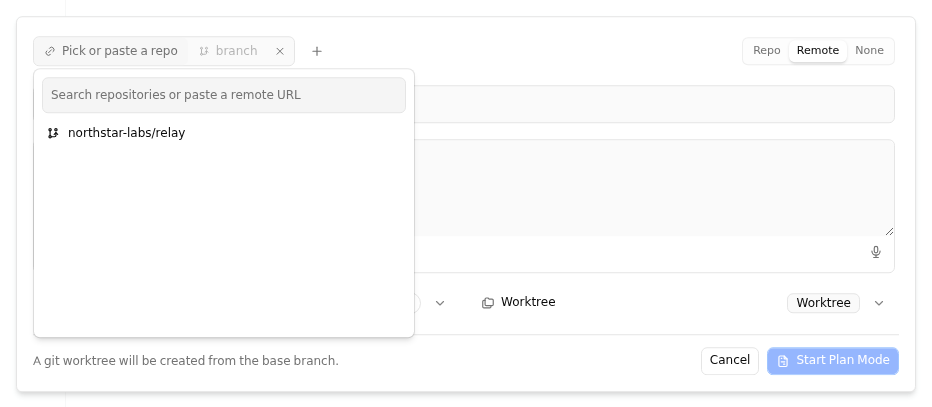
The examples below were captured from an isolated packaged-plugin run. The provider data is fictional; the surrounding controls are the production host-owned components.
Provider dashboard and repository picker
The plugin route composes the shared dashboard primitives, while the declared repository provider appears inside Kandev's existing task dialog.

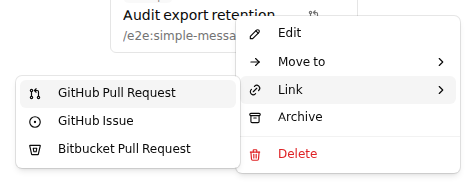
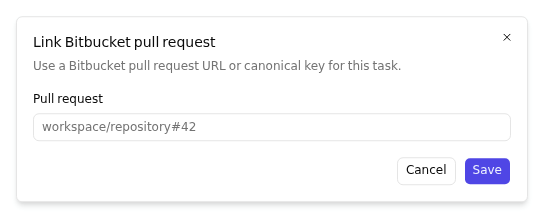
Link a pull request from a task
registerTaskAction contributes only the provider entry. The host owns the
parent Link menu and the link dialog.
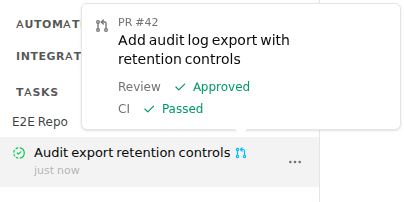
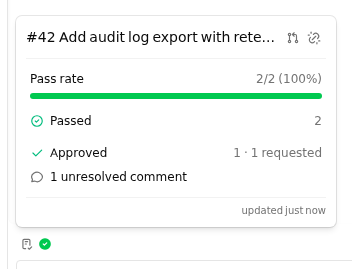
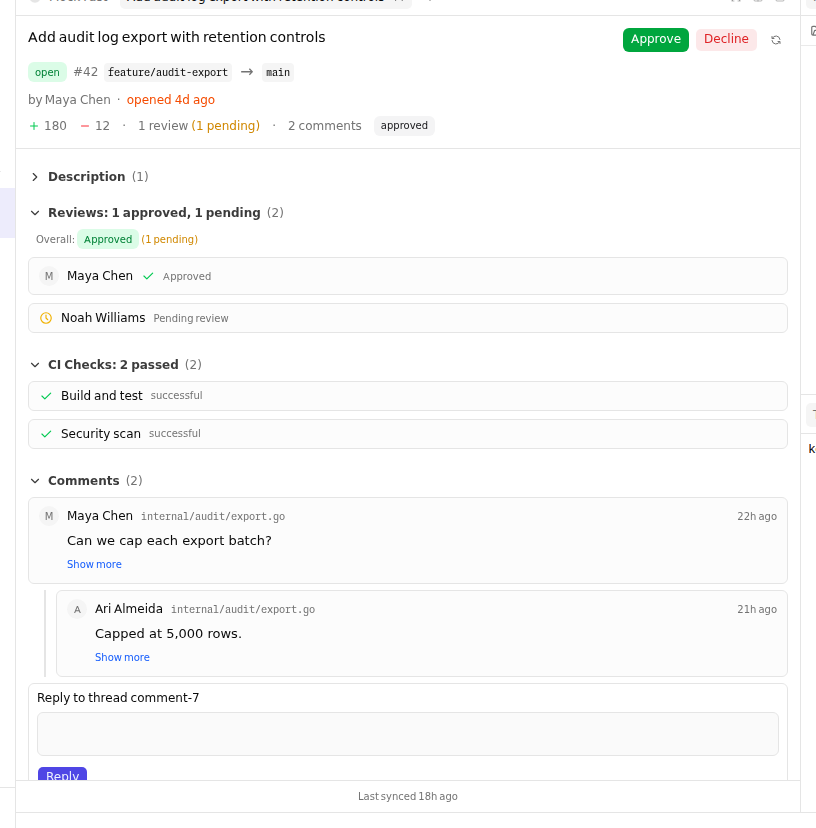
Task status, CI, and review
Association and review snapshots drive every surface. In this example, passing CI plus one outstanding reviewer makes the task icon sky blue; hovering it shows the same normalized summary used by first-party providers.
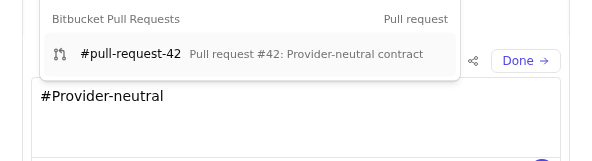
Composer reference search
Dynamic reference_sources appear beside built-in sources. A selected result is
display-only until Kandev calls the plugin again to authorize it for submission.
Supported named slots
registerComponent currently has these mounted slots. The source type is open to strings, but an unmounted name renders nowhere.
| Slot | Mounted location | slotProps |
|---|---|---|
| task-sidebar | Bottom of task-detail sidebar | none |
| settings-nav | Settings navigation tree | none |
| chat-input-actions | Task or Quick Chat composer toolbar | PluginComposerSlotProps |
| task-create-input-actions | Task creation composer toolbar | PluginComposerSlotProps |
| new-session-input-actions | New-session composer toolbar | PluginComposerSlotProps |
| chat-submit-decoration | Layer over the composer's send button | ChatSubmitDecorationSlotProps |
| chat-top-bar | Session top bar or phone Plugins menu | ChatTopBarSlotProps |
| main-top-bar | Home/Kanban/Tasks top bar or phone Plugins menu; a task toolbar from the same plugin takes precedence | MainTopBarSlotProps |
| app-status-bar-left | Left side of desktop status bar or mobile status drawer | AppStatusBarSlotProps |
| app-status-bar-right | Right side of desktop status bar or mobile status drawer | AppStatusBarSlotProps |
| plugin-settings | Top of this plugin's Settings > Plugins page | { pluginId, status }; owner-scoped to the plugin being viewed |
| task-card-indicators | Kanban card, beside the PR status icon | { taskId, workspaceId, workflowStepId } |
| task-card-tags | Kanban card, its own row below the badges row | { taskId, workspaceId, workflowStepId } |
| task-row-metadata | Sidebar task tree and /tasks rows | TaskRowMetadataSlotProps |
| sidebar-workspace-actions | Desktop New Task row or phone navigation action group, after Quick Terminal and Quick Chat | SidebarWorkspaceActionsSlotProps |
Standard actions in component slots
Use host.ui.Action for a standard action in a mounted component slot. Use
host.ui.ActionGroup when one contribution has more than one standard action.
The plugin still owns state, visibility, callbacks, and rich content. The host
owns the button shell, icon box, spacing, focus and disabled styles, and the
surface-specific size. This is an optional migration path; it does not add a
second registration API.
Action renders one button and accepts a localized label, optional decorative
icon, visible text, short badge, tone, pressed, disabled, busy,
tooltip, a button ref, supported button events, and trigger ARIA metadata.
The label stays meaningful when the visible value changes or truncates. An
icon-only action uses its label as the tooltip on fine-pointer desktop. Pass an
empty tooltip to disable it. busy shows activity and does not disable the
button. Action does not accept className, style, size, variant,
asChild, or interactive children.
| Slot surface | Host presentation |
|---|---|
chat-input-actions, task-create-input-actions, new-session-input-actions | 28px desktop controls with 16px icons; on phone, controls stay beside their composer and have touch-sized targets |
main-top-bar, chat-top-bar | Match the surrounding 28px toolbar controls; on phone, actions appear in the shared Plugins navigation section with touch-sized targets |
sidebar-workspace-actions | Compact 24px desktop actions; phone actions appear in Plugins navigation with touch-sized targets |
app-status-bar-left, app-status-bar-right | Inline action fitting the 24px bar; tablet/coarse-pointer status stays compact, while the phone Status drawer provides touch-sized rows |
The phone and coarse-pointer targets outside the compact status bar are at least
44px in the active dimension. The status bar remains 24px on tablet; use its
phone drawer row for a touch-sized status action. The host owns gaps between
registrations. ActionGroup owns the gap between actions inside one
contribution. It returns null when it has no direct children. Existing slot
components and their saved registration/order identity remain unchanged.
This example covers a command, a recording toggle, a changing value, a bounded custom glyph, and a controlled disclosure trigger:
function makePluginControls(host) {
  const { jsx: h, ui } = host;

  return function PluginControls() {
    const [recording, setRecording] = host.React.useState(false);
    const [detailsOpen, setDetailsOpen] = host.React.useState(false);
    const { t } = host.i18n.useTranslation();
    return h(
      ui.ActionGroup,
      { label: t("pluginActions") },
      h(ui.Action, {
        label: t("openPluginPage"),
        icon: myIcon(h),
        onClick: () => host.navigate("/hello-world"),
      }),
      h(ui.Action, {
        label: t("voiceRecording"),
        icon: myMicrophoneIcon(h),
        text: recording ? t("recording") : t("record"),
        pressed: recording,
        busy: recording,
        onClick: () => setRecording((value) => !value),
      }),
      h(ui.Action, {
        label: t("providerUsage"),
        icon: myAnimatedGlyph(h),
        text: "63%",
        badge: t("live"),
        onClick: refreshUsage,
      }),
      h(
        ui.Popover,
        { open: detailsOpen, onOpenChange: setDetailsOpen },
        h(
          ui.PopoverTrigger,
          { asChild: true },
          h(ui.Action, {
            label: t("usageDetails"),
            icon: myIcon(h),
            "aria-haspopup": "dialog",
            "aria-expanded": detailsOpen,
            "aria-controls": "usage-details",
          }),
        ),
        h(ui.PopoverContent, { id: "usage-details" }, t("currentUsageDetails")),
      ),
    );
  };
}

registry.registerComponent("main-top-bar", makePluginControls(host));
For a plugin that must also run on an older host, feature-detect Action in
the existing component and return one tree. Keep the legacy Button as the
fallback; register the component once and do not register both trees.
function makeOneAction(host) {
  return function OneAction() {
    const { t } = host.i18n.useTranslation();
    const Action = host.ui.Action;
    return Action
      ? host.jsx(Action, {
          label: t("openPluginPage"),
          icon: myIcon(host.jsx),
          onClick: openPage,
        })
      : host.jsx(host.ui.Button, {
          type: "button",
          variant: "ghost",
          size: "icon",
          "aria-label": t("openPluginPage"),
          onClick: openPage,
        }, myIcon(host.jsx));
  };
}

registry.registerComponent("chat-input-actions", makeOneAction(host));
Use the existing host Popover, Drawer, or Dialog for disclosure content. Compose
it with Action as the trigger; do not render a second button inside an Action.
A plugin that requires the new shell can instead declare its actual
min_kandev_version. This additive UI export does not itself require a
manifest API-version bump. Keep using raw slot components for rich controls
that do not fit this contract, and keep host.ui.Button for existing controls
and ordinary plugin pages.
AppStatusBarSlotProps is { placement, presentation, density, pathname, activeWorkspaceId, activeTaskId, activeSessionId }. Desktop presentation is a compact 24px bar; mobile presentation is an in-flow drawer, so render a touch-usable row. Status items can be reordered by the host; plugins do not get an ordering API.
SidebarWorkspaceActionsSlotProps is { workspaceId, workspaceLabel?, presentation }. The host uses presentation: "desktop" for the compact
sidebar cluster and presentation: "mobile" for the phone navigation sheet.
Mobile actions must keep their own buttons or links at least 44px in the active
dimension and provide an accessible name.
PluginComposerSlotProps is exported by @kdlbs/plugin-sdk as { surface, presentation, taskId, taskTitle?, activeSessionId, sessionIds, disabled, submittable, disabledReason?, composer, registerTaskCreatedHandler? }. The
optional registerTaskCreatedHandler is supplied only to create-mode
task-create-input-actions. Register a callback that receives a readonly
{ id, workspace_id } identity after that dialog successfully creates its task;
the registration returns a cleanup function for slot unmount. Each registration
belongs to one open create cycle. Closing, reopening, or changing the dialog
mode revokes that cycle, so a delayed result cannot notify a later contribution.
Failed or canceled creation does not notify handlers. Callbacks may return a
promise. The host logs each synchronous throw or rejected promise and continues
dispatching without affecting task creation.
The generic PluginRegistry.registerComponent signature lets the contribution
declare slotProps?: PluginComposerSlotProps directly, without narrowing an
unknown slot prop.
Backend contract
Plugin lifecycle surface
| Surface | Input/output | Manifest capability or declaration | Lifecycle/cleanup | Example |
|---|---|---|---|---|
| Plugin.OnEvent | OnEvent(ctx, *pluginsdk.Event) error; event has EventID, EventType, OccurredAt, WorkspaceID, Payload | Matching capabilities.events subject/pattern | Delivery is sequential per plugin with bounded queue and retries; make handlers idempotent by EventID and reconcile critical state | if event.EventType == "task.created" { ... } |
| Plugin.HandleWebhook | HandleWebhook(ctx, *pluginsdk.WebhookRequest) (*WebhookResponse, error); request includes key, method, path, query, headers, body | webhooks[].key; auth additionally required for login assertion header | Undeclared keys are 404; GET/POST are relayed; validate method/signature and bound side effects | if req.WebhookKey == "inbound" { ... } |
| Host.EmitEvent | EmitEvent(ctx, name, payload) publishes plugin.. | None; intentionally ungated | Subscribers must declare the emitted subject; use versioned names/payloads | host.EmitEvent(ctx, "sync.completed", payload-map) |
Event delivery is best-effort: Kandev makes the initial attempt plus retries with 5s, 15s, and 45s delays, and a bounded in-memory queue/error buffer can drop events during sustained overload or restart. Use EventID for deduplication and a source-of-truth reconciliation path when loss matters. The full subscription vocabulary and wildcard rules are in the manifest reference.
Host API matrix
| Host surface | Methods | Required manifest capability | Notes |
|---|---|---|---|
| State | GetState, SetState, DeleteState, ListState | state: true | Plugin-scoped JSON objects keyed by scope/scopeID/key; no transactions |
| Config | GetConfig | None | Reads this plugin's validated config_schema; secret fields are cleartext in the subprocess; config updates restart active plugins |
| Secrets | RevealSecret, GetSecret, SetSecret, DeleteSecret | secrets: true | Encrypted vault; plugin-owned keys are namespaced; never log values |
| Tasks | Tasks().List, Tasks().Get | api_read: tasks | Typed DTOs and opaque pagination cursor |
| Tasks writes | Tasks().Create, Tasks().Update, Tasks().Move | api_write: tasks | Implemented; routed through Kandev services so events/WS updates fire. Create and Update support priority. Update rejects a workflow step change; Move is the only path that moves a task between steps |
| Exact task update | HostV2(host) and ExactHost.UpdateTaskExact | Declared api_write: tasks plus active workspace grant for host.v2.write:tasks | Optional Host v2 extension; requires task resource_version, approval revision, manifest digest, and idempotency key. Writes title, description, state, or priority |
| Exact task commands | HostTaskCommands(host), CreateTask, SetLabels, Assign, Move, Archive, AddRelation, RemoveRelation, SendMessage | Task writes require api_write: tasks plus host.v2.write:tasks; messages require api_write: messages plus host.v2.write:messages | Version-checked commands return durable receipts; when a management claim is active, task mutations and message admission also require the current manager instance key and claim generation |
| Workspace administration | HostWorkspaceAdministration(host), Apply | Defaults: api_write: workspaces plus host.v2.write:workspaces; workflows and steps: api_write: workflows plus host.v2.write:workflows; repositories: api_write: repositories plus host.v2.write:repositories | One typed operation per call. Commands use observed versions, approval revision, manifest digest, and an idempotency key. Only supported non-destructive settings are available. |
| Task management claims | HostTaskManagementClaims(host), Acquire, Transfer, Release | api_write: tasks plus host.v2.write:tasks | Optional task owner, separate from worker assignment; version-checked changes create audit entries; claims never time out. Human transfer and release use existing authorized APIs outside the plugin Host API. Task detail has no claim inspection or recovery dialog. |
| Completion gates | HostTaskCompletionGates(host), SetCriteria, Verify | api_write: tasks plus host.v2.write:tasks | Task-version, criteria-revision, claim-generation, and idempotency fenced; returns typed criteria, evidence, and blockers. Plugins cannot weaken unmet criteria or issue human overrides. Human recovery APIs remain outside the plugin Host API. Task detail has no gate inspection or recovery dialog. |
| Task directives | IssueDirective, ResolveDirective | api_write: task_directives plus host.v2.write:task_directives; delegated capability must also be approved for the target | Short-lived, version-fenced request records; instruction and resolution bodies are represented by digests |
| Native task deletion | PluginOwnedTaskTrees().Preview; legacy Delete remains in the v1 SDK | Preview is source-scoped; native deletion is a Human-only task UI action | The current Host denies plugin Delete with PermissionDenied and native_human_confirmation_required; see deletion consent |
| Exact execution controls | HostExecutionCommands(host): EnsureTaskRun, StopTaskRun, RecoverSession, CancelPendingTaskTransition, GetSessionModeContext, SetSessionMode | Writes require api_write: execution plus host.v2.write:execution; mode reads require api_read: sessions plus host.v2.read:sessions | Exact task/session versions, execution IDs, and the observed management claim generation fence controls; the Host derives the caller installation and serializes effects with ownership changes. Recovery uses normal launch admission; unsafe provider modes are filtered |
| Managed conversations | ExactHost.ManagedAgentConversations() | api_read and/or api_write: managed_agent_conversations, plus matching Host v2 workspace grant | Installation-owned hidden conversations with revisioned launch settings, pause state, retained lifecycle, and durable mutation receipts |
| Managed conversation input | EnqueueInput, GetInput, ListInputs, CancelInput, Dispatch | Reads use api_read: managed_agent_conversations; writes use api_write: managed_agent_conversations, plus the matching Host v2 workspace grant | Durable FIFO receipts, bounded sequence reads, exact active cancellation, and immediate dispatch whose busy result never queues |
| Managed conversation schedules | HostManagedConversationSchedules(host): List, Create, Update, SetEnabled, Delete | Reads require api_read: automations plus host.v2.read:automations; writes require api_write: automations plus host.v2.write:automations | Installation-owned schedules use revisioned commands and durable receipts; delivery reauthorizes the retained destination and retries by occurrence ID |
| Sessions | Sessions().List, Sessions().CodeStats | api_read: sessions | Typed session and computed code-stat records |
| Workspaces | Workspaces().List | api_read: workspaces | Instance-visible workspaces |
| Workflows | Workflows().List, Workflows().ListSteps | api_read: workflows | List steps by workflow id |
| Agent profiles | AgentProfiles().List | api_read: agent_profiles | Global agent profiles exposed by the Host data API |
| Repositories | Repositories().List | api_read: repositories | List by workspace id |
| Messages | Messages().List | api_read: messages | Historical user/agent content; Kandev system blocks are stripped |
| Message send | Messages().Send | api_write: messages | Sends a prompt to a task session and records plugin: author |
| Interactions | Interactions().ListPending, Interactions().Get | api_read: interactions | Durable record of agent requests still owed a human answer; Get resolves resolved ones too |
| Exact interaction responses | HostExactInteractionCommands(host): RespondPermission, AnswerClarification | api_write: interactions plus host.v2.write:interactions and a Host-issued human response receipt | The authenticated native UI issues a short-lived receipt for one interaction revision and exact response; legacy v1 response methods return PermissionDenied |
| Exact observations | pluginsdk.HostExactQueries(host) | Resource declaration plus matching host.v2.read:<resource> workspace grant | Snapshot-bound workspace, task, session, interaction, message, inbox, relation, pending-transition, PR-evidence, and usage reads; use capability discovery for per-host support |
| Automation history | pluginsdk.HostAutomationHistory(host): ListAutomations, ListRuns, GetRun | api_read: automations plus host.v2.read:automations | Workspace-authorized definition and retained-run observations; list reads use the shared bounded snapshot, and GetRun refreshes one known run through current authority |
| Linked issue writeback | pluginsdk.HostSourceIssueWriteback(host): GetCapabilities, Comment, Transition | api_read: source_issues and host.v2.read:source_issues for reads; api_write: source_issues and host.v2.write:source_issues for writes | Resolves the task's existing Jira/Linear link and uses workspace credentials; commands carry task/source versions and durable receipts, and ambiguous outcomes return UNCERTAIN without automatic resend |
| Agent invocation | InvokeUtilityAgent(ctx, prompt, options...) | agent_invoke: true | One-shot completion. No options, or an empty ProfileID, uses the current platform default. A non-empty ProfileID selects that exact eligible profile. An invalid explicit profile returns FailedPrecondition without fallback. The host does not read plugin configuration for selection. |
| Agent conversations | AgentConversations(host): Ensure, Dispatch, Delete | agent_conversation: true | Hidden workflowless ephemeral task/session per plugin, workspace, and conversation key; dispatch occurrence keys are durable and idempotent; uninstall removes every conversation owned by the plugin |
The Go signatures, filters, DTOs, and pagination types live in pluginsdk/host.go and data_types.go. api_write task/message methods are implemented in the current branch; do not repeat older docs that call them reserved.
Build an independent coordination policy
Use the same public SDK for different policies. Kandev scopes approvals and
plugin data to each installed plugin. A coordinator can keep role and memory
records in its own KANDEV_PLUGIN_DATA_DIR; an observer can keep revisioned
proposals in its own directory. Neither package receives another plugin's
approval, data, or conversation.
Check both support and authorization for each exact operation before showing an action. An approval does not make an operation available when the host does not support it. For example, a proposal-first plugin can read canonical task revisions, save a proposal in its own database, then create a task only after a human approves it:
func operationAllowed(capability *pluginsdk.CapabilityContext, method string) bool {
    for _, operation := range capability.Operations {
        if operation.Method == method {
            return operation.Supported && operation.Authorized
        }
    }
    return false
}

exact, ok := pluginsdk.HostV2(host)
if !ok {
    return errors.New("exact Host operations are unavailable")
}
capability, err := exact.GetCapabilityContext(ctx, workspaceID)
if err != nil {
    return err
}
if !operationAllowed(capability, "CreateTaskExact") {
    return errors.New("task creation is unsupported or not approved")
}
commands, ok := pluginsdk.HostTaskCommands(host)
if !ok {
    return errors.New("exact task commands are unavailable")
}
result, task, err := commands.CreateTask(ctx, pluginsdk.ExactTaskCreate{
    RequestID: proposal.RequestID,
    WorkspaceID: workspaceID,
    IdempotencyKey: proposal.RequestID,
    ExternalID: "observer:" + proposal.ID,
    ApprovalRevision: capability.ApprovalRevision,
    ManifestDigest: capability.ManifestDigest,
    Task: pluginsdk.CreateTaskInput{
        WorkspaceID: workspaceID,
        Title: proposal.Title,
        Description: proposal.Description,
        StartAgent: false,
    },
})
if err != nil {
    return err
}
_ = result // Inspect the typed status before recording the task receipt.
_ = task
CreateTaskExact deduplicates the external identity within the workspace. Use
the same request and identity after an uncertain result. Do not call a separate
run or recovery operation unless the user approves that policy. A coordinator
that adopts existing work instead uses HostTaskManagementClaims; task claims
are separate from worker assignment and the host rejects stale claim
generations.
The browser uses a declared action for plugin-owned policy and data. It does not call exact Host methods directly:
const snapshot = await host.api.invokeAction("observe.scan", {
  workspaceId,
  body: {},
});
An observer manifest can declare api_version: 2, api_read: ["tasks"], and
api_write: ["tasks"]. For workflow creation, use the typed
HostWorkspaceAdministration manager with api_write: ["workflows"] and the
host.v2.write:workflows workspace grant. The workspace command remains
version-fenced and limited to operations Kandev advertises. Do not add a
separate workspace_admin resource or private Host route.
The public Go and browser contracts are additive. Existing v1 Host calls keep
their semantics. A manifest should set min_kandev_version only after the
release that first contains every API used by the package is known; a checkout
smoke does not establish a released minimum. Providers are usable only when
the Host reports their exact operation as supported.
Linked Jira and Linear issue writeback
Use pluginsdk.HostSourceIssueWriteback(host) to read a task's linked source
operations, add a comment, or request one of the issue's currently available
transitions. Declare source_issues in api_read for the capability read and
in api_write for comments or transitions. Each call also needs its active
workspace grant. Read the current task and source versions with
GetCapabilities, then pass both versions and a stable idempotency key to the
write command.
The Host resolves the issue from its persisted task-source association and checks that the task's source metadata agrees. Do not pass an issue URL or credential. Jira and Linear credentials remain in their workspace integration settings. The Host rechecks the association and available provider operations before sending the request.
The Host stores the write intent and source receipt before the provider call.
It returns APPLIED, CONFLICT, DENIED, NOT_FOUND, UNSUPPORTED, or
RATE_LIMITED for known outcomes. An ambiguous timeout returns UNCERTAIN.
Retry the same idempotency key to read that saved result; the Host will not send
the same comment or transition again. A new key is appropriate only after a
known no-effect result, such as RATE_LIMITED. Receipts identify the actor,
task, linked issue, operation, and provider receipt ID when available. The
stored intent contains a payload digest, not the comment text.
Host calls are request-scoped rather than registrations: pass the handler
context, handle cancellation, and close any files or external clients created
by the plugin. There is no Host cleanup callback. Typical calls are
host.SetState(ctx, "task", taskID, "note", value),
host.Tasks().List(ctx, filter, page),
host.Tasks().Create(ctx, pluginsdk.CreateTaskInput{...}),
host.Messages().Send(ctx, taskID, sessionID, text), and
host.InvokeUtilityAgent(ctx, prompt); each fails with PermissionDenied
when its manifest capability is absent.
Exact Host v2 task updates
The Go SDK keeps its existing Host methods as v1 compatibility APIs. Use
pluginsdk.HostV2(host) to detect the optional exact-command extension. The
frontend PluginHostApi does not expose privileged Host RPCs; its
PluginHostV2* types describe data a plugin may pass between its own backend
and UI.
GetCapabilityContext reports which exact methods this host supports and the
current workspace approval revision. It does not grant permission. An exact
task update also needs the installed manifest digest and the task's
ResourceVersion. Keep the idempotency key stable when retrying the same
operation. A changed payload with that key and a stale task version return a
typed conflict. A revoked or missing workspace grant returns DENIED without
starting a task mutation.
Workspace managers select access in the host's plugin settings. The approval applies to one installation and one workspace. Users without the workspace management scope can inspect the plugin but cannot grant, narrow, or revoke its Host v2 access. The Host rechecks each command against the active approval, so a saved grant in the plugin UI or its local settings cannot create authority.
if exact, supported := pluginsdk.HostV2(host); supported {
	capability, err := exact.GetCapabilityContext(ctx, workspaceID)
	if err != nil {
		return err
	}
	task, err := host.Tasks().Get(ctx, taskID)
	if err != nil {
		return err
	}
	result, _, err := exact.UpdateTaskExact(ctx, pluginsdk.ExactTaskUpdate{
		RequestID: "request-1", WorkspaceID: workspaceID, TaskID: task.ID,
		IdempotencyKey: "stable-update-key",
		ExpectedResourceVersion: task.ResourceVersion,
		ApprovalRevision: capability.ApprovalRevision,
		ManifestDigest: capability.ManifestDigest,
		Title: &newTitle,
	})
	if err != nil {
		return err
	}
	switch result.Status {
	case pluginsdk.CommandApplied, pluginsdk.CommandAlreadyApplied:
		// The command is complete.
	case pluginsdk.CommandConflict, pluginsdk.CommandDenied:
		// Re-read context/task state before deciding whether to retry.
	}
}
The Host persists command admission before calling the task service. Task data and the operation identity commit together. This lets a retry recover a task change if the process stops before it stores the completed command receipt.
Use pluginsdk.HostTaskCommands(host) for the additive task command manager.
CreateTask requires an external source identity so a retry after a lost reply
can resolve the original task, including an archived task. SetLabels replaces
the complete label list at the task's observed resource version. Keep each
idempotency key unchanged when retrying the same payload. Assign changes only
the human assignee; worker-agent assignment remains a separate native action.
Move uses shared workflow validation and WIP admission, and does not bypass
pending-transition rules. It returns the canonical task after the move or the
recovered task for a retry.
Archive uses the native task cleanup lifecycle and commits its operation
identity with the archive marker and queue purge.
Use pluginsdk.HostTaskManagementClaims(host) to acquire, transfer, or release
an optional manager claim. Keep claims separate from the task's worker
assignment. Pass both the task resource version and the claim resource version
observed from Host reads. The Host binds each claim to the authenticated plugin
installation; use an opaque instance key when several coordinator instances
share that installation. A transfer advances the fencing generation, so a
former owner cannot commit later task writes. Versioned task updates, labels,
assignment, moves, archive, relations, and message admissions include the
instance key and expected claim generation while a claim is active. Do not
silently reacquire a claim after a conflict; reload the owner and request an
explicit transfer.
Claims do not change the worker agent assignment. Existing authorized human APIs support claim inspection, transfer, and release, including when the plugin is disabled or removed. These APIs are outside the plugin Host API. Transfer and release require a reason and compare task and claim versions. Native task detail does not show claim history or provide recovery dialogs. No timeout silently replaces the manager.
Use pluginsdk.HostTaskCompletionGates(host) to set task-owned completion
criteria or record typed evidence. Both commands require the task resource
version, completion-set revision, a stable idempotency key, the workspace grant,
and the current management instance key and generation. The Host derives the
plugin actor from its authenticated installation and returns the canonical gate
snapshot. Supported evidence subjects are task revisions, completed execution
IDs, immutable artifact revisions, and GitHub pull-request heads. Plugins cannot
remove or weaken unmet requirements as a human action, and they cannot issue the
one-move completion override. Existing authorized human APIs retain these
recovery actions outside the plugin Host API. Native task detail has no gate
inspection or recovery dialog.
Completion rechecks evidence in the final task transition, so stale evidence
remains blocked after a previous verification.
gates, supported := pluginsdk.HostTaskCompletionGates(host)
if !supported {
    return errors.New("task completion gates are unavailable")
}
result, gate, err := gates.SetCriteria(ctx, pluginsdk.ExactTaskCompletionCriteria{
    RequestID: "request-criteria-1", WorkspaceID: workspaceID, TaskID: task.ID,
    IdempotencyKey: "task-42-criteria-v1",
    ExpectedTaskResourceVersion: task.ResourceVersion,
    ExpectedRevision: storedGateRevision,
    ApprovalRevision: capability.ApprovalRevision,
    ManifestDigest: capability.ManifestDigest,
    ManagementInstanceKey: instanceKey,
    ExpectedClaimGeneration: claimGeneration,
    Criteria: []pluginsdk.TaskCompletionCriterionInput{{
        ID: "tests-pass", Description: "Required checks pass",
        EvidenceSubject: pluginsdk.TaskCompletionEvidenceSubject{
            Kind: "artifact_revision", ID: "test-run-42",
        },
    }},
})
if err != nil {
    return err
}
_ = result.Status
_ = gate.Blockers
AddRelation and RemoveRelation add or remove one dependency between tasks
in the same workspace. Pass both task resource versions and a stable
idempotency key. The Host checks task scope and relation validity, including
cycles. A parent-child relation does not give a plugin authority to delete
either task.
relation, err := commands.AddRelation(ctx, pluginsdk.ExactTaskRelation{
    RequestID: "request-8", WorkspaceID: workspaceID,
    TaskID: task.ID, RelatedTaskID: relatedTask.ID,
    ExpectedTaskResourceVersion: task.ResourceVersion,
    ExpectedRelatedTaskResourceVersion: relatedTask.ResourceVersion,
    IdempotencyKey: "proposal-17-blocks-api-v1",
    ApprovalRevision: capability.ApprovalRevision,
    ManifestDigest: capability.ManifestDigest,
})
if err != nil {
    return err
}
_ = relation.Status // APPLIED or ALREADY_APPLIED
Exact workspace administration
Use pluginsdk.HostWorkspaceAdministration(host) for typed workspace,
workflow, step, and repository changes. Use pluginsdk.HostV2(host) to read
the current approval revision and manifest digest. The manifest must declare
the matching capabilities.api_write resource. A workspace manager must also
grant the matching host.v2.write:<resource> capability for that workspace.
Read resource versions from exact Host observations. Legacy workspace and
workflow readers do not return these versions.
Each call carries one operation. It also carries the resource versions that the plugin read, a request ID, and a stable idempotency key. The Host stores a receipt before it calls Kandev's shared service layer. A retry with the same key and payload returns the recorded result. If a version changed, read the current resource and create a new command with a new key.
The supported operations are:
- Update workspace name, description, and default executor, environment, or agent profiles.
- Create, update, or reorder workflows. Update and reorder reject workflows managed by sync or reserved by the Improve Kandev workspace.
- Create, update, or reorder workflow steps through workflow validation. The
typed action fields support four
on_enteractions and move actions for turn-start and turn-complete events. An update preserves native actions that the plugin API cannot represent. - Register a repository, or update its name, default branch, branch prefix, branch template, and pull-before-worktree setting.
These commands cannot delete workflows, steps, or repositories. They cannot set repository scripts, copy-file rules, or secret bindings. The Host checks that each target belongs to the approved workspace. Use native Kandev settings for unsupported or destructive changes.
exact, ok := pluginsdk.HostV2(host)
if !ok {
    return errors.New("exact Host commands are unavailable")
}
queries, ok := pluginsdk.HostExactQueries(host)
if !ok {
    return errors.New("exact Host reads are unavailable")
}
admin, ok := pluginsdk.HostWorkspaceAdministration(host)
if !ok {
    return errors.New("workspace administration is unavailable")
}
capability, err := exact.GetCapabilityContext(ctx, workspaceID)
if err != nil {
    return err
}
page, err := queries.ListWorkspaces(ctx, pluginsdk.ExactWorkspaceQuery{
    RequestID: "request-workspace-read-1", WorkspaceID: workspaceID,
    Page: pluginsdk.ExactReadPage{Limit: 1},
})
if err != nil {
    return err
}
if len(page.Items) != 1 {
    return errors.New("workspace was not found")
}
result, err := admin.Apply(ctx, pluginsdk.WorkspaceAdminCommand{
    RequestID: "request-workflow-1", WorkspaceID: workspaceID,
    IdempotencyKey: "workspace-workflow-build-v1",
    ApprovalRevision: capability.ApprovalRevision,
    ManifestDigest: capability.ManifestDigest,
    CreateWorkflow: &pluginsdk.WorkspaceWorkflowCreate{
        ExpectedWorkspaceResourceVersion: page.Items[0].ResourceVersion,
        Name: "Build",
    },
})
if err != nil {
    return err
}
_ = result.Status // APPLIED, ALREADY_APPLIED, or a typed non-success result
IssueDirective and ResolveDirective operate on a versioned, short-lived
task directive. Issuance identifies one task and session, a workspace-approved
delegated capability, an instruction digest, and an expiry. It does not claim
that an agent has acted. Resolution uses the directive's current resource
version and stores a digest of the outcome.
SendMessage uses the observed task and session versions and a stable
idempotency key. It appends one entry to the durable session FIFO and returns
the accepted queue receipt ID. APPLIED means accepted by the queue; it does
not mean an agent has received or acted on the message. A retry with the same
key recovers the same queue receipt, including after a lost Host response.
Native task deletion consent
Task deletion uses a separate native confirmation flow. The UI requests a
one-use preview bound to the current Human, selected task roots, cascade and
worktree-discard choices, and task-tree snapshot. The preview expires after
five minutes, and any tree change requires a new preview. Plugins can inspect
their source-owned task tree, but PluginOwnedTaskTrees().Delete is denied
with PermissionDenied and native_human_confirmation_required; the plugin
Host does not accept or mint native deletion confirmations. Send the user to
the native task UI. A task's plugin provenance, chat text, or a plugin dialog
does not count as human consent.
commands, supported := pluginsdk.HostTaskCommands(host)
if !supported {
	return errors.New("exact task commands are unavailable")
}
created, task, err := commands.CreateTask(ctx, pluginsdk.ExactTaskCreate{
	RequestID: "request-2", WorkspaceID: workspaceID,
	IdempotencyKey: "proposal-17-create", ExternalID: "coordinator:proposal-17",
	ApprovalRevision: capability.ApprovalRevision,
	ManifestDigest: capability.ManifestDigest,
	Task: pluginsdk.CreateTaskInput{
		WorkspaceID: workspaceID, WorkflowID: workflowID, Title: "Add coordinator API",
	},
})
if err != nil {
	return err
}
_ = created.Status // APPLIED or ALREADY_APPLIED

labelsResult, labeledTask, err := commands.SetLabels(ctx, pluginsdk.ExactTaskLabels{
	RequestID: "request-3", WorkspaceID: workspaceID, TaskID: task.ID,
	IdempotencyKey: "task-42-labels-v2", ExpectedResourceVersion: task.ResourceVersion,
	ApprovalRevision: capability.ApprovalRevision, ManifestDigest: capability.ManifestDigest,
	Labels: []string{"coordination", "urgent"},
})
if err != nil {
	return err
}
_ = labelsResult.Status

moved, movedTask, err := commands.Move(ctx, pluginsdk.ExactTaskMove{
	RequestID: "request-5", WorkspaceID: workspaceID, TaskID: task.ID,
	IdempotencyKey: "task-42-move-review-v1",
	ExpectedResourceVersion: labeledTask.ResourceVersion,
	WorkflowID: workflowID, WorkflowStepID: reviewStepID, Position: 0,
	ApprovalRevision: capability.ApprovalRevision, ManifestDigest: capability.ManifestDigest,
})
if err != nil {
	return err
}
_ = moved.Status
_ = movedTask.ResourceVersion

accepted, err := commands.SendMessage(ctx, pluginsdk.ExactTaskMessage{
    RequestID: "request-7", WorkspaceID: workspaceID, TaskID: task.ID,
    SessionID: session.ID, IdempotencyKey: "proposal-17-follow-up-v1",
    ExpectedTaskResourceVersion: task.ResourceVersion,
    ExpectedSessionResourceVersion: session.ResourceVersion,
    ApprovalRevision: capability.ApprovalRevision,
    ManifestDigest: capability.ManifestDigest,
    Content: "Implement the accepted proposal and report the resulting task state.",
})
if err != nil {
    return err
}
if accepted.Status != pluginsdk.CommandApplied && accepted.Status != pluginsdk.CommandAlreadyApplied {
    return errors.New("message was not accepted")
}
queueReceiptID := accepted.Receipt.TargetID
_ = queueReceiptID
Exact managed conversations
Use pluginsdk.HostV2(host) to access conversations that retain identity and
history across ordinary plugin lifecycle events. A conversation belongs to one
installation, workspace, and opaque instance key. Declare
api_read: ["managed_agent_conversations"] for reads and
api_write: ["managed_agent_conversations"] for ensure, pause, or delete.
Workspace managers grant the corresponding exact Host v2 read and write
capabilities separately.
Ensure creates a conversation when ExpectedRevision is zero. To update its
profile, executor, or instructions, pass the revision returned by the previous
call. The Host rejects stale revisions and launch-setting changes while a turn
is active. SetPaused also checks a revision. Pause state blocks future starts;
stopping a running generation is a separate operation. Delete is explicit and
removes only the selected conversation owned by the current installation.
Delete checks the current identity and expected revision when it admits the
operation. If an accepted update wins first, deletion returns a conflict; if
uninstall has detached the conversation, deletion returns not found. These
rejected attempts preserve the task and transcript and perform no deletion
cleanup. Once deletion is admitted, competing changes cannot be accepted until
that operation commits or releases its reservation.
An admitted deletion can fail after environment transfer or canvas cleanup has
already taken effect. The task and transcript remain when final deletion rolls
back, but those preparation effects are not guaranteed to be undone. The Host
returns CommandUnavailable for admitted failure, uncertain outcome, or an
unavailable acknowledgement. An incomplete receipt or missing task alone does
not prove successful deletion. Replay the same command key to recover its
result; a successful replay requires durable evidence of that operation's
deletion commit and cannot delete a replacement conversation. A reservation
with an unproven owner remains unavailable rather than being stolen by replay.
Workspace deletion can fail after canvas cleanup while the workspace, task and retained transcript rows remain.
if exact, ok := pluginsdk.HostV2(host); ok {
    capability, err := exact.GetCapabilityContext(ctx, workspaceID)
    if err != nil {
        return err
    }
    result, conversation, err := exact.ManagedAgentConversations().Ensure(ctx,
        pluginsdk.ManagedAgentConversationSpec{
            RequestID: "request-1", IdempotencyKey: "instance-lead-v1",
            WorkspaceID: workspaceID, InstanceKey: "lead", ExpectedRevision: 0,
            ApprovalRevision: capability.ApprovalRevision,
            ManifestDigest: capability.ManifestDigest,
        AgentProfileID: profileID, ExecutorProfileID: executorProfileID,
        AgentToolNames: []string{"read_task"},
            BasePrompt: instructions, InstructionVersion: "prompt-v1",
        })
    if err != nil {
        return err
    }
    if result.Status != pluginsdk.CommandApplied && result.Status != pluginsdk.CommandNoChange {
        return fmt.Errorf("ensure managed conversation: %s", result.Status)
    }
    _ = conversation.TaskID // opaque Host handle; do not access the backing row
}
An in-place upgrade retains the installation identity and rechecks its manifest
approval. Disable closes Host admission, pauses retained conversations, stops
active runs, and preserves history. Enabling the plugin does not silently
unpause them. A host restart preserves their identity and lets normal session
reconciliation handle interrupted runs. Uninstall revokes the old identity,
stops active runs, pauses and detaches each transcript, and removes plugin-owned
state; the host can expose a detached transcript without loading the plugin.
Reinstall creates a new identity and cannot silently read or claim the previous
installation's conversations. These exact lifecycle methods are separate from
v1 Host.AgentConversations, whose hidden conversations retain their older
delete-on-disable cleanup behavior.
Creating a managed conversation does not itself authorize agent turns, access
to arbitrary repositories, or a tool-policy bypass. Use the managed input
methods and restricted execution capability when the Host advertises them. The
exact method registry reports supported operations and current
workspace grants; a missing or revoked grant does not fall back to v1 authority.
Workflow changes still use Tasks().Move.
Durable input and immediate dispatch
Use EnqueueInput when a managed conversation must keep work while its session
is busy. The Host stores the input receipt and its FIFO row in one transaction.
The receipt starts in accepted, and queue delivery can begin as soon as
admission succeeds. Retry with the same occurrence key and request to recover
the original receipt. A different payload for that occurrence returns a
conflict.
ListInputs returns a bounded page after an exclusive sequence cursor. Receipts
use accepted, running, completed, failed, cancelled, or uncertain.
The Host assigns a new sequence to each receipt and keeps managed inputs in FIFO order.
If a dispatch outcome cannot be tied to a known turn and execution, the Host
returns uncertain and does not replay the input automatically.
CancelInput removes accepted input from the queue. To cancel a running input,
pass its exact observed execution ID. The Host stops that generation and marks
the receipt cancelled only after the stop succeeds. A stale execution ID does
not stop the current execution. A periodic input with a non-empty coalesce key
can replace an unreserved pending periodic input. The old receipt becomes
cancelled and its SupersededBy field names the replacement.
Dispatch attempts an immediate turn without creating an input receipt. It
returns busy when the session or its queue already has work. A busy result
never means the Host queued the payload. Use EnqueueInput for durable delivery
while another turn runs. Pausing prevents queue drain but preserves accepted
inputs. Resuming wakes the queue.
Managed-conversation schedules
Use pluginsdk.HostManagedConversationSchedules(host) to manage schedules
owned by the current installation. Declare api_read: [automations] for list
access and api_write: [automations] for create, update, enable/disable, or
delete. Each operation also needs the corresponding host.v2.read:automations
or host.v2.write:automations approval for that workspace.
Writes carry the approval revision, manifest digest, a stable idempotency key, and the observed schedule revision for update, enable/disable, and delete. The Host binds schedule ownership to the current installation and validates the managed-conversation destination before saving. It resolves private installation and conversation identifiers itself, then rechecks destination authorization at each delivery. Run IDs are stable occurrence keys, so retry and restart recovery read or enqueue the same input instead of creating a duplicate. Deleting a schedule does not delete its shared conversation.
The native automation editor supports this destination for retained managed conversations. Portable exports include the plugin ID and logical instance key, not internal IDs. When importing a managed schedule into another workspace, select its destination explicitly before creating the schedule.
Exact execution controls and human interaction responses
Use pluginsdk.HostExecutionCommands(host) for run and provider operations.
Writes require api_write: ["execution"] and the workspace grant
host.v2.write:execution. GetSessionModeContext reads require
api_read: ["sessions"] and host.v2.read:sessions.
EnsureTaskRun checks the task version and enters through normal task launch
admission. StopTaskRun requires the observed session version and execution
ID; it cannot stop a replacement execution. RecoverSession currently
supports only resume for an execution-less interrupted session and uses the
normal orchestrator launch path. CancelPendingTaskTransition requires the
exact transition ID and resource version. Commands return typed outcomes such
as APPLIED, ALREADY_APPLIED, CONFLICT, UNAVAILABLE, and UNSUPPORTED.
An uncertain outcome is not replayed as a new operation.
Each execution command also carries the task's observed management instance key and claim generation. The Host supplies the caller installation identity; the command fields only assert which claim the caller observed. For a never-claimed task, send an empty instance key and generation zero. After a claim is released, send an empty key and the current positive generation. A competing installation, stale generation, or former owner is rejected at the effect boundary. Claim changes wait for an admitted effect to finish, so transfer or release cannot race a run, stop, recovery, transition cancellation, or mode change.
GetSessionModeContext returns only provider-advertised modes. The Host
filters mode IDs associated with permission bypass or credential repair.
SetSessionMode checks the observed session and execution versions and rejects
modes the provider does not currently advertise. These commands do not change
the managed conversation's restricted tool policy.
For permission and clarification responses, use
pluginsdk.HostExactInteractionCommands(host). The shared native UI asks
Kandev for a response receipt after a person chooses an option or submits an
answer. It sends an authenticated request to
POST /api/plugins/host/interactions/response-receipts with the workspace,
interaction ID, observed resource version, response kind, and exact response
payload. The user must have native session.control access to the workspace.
Kandev verifies the interaction is pending at that revision. The receipt
expires after five minutes and binds one response payload to that interaction
and revision. It is single-use.
The plugin backend relays that user decision without changing the payload:
responses, ok := pluginsdk.HostExactInteractionCommands(host)
if !ok {
    return errors.New("exact interaction responses are unsupported")
}
result, interaction, err := responses.RespondPermission(ctx, pluginsdk.ExactPermissionResponse{
    RequestID: "request-12", WorkspaceID: workspaceID,
    InteractionID: observed.Interaction.ID,
    ExpectedResourceVersion: observed.ResourceVersion,
    OptionID: selectedOptionID, HumanResponseReceiptID: receiptID,
    ApprovalRevision: capability.ApprovalRevision,
    ManifestDigest: capability.ManifestDigest,
})
AnswerClarification uses the same receipt flow. The first valid response
wins. A stale revision or changed payload is denied or conflicted and cannot
answer a replacement interaction.
Exact workspace observations
Use pluginsdk.HostExactQueries(host) when a backend plugin must rebuild a
workspace view after a missed event. The extension returns authoritative,
workspace-scoped snapshots. It is a Go backend API; browser code cannot call the
privileged Host RPCs directly.
queries, ok := pluginsdk.HostExactQueries(host)
if !ok {
    return errors.New("exact workspace observations are unsupported")
}
page, err := queries.ListTasks(ctx, pluginsdk.ExactTaskQuery{
    RequestID: "reconcile-workspace-01",
    WorkspaceID: workspaceID,
    Filter: pluginsdk.TaskFilter{IncludeArchived: true},
    Page: pluginsdk.ExactReadPage{Limit: 100},
})
if err != nil {
    return err
}
for _, task := range page.Items {
	_ = task.CanonicalStatus
	_ = task.ResourceVersion
}
if page.PageInfo.HasMore {
	nextPage, err := queries.ListTasks(ctx, pluginsdk.ExactTaskQuery{
		RequestID: "reconcile-workspace-02",
		WorkspaceID: workspaceID,
		Filter: pluginsdk.TaskFilter{IncludeArchived: true},
		Page: pluginsdk.ExactReadPage{
			Limit: 100, Cursor: page.PageInfo.NextCursor,
			SnapshotVersion: page.PageInfo.SnapshotVersion,
		},
	})
	if err != nil {
		return err
	}
	_ = nextPage
}
Pass the same filters, workspace, and snapshot version with the opaque cursor
to read the next page. Cursors bind to installation, method, filter, and
approval revision. They expire after five minutes. A stale snapshot returns
FailedPrecondition; start a new reconciliation instead of combining it with
newer rows. Each page is limited to 200 entries, and one snapshot is limited to
5,000 entries and 8 MiB.
Exact task observations include the stored task status and resource version,
plus activity, execution, and blocker projections when the status summary is
available. Message content uses the existing system-content sanitizer. Change
request evidence reports cached GitHub head/check/review aggregates and sync
time. A head or cached update changes its resource version. Usage reports use
integer hundredths-of-a-cent cost_subcents, USD currency, token counts, and
explicit estimated, unpriced, and no-observation states. No observations do not
mean a measured zero-cost run.
ListTaskInbox currently contains pending human interactions and queued
workflow moves. Directive reads stay unsupported until the Host advertises a
durable directive source. Read GetCapabilityContext and use each method's
Supported and Authorized values before depending on an optional operation.
Automation history
Use pluginsdk.HostAutomationHistory(host) for supported automation
definitions, retained run history, and exact run refresh. Declare
api_read: [automations] and obtain the workspace grant
host.v2.read:automations. The manifest declaration alone does not authorize a
read.
history, ok := pluginsdk.HostAutomationHistory(host)
if !ok {
    return errors.New("automation history is unsupported")
}
definitions, err := history.ListAutomations(ctx, pluginsdk.AutomationDefinitionQuery{
    RequestID: "automation-inventory-01", WorkspaceID: workspaceID,
    Page: pluginsdk.ExactReadPage{Limit: 100},
})
if err != nil {
    return err
}
if len(definitions.Items) == 0 {
    return nil // successful empty query: this workspace has no automations
}
// definitions.PageInfo.HasMore reports more pages: repeat the call with Cursor
// and SnapshotVersion until it is false before treating the inventory as complete.
runs, err := history.ListRuns(ctx, pluginsdk.AutomationRunQuery{
    RequestID: "automation-runs-01", WorkspaceID: workspaceID,
    Filter: pluginsdk.AutomationRunFilter{AutomationID: definitions.Items[0].ID},
    Page:   pluginsdk.ExactReadPage{Limit: 100},
})
if err != nil {
    return err
}
if len(runs.Items) == 0 {
    return nil // successful empty query: this automation has no retained runs
}
refreshed, receipt, err := history.GetRun(ctx, pluginsdk.AutomationRunGetQuery{
    RequestID: "automation-refresh-01", WorkspaceID: workspaceID, RunID: runs.Items[0].ID,
})
if err != nil {
    return err
}
_ = refreshed.Status      // current observed status
_ = refreshed.SourceStatus // stored run status
_ = receipt.ObservedAt
Definition observations include automation identity, name, enabled state, and
safe trigger identities. Scheduled triggers expose cron_expression and the
configured timezone only when schedule_available is true; other trigger kinds
keep their identity without configuration. Malformed schedule data leaves the
automation visible with an unavailable schedule.
Run observations keep source_status (what the run recorded) separate from
status (the automation service's current task-aware projection). Retry state
and delivery state are independent, and absent timestamps and unknown status
strings remain absent rather than becoming success. attempt_number is absent
when the source did not record one. Summary and error fields are bounded,
credential-sanitized excerpts, not transcripts.
Lists use the same bounded immutable snapshots as other exact reads: pages are
at most 200 rows, one snapshot is limited to 5,000 rows and 8 MiB, and
continuations expire after five minutes. Cursors bind to the installation,
workspace, method, normalized filters, and approval revision. An oversized
filtered result fails with ResourceExhausted; narrow the automation or
creation-time filter instead of treating the error as an empty workspace.
Creation-time bounds are UTC RFC3339 strings; created_from is inclusive and
created_before is exclusive. GetRun is independent of list snapshots and
always uses current authorization, so use it to reconcile a missed completion
event. Optional-method discovery reports support and current authority; an
older Host returns Unimplemented from the new calls.
Remote executor providers
A managed plugin can declare one or more remote executor providers. Set
capabilities.executor_provider: true and add executor_providers to its
manifest. The manifest reference
defines the supported fields and schema subset.
The provider plugin owns remote compute operations: profile validation, provisioning, recovery, attachment, inspection, connection leases, and cleanup. Kandev owns agentctl, ACP, task lifecycle, authorization, workspace materialization, and durable resource inventory. The provider must return the same resource for a retry with the same operation identity. It must not replace an unknown operation with a new allocation.
Implement the complete pluginsdk.ExecutorProviderPlugin interface. Its seven
methods use the kandev.plugin.v1 gRPC contract documented in
GRPC-CONTRACT.md.
Older plugins remain compatible because this SDK extension is optional. A
manifest that declares a provider without the complete interface is unavailable.
Profile secrets arrive in the operation's transient SecretValues map. Keep
them out of provider resource state, logs, command arguments, and returned URLs.
Resource state is durable, bounded, and validated against a closed provider
schema before it is stored. Include only declared fields with valid required
values, scalar types, enum members, and numeric bounds. Do not return undeclared
or secret fields. A bounded environment must report a parseable absolute expiry
within its declared maximum lifetime. Use operation-bound Host callbacks to
checkpoint resource state, report progress, and read the host's agentctl runtime
artifact.
Start agentctl with its control server on the bootstrap runtime_port and the
bootstrap nonce. Kandev then creates a session instance, which agentctl serves
on a port it assigns, so ResolveExecutorConnection must route both the control
port and any instance port Kandev requests.
For private repositories, choose the workspace's managed task Git credentials
mode (task_git_credentials_mode: managed) to use its connected Git provider.
Kandev sends the scoped credential lease to the session instance, and agentctl
uses it during repository materialization. Providers do not need to add Git
credentials to bootstrap data or reusable runtime images. The remote runtime
must be able to reach Kandev's Git credential broker.
Fresh workspaces default to executor-owned Git credentials
(task_git_credentials_mode: executor). In that mode, private repositories need
Git access configured on the remote executor; connecting a Git provider in Kandev
does not automatically grant the remote clone access.
Return short-lived HTTPS connection leases. Put credentials in HTTP or WebSocket headers, never in the URL. Remote environments must reach the configured Kandev API URL so agentctl can complete normal session work. Kandev validates endpoint addresses and TLS certificates for each connection.
Declare the provider contract version and every resource-state version the plugin can read. Keep the plugin available while it owns resources. Disable, uninstall, or upgrade actions can be blocked while cleanup or compatibility is unresolved. Kandev retains cleanup inventory until the provider confirms that a resource is absent.
After installation, an active plugin with a compatible provider contract can create and use provider profiles without a separate feature flag or restart. Disabled, incompatible, or unavailable providers cannot accept new operations.
The maintained fixture's provider implementation and contract tests show a deterministic provider and HTTPS lease service.
Task-oriented recipes
The snippets below are deliberately small. Keep the full template Makefile and release workflow from the official scaffold.
The maintained in-tree fixture shows the same surfaces end to end: its Go backend, manifest, and native bundle are the source examples used by the package and browser tests.
1. UI-focused plugin
Use a no-op backend because the managed installer requires a host executable.
# manifest.yaml
id: "acme-dashboard"
api_version: 1
version: "0.1.0"
display_name: "Acme Dashboard"
runtime:
  type: binary
  executables:
    linux-amd64: server/plugin-linux-amd64
ui:
  bundle: "/ui/bundle.js"
// server/main.go
package main
import "github.com/kdlbs/kandev/pluginsdk"
func main() { pluginsdk.Serve(&pluginsdk.UnimplementedPlugin{}) }// ui/bundle.js
window.registerKandevPlugin("acme-dashboard", {
initialize(registry, host) {
function Page() {
return host.jsx("main", null, "Acme dashboard");
}
registry.registerRoute("/acme-dashboard", Page);
registry.registerNavItem({
id: "home",
label: "Acme",
path: "/acme-dashboard",
icon: "chart",
});
},
});2. Go backend with Host state
type Plugin interface {
	// OnEvent handles a single bus event delivery. A non-nil error causes
	// kandev to retry (3 retries, 5s/15s/45s backoff).
	OnEvent(ctx context.Context, e *Event) error

	// HandleWebhook handles an inbound request relayed from
	// POST /api/plugins/{id}/webhooks/{key}.
	HandleWebhook(ctx context.Context, req *WebhookRequest) (*WebhookResponse, error)
}
Embed pluginsdk.UnimplementedPlugin and override only the methods you need
It is a no-op base that also implements HostSetter, so Serve injects a
live Host into your plugin once the broker connection back to kandev is
established (retrieve it later via p.Host()).
Webhooks
Declare each webhook key in manifest.yaml. Kandev relays GET and POST
requests for /api/plugins/<id>/webhooks/<key> to HandleWebhook; undeclared
keys return 404. Request bodies are limited to 4 MiB and requests that
exceed the limit return 413 before reaching the plugin. Kandev does not
authenticate webhook callers or enforce the manifest's informational method,
so validate the HTTP method and the upstream provider's signature before any
side effect.
The Host API
A plugin calls back into kandev through the injected Host:
type UtilityAgentOptions struct {
	ProfileID string
}

type Host interface {
	GetState(ctx context.Context, scope, scopeID, key string) (value map[string]any, found bool, err error)
	SetState(ctx context.Context, scope, scopeID, key string, value map[string]any) error
	DeleteState(ctx context.Context, scope, scopeID, key string) error
	ListState(ctx context.Context, scope, scopeID string) ([]StateEntry, error)

	// GetConfig returns the plugin's own operator-editable config (set via
	// Settings > Plugins > <plugin>, generated from manifest config_schema).
	// Ungated: always readable, secret values included. Kandev restarts a
	// running plugin when its config changes, so re-read at startup.
	GetConfig(ctx context.Context) (map[string]any, error)

	// GetSecret/SetSecret/DeleteSecret manage a plugin-owned secret in
	// kandev's encrypted vault, namespaced to this plugin. Require the
	// `secrets` capability.
	GetSecret(ctx context.Context, key string) (value string, found bool, err error)
	SetSecret(ctx context.Context, key, value string) error
	DeleteSecret(ctx context.Context, key string) error

	// RevealSecret resolves an operator-provided secret reference (e.g. a
	// config value pointing at a shared kandev secret) to its cleartext
	// value. For secrets the plugin itself owns, use GetSecret/SetSecret.
	RevealSecret(ctx context.Context, ref string) (string, error)

	EmitEvent(ctx context.Context, name string, payload map[string]any) error

    // Tasks/Sessions/Workspaces/Workflows/AgentProfiles/Repositories return
	// Host data accessors. List/Get operations require their own api_read
	// resource; task Create/Update/Move require api_write:tasks.
	Tasks() TaskReader
	Sessions() SessionReader
	Workspaces() WorkspaceReader
	Workflows() WorkflowReader
	AgentProfiles() AgentProfileReader
	Repositories() RepositoryReader

	// Messages.List reads historical content (api_read:messages); Send
	// delivers a user prompt through the task session (api_write:messages).
	Messages() MessageReader

	// InvokeUtilityAgent runs a one-shot completion. No options uses the
	// platform default. UtilityAgentOptions.ProfileID selects one eligible
	// profile for this call (capability agent_invoke).
	InvokeUtilityAgent(ctx context.Context, prompt string, options ...UtilityAgentOptions) (string, error)
}
Conversation caller context
Reuse the context.Context Kandev passed to your plugin handler (event, webhook,
action, or agent-tool invocation) for every Host call. Kandev restores the
caller's native principal and any workspace collaboration grant from that
context. Dropping it and calling with context.Background() cannot gain
conversation authority: task, workspace, session, message, interaction, and
execution operations then fail with PermissionDenied while workspace
collaboration is enabled.
Plugin-owned operations keep their existing capability rules without that context: Host state, config, secrets, events, capability context, plugin-owned task trees, managed agent conversations and schedules, managed inputs, executor progress and artifacts, declared source-issue writeback, utility agents, and profile catalogs. Detached background work that uses only those operations continues to run when collaboration is enabled. Retain the handler context for the duration of each conversation-domain call instead of storing one globally.
Executor profiles are an additive, optional Host extension so older Host implementations remain source-compatible. Discover it through the SDK helper:
profiles, ok := pluginsdk.ExecutorProfiles(host)
if ok {
	items, page, err := profiles.List(ctx, pluginsdk.Page{})
	// handle items, page, and err
}
Declare api_read: ["executor_profiles"] before using this reader. A host that
does not implement the extension returns ok == false; an implemented reader
without the capability returns PermissionDenied from List.
Pending agent interactions are an additive, optional Host extension too;
discover it the same way with pluginsdk.Interactions(host). See "Pending
agent interactions" below for the contract.
Managed agent conversations are another optional Host extension. They let a backend plugin keep one hidden agent session for each workspace and stable conversation key:
conversations, ok := pluginsdk.AgentConversations(host)
if !ok {
	return errors.New("this Kandev host does not support agent conversations")
}

descriptor, status, err := conversations.Ensure(ctx, pluginsdk.AgentConversationSpec{
	WorkspaceID:     workspaceID,
	ConversationKey: "coordinator",
	BasePrompt:      "Review this workspace and report actionable changes.",
	AgentProfileID:  configuredProfileID,
})
Declare agent_conversation: true before using the manager. Ensure returns
created, exists, or configuration_required; the last result creates no
task or session. Dispatch returns started, sent, duplicate_occurrence,
or skipped_busy. Supply a stable occurrence key when a scheduled event may be
retried; a busy dispatch does not consume it. Delete is idempotent and only
removes conversations owned by the calling plugin. Disabling or uninstalling
the plugin removes all of that plugin's managed conversations across
workspaces.
Host state is a small key/value store kandev keeps for your plugin in
its own database. Each entry is addressed by a (scope, scopeID, key)
triple and holds a JSON object (map[string]any): SetState upserts one,
GetState reads it back (found is false when the key was never set),
DeleteState removes it, and ListState returns every entry under a
(scope, scopeID). Values are JSON objects, not bare scalars; wrap a
number as map[string]any{"n": 3}. State is namespaced per plugin (kandev
injects your plugin id server-side, so no plugin can read or write
another's), survives restarts, is captured by kandev's database backups, and
is deleted when the plugin is uninstalled. Reach for it when you want kandev
to durably remember something small and structured for you; use the writable
data directory below for arbitrary files you'd rather manage yourself.
scope partitions that store by what a value belongs to: instance (the
whole kandev instance; scopeID empty), or workspace / task / agent
with scopeID set to that entity's id. A per-task counter, for example, is
SetState(ctx, "task", taskID, "count", map[string]any{"n": 3}); kept
separate from every other task's.
EmitEvent publishes plugin.<your-plugin-id>.<name> on kandev's internal
event bus for delivery to any subscriber (including other plugins).
The data-reader accessors return typed, paginated readers, for example
host.Tasks().List(ctx, TaskFilter{...}, Page{Limit: 50}) returns
([]Task, *PageInfo, error) with an opaque PageInfo.NextCursor for the
next page. See pluginsdk/data_types.go for the full Task,
Workspace, Workflow, WorkflowStep, AgentProfile, Repository,
Session, Message, and filter/page types.
Task dependencies
Every Task returned by host.Tasks().Get/.List carries a read-only
dependency projection: Blocked, BlockedReason, DependsOn, Blocks,
DependsOnTruncated, BlocksTruncated, and StartWhenUnblocked. DependsOn
and Blocks are []TaskDependencyRef (ID, Title, State, Status;
Status is only ever set on a DependsOn entry, since a task cannot be
"pending" or "resolved" against a task it blocks). Each list is capped at 512
entries; the matching *Truncated flag reports whether more edges exist than
were returned. A gRPC plugin sees no redaction: every edge end's Title and
State are populated regardless of which workspace it belongs to, unlike the
canvas surface described in canvases.md, which blanks both
fields for an edge end the caller's canvas scope does not directly admit: a
workspace-scoped canvas admits an end sharing its workspace, a repository- or
session-scoped canvas admits an end only when it is also returned as a
directly readable task in the same response, and a task-scoped canvas admits
none.
If dependency derivation cannot produce a verdict for a task that a call
does return, the host substitutes the withheld verdict rather than failing
that call: Blocked: true, BlockedReason: "unknown", empty
DependsOn/Blocks, both truncation flags false, and
StartWhenUnblocked: false. Treat this shape as "no answer," not as "task is
actually blocked." Two distinct causes reach it: an internal read failure
during derivation, or a task reached through CreateTask/UpdateTask/
MoveTask by a caller holding api_write:tasks but not api_read:tasks (an
independent capability those RPCs gate on writing, not reading). List and
Get themselves never produce this verdict for a missing read capability:
each fails the call outright with PermissionDenied before any task is
returned, so accessor denial and a withheld verdict on a returned task are
never the same signal. This is also distinct from the fan-out limit below:
that refuses the whole call with ResourceExhausted rather than substituting
a withheld verdict onto any task.
Canvas event payloads do not carry the dependency projection: Blocked,
BlockedReason, DependsOn, Blocks, the truncation flags, and
StartWhenUnblocked are refetch-on-signal fields for the canvas surface.
Native plugin OnEvent deliveries can carry the four dependency fields
(blocked, blocked_reason, depends_on, and blocks) on dependency-related
task.updated events. The truncation flags and start_when_unblocked still
come from host.Tasks().Get/.List, so an event is never a complete
replacement for a task read. A plugin that caches a task's dependency fields
refetches them when: a
task.updated event names that task or either end of one of its edges; a
task.dependencies_resolved or task.dependency_failed event names that
task; or a task.state_changed event names any task ID present in that
task's cached DependsOn or Blocks list, since a predecessor or dependent
simply advancing state is not itself one of the first three signals. A single
Get/List response is not a transactional snapshot: with no surrounding
lock, an edge can change while the read is being derived, so one response can
show an edge asymmetrically (for example, a predecessor still listed as
pending after it has already resolved). Treat what a response returns as the
union of independently-read facts, and resolve staleness by refetching on the
next matching signal rather than trusting any single response as
authoritative.
Reading dependencies adds no extra query per task; the host derives them for
the whole page in one batched pass. That batch is bounded by a fixed limit on
the number of distinct task IDs it will read across all edges on the page:
whether an edge is expressed once or shared by many tasks, each distinct ID
only counts once toward the limit. ListTasks and the plugin-owned
task-tree preview RPC (PreviewPluginOwnedTaskTree) are both bound by this
limit and fail the call with a ResourceExhausted error when a page (or, for
the preview RPC, the tree itself) would cross it; the preview RPC accepts no
page limit at all, so the only remedy is asking for a smaller tree. Flows
that always return exactly one task, GetTask and the task-write RPCs
(CreateTask, UpdateTask, MoveTask), can never exceed the limit and are
exempt. A ResourceExhausted response is about the cost of deriving the
answer, not about the size of the reply; it is never folded into the withheld
verdict.
ListTasks's Page.Limit clamps only its upper bound: a limit above the
host's page ceiling is lowered to that ceiling, and a limit at or below zero
(including an unset, proto3-default zero) falls back to the host's default
page size. That default is the largest page the endpoint will return on its
own, so retrying a rejected call with a smaller explicit Limit (not with a
zero or negative one) is the way to shrink a page that tripped the fan-out
limit above.
Declare a min_kandev_version manifest floor for the first Kandev release
your plugin expects to carry these seven fields; a host older than that floor
omits them from the wire message entirely (the SDK reports them as their zero
values, indistinguishable from "not blocked, no edges"). This floor is a
single host-wide capability check performed once at install time: it does
not name task-dependencies or any other capability, unlike the
capability-keyed min_kandev_version requirement on api_read:messages
described above, which the host re-validates per declared capability. A dev
or otherwise non-release development build of the host always satisfies the floor check
regardless of its actual age, so a plugin installed on such a build can still
receive the same ambiguous zero-value bytes; do not rely on the floor check
alone as proof the fields are populated when running against a non-release
host.
Published npm Nightlies enforce the same install-time floor as Stable hosts.
A Nightly is a prerelease below the Stable release with the same numeric core:
1.2.4-nightly.sha123456789abc accepts a minimum of 1.2.3 but rejects
1.2.4 or a newer minimum. The manifest minimum must still use a stable
numeric release value; prerelease minimums are not accepted.
host.Messages().List(ctx, MessageFilter{...}, Page{...}) reads historical
conversation content (capability api_read:messages). Filter by SessionIDs,
TaskIDs, a Since/Until created_at window (RFC3339; Since inclusive,
Until exclusive, the natural way to fetch "yesterday"), and message
Types. Each Message carries id, session_id, task_id, turn_id,
author_type (user or agent), content, type, and created_at.
content has kandev's injected <kandev-system> blocks stripped; a plugin
never sees raw system prompts.
Pending agent interactions
An agent sometimes stops and waits for a person: a tool-permission request, or
a structured question bundle. If your plugin surfaces attention (an inbox, a
notifier, a dashboard badge), read that from the interaction API rather than
from session state. WAITING_FOR_INPUT also describes an ordinarily completed
turn, so a plugin that branches on state alone tells people they owe an answer
they do not.
interactions, ok := pluginsdk.Interactions(host)
if !ok {
    // Host predates the interaction API.
    return nil
}
pending, _, err := interactions.ListPending(ctx, pluginsdk.InteractionFilter{
    TaskIDs: []string{taskID},
}, pluginsdk.Page{Limit: 50})
Each Interaction carries ID (the pending id every response keys on), Kind
(permission or clarification), the task, session and turn ids, a normalized
Status, timestamps, and everything needed to render a valid response:
Options for a permission, Questions (each with its own options) for a
clarification bundle. AgentDisconnected marks a still-pending clarification
whose original waiter went away; it remains answerable, and answering it
resumes the session in a new turn, so do not treat it as resolved.
Interactions().Get(ctx, id) resolves any interaction, including resolved
ones. That is how an event-driven cache reconciles: an id from an event you
replayed or a snapshot you took before a restart still resolves to its current
state instead of vanishing.
The v1 response methods remain in the SDK for source compatibility, but the
Host returns PermissionDenied because those requests cannot carry the
observed revision or a human response receipt. Use the exact response manager
described in Exact execution controls and human interaction responses.
host.InvokeUtilityAgent(ctx, prompt) runs a one-shot, non-interactive LLM
completion using the platform default profile configured in Settings >
Utility Agents (capability agent_invoke), and returns its text. A plugin can
pass an explicit profile for one call:
text, err := host.InvokeUtilityAgent(ctx, prompt, pluginsdk.UtilityAgentOptions{
	ProfileID: savedProfileID,
})
The plugin owns persistence of savedProfileID. An empty or unset preference
should omit the override or pass an empty ProfileID. The host does not inspect
the plugin's configuration to choose a profile. Declare an optional profile
field when the plugin wants the standard Settings picker:
capabilities:
  agent_invoke: true

config_schema:
  type: object
  properties:
    agent_profile:
      type: string
      format: agent-profile
      title: Utility agent profile
      description: Optional profile used for this plugin's LLM calls
The picker displays eligible global agent profiles and stores the selected
profile's stable ID. The field is ordinary plugin configuration; read it with
host.GetConfig and pass the value explicitly. A missing, deleted, disabled,
CLI-passthrough, workspace-scoped, or non-inference explicit profile returns
gRPC FailedPrecondition. The host does not switch to the default after an
invalid explicit value. A revised SDK calls a separate wire method for the
override, so an older host returns Unimplemented instead of silently
ignoring the selection. Existing prompt-only wire callers continue to use the
platform default on a revised host. The plugin needs no provider API key
because it delegates to a kandev-configured profile. This is the LLM step
behind, for example, a "summarize yesterday" plugin: read the conversation
with host.Messages(), then summarize it with
host.InvokeUtilityAgent(ctx, prompt, options...).
Capability gating. Every Host RPC except GetConfig and EmitEvent is
checked against your manifest's capabilities before the handler runs:
GetState/SetState/DeleteState/ListState require
capabilities.state: true; GetSecret/SetSecret/DeleteSecret/
RevealSecret require capabilities.secrets: true; InvokeUtilityAgent
requires capabilities.agent_invoke: true; managed conversation operations
require capabilities.agent_conversation: true; each data-reader accessor requires
its resource in capabilities.api_read (e.g. tasks, sessions, messages,
interactions, workspaces, workflows, agent_profiles, repositories).
Calling one without the declared capability returns gRPC PermissionDenied
with a message naming the missing capability; declare what you use.
Live Host writes
api_write is live, not advisory. Declare only the exact resource you mutate:
api_write: ["tasks"] enables host.Tasks().Create(ctx, CreateTaskInput{...}),
.Update(ctx, UpdateTaskInput{...}), and .Move(ctx, MoveTaskInput{...});
api_write: ["messages"] enables
host.Messages().Send(ctx, taskID, sessionID, text);
api_write: ["interactions"] enables the interaction response methods above. A blank
sessionID targets the task's primary session. Send queues behind a running
session or resumes/starts it when appropriate, returning queued, sent, or
started.
Task writes use Kandev's first-party service layer, so normal task events and
browser updates occur. Kandev stamps the source as plugin:<id> and reserves
the metadata.source key; plugin metadata is stored under that source. .Update
writes title, description, state, and priority: it rejects a workflow step
change. Priority accepts only critical, high, medium, or low; omitted
priority on .Create defaults to medium.
The read-side Task.Labels field remains available only as deprecated API v1
compatibility for plugins built against Kandev v0.93.0. New plugins should keep
provider-specific labels or tracker annotations in plugin-owned task state and
render them through task UI slots. .Create and .Update do not write Kandev
task labels.
Moving a task between workflow steps goes through .Move instead, which routes
through the same path the board's own drag-and-drop move uses (validation, WIP
admission, task.moved publication, auto-start gates, queue reconciliation),
so a plugin-driven move triggers on_enter/on_exit step actions the same way
a manual move does. Creating a task can select an existing repository or
provide a complete, credential-free remote descriptor only when the plugin
owns that repository_providers id. Treat all write calls as user-visible
mutations and honor ctx.Done().
Authenticated declared actions
Use a manifest actions entry for a browser action that needs the current
Kandev identity and a Kandev resource, not a public webhook. The bundle calls
host.api.invokeAction; Kandev authenticates the request, authorizes the
declared scope, strips selectors from the untrusted body, and calls the
plugin's optional ActionHandler with a VerifiedActionContext.
min_kandev_version: "0.91.1"
actions:
  - key: "pullrequests.link"
    scope: "task"
    access: "authenticated"
    max_body_bytes: 32768
access defaults to authenticated. Set it to admin for instance-wide
configuration or credentials that only a Kandev administrator may manage. The
host checks this policy before reading the bounded envelope or invoking the
plugin, so the plugin does not need to infer roles from actor IDs. An admin
action requires min_kandev_version: "0.91.1" or later; validation rejects a
missing or older minimum because earlier hosts do not enforce action access.
const result = await host.api.invokeAction(
  "pullrequests.link",
  {
    taskId,
    body: { pullRequestId },
  },
  { signal: controller.signal },
);
The JSON envelope uses camelCase resource selectors:
{ workspaceId?, taskId?, sessionId?, repositoryId?, body? }. It is not a source of
authority. A workspace action requires only workspaceId; a task action
requires taskId (an optional matching workspaceId is checked) and may include
repositoryId only when that persisted repository is attached to the task. It may
include sessionId only when that session belongs to the task. When both are present,
Kandev verifies the repository worktree and derives its non-empty head branch; a
repository action requires workspaceId and repositoryId. The plugin gets
only host-verified actorID, workspaceID, taskID, sessionID, repositoryID,
and derived headBranch plus
the bounded JSON Body. Unknown actions return 404; bad envelopes and
scope-selector combinations return 400; unauthenticated calls return 401; and
members calling an admin action receive 403.
The host gives each action 15 seconds and cancels its RPC when the browser
abandons the request. Pass the AbortSignal supplied to your UI calls, and in
the backend check ctx.Done() before and during provider I/O. An action reply
is capped at 1 MiB. A zero response status means 200; explicit statuses from 200
through 599 let the plugin report safe domain failures such as 400, 409, or 429.
The response may set only Content-Type, Cache-Control, ETag, or Retry-After;
the host rejects invalid statuses, redirects, cookies, arbitrary headers, and
unexpected internal error text.
Use pluginsdk.CategorizeActionError or
pluginsdk.CategorizeActionErrorWithRetry inside the backend instead of classifying
err.Error() text. The stable categories are invalid_argument,
unauthenticated, permission_denied, not_found, conflict, rate_limited,
unavailable, and upstream; pluginsdk.ActionErrorHTTPStatus projects their
shared HTTP status. Preserve wrapped causes for errors.Is/errors.As, but return a
sanitized response message. A retry hint belongs in the typed error and the allowed
Retry-After header, never in string parsing.
Provider, task, review, and reference registrations
A native bundle can register a manifest-owned repository provider with
registry.registerRepositoryProvider(...), children of the task menu's Link
submenu with
registerTaskAction(...), and review data/panels with
registerReviewProvider(...). These registrations are revoked automatically
when the plugin disables or uninstalls. Repository and review providers are
exclusive by provider id; declare the id in repository_providers before
registering it. Provider IDs must already be canonical lowercase identifiers;
the manifest and runtime registry reject case variants instead of treating them
as separate owners. Provider callbacks receive an AbortSignal and must cancel
fetches rather than publishing results after their host surface has gone away.
Kandev overwrites RepositoryInspection.providerId with the owning registration
ID for both listing and URL inspection, so result data cannot claim another
provider's namespace.
matchesURL is an optional, synchronous performance hint, never an ownership
decision. Omit it when ownership depends on workspace configuration (especially
self-hosted origins). Kandev asks every remaining candidate to run cancellable,
workspace-scoped inspectURL; return null for a URL the configured provider
does not own. Exactly one structured inspection may succeed. Multiple successes
are rejected as ambiguous instead of selecting registration order, while a real
inspection failure is surfaced when no provider establishes ownership.
First-use repository task creation
The browser inspectURL callback supports the repository picker. Its result is
display data and is not trusted for a native task write. To support a native task
that uses a repository not yet saved in the workspace, declare this action:
actions:
  - key: "repositories.inspect"
    scope: "workspace"
    max_body_bytes: 16384
Kandev invokes the active manifest owner from the backend. It supplies a verified workspace context and a body with only the submitted URL:
{ "url": "https://code.example.com/owner/repository" }The preferred response nests the complete descriptor under repository:
{
  "repository": {
    "provider_id": "acme",
    "provider_host": "https://code.example.com",
    "provider_scope": "workspace-a",
    "provider_repository_id": "owner/repository",
    "owner_or_project": "owner",
    "name": "repository",
    "clone_url": "https://code.example.com/owner/repository.git",
    "default_branch": "main"
  }
}
The host also accepts the descriptor fields at the top level for compatibility.
Return {"matched":false} when the provider does not own the URL. The host
requires a matching provider_id, a valid HTTPS provider origin, a scope of at
most 512 bytes, and complete repository identity fields. The clone URL must be
HTTPS, contain no credentials, and use the same origin as provider_host.
Provider and repository identity fields must not contain NUL bytes. The host
also checks any provider scope or repository ID hint that came from the picker.
The action has a 15-second deadline and a 1 MiB response limit. Do not return
credentials or provider error details. Invalid output maps to a validation error,
{"matched":false} maps to not found, and provider or transport failures map to
an unavailable error. After successful inspection, Kandev persists the validated
descriptor with the normal native task flow. Existing repository IDs and built-in
provider URLs continue to use their existing paths.
Bare project URL discovery
Office projects store repository source strings without a provider hint. When a
source is not a public built-in URL and does not name a provider, Kandev asks
every active manifest owner that declares the workspace repositories.inspect
action to inspect it. Each candidate receives the selected workspace and must
reject URLs its own connection does not own before any authenticated provider
call. Return {"matched":false} for those URLs.
Kandev keeps all validated candidates and never chooses one by registration order, hostname resemblance, or response speed. A project source that two providers both recognize is rejected as ambiguous, and so is a source that no provider recognizes. Discovery uses at most four simultaneous inspections under one 15-second deadline. Cancellation, a deadline, or a plugin that disables, upgrades, or uninstalls during the pass discards the whole candidate set, so the caller retries rather than accepting a partial result.
An unrelated candidate's ordinary inspection failure does not cancel another
candidate's match. The host selects that failure for the user-visible error only
when no provider matched. Plugin participation needs no new wire action, SDK
method, or host provider list: declare repository_providers, declare the
workspace repositories.inspect action, and implement its connection checks.
Installation makes the capability available; the plugin still owns its
connection, authentication, and URL rules.
A code-host review provider may publish normalized task chrome on each snapshot:
interface ReviewItemSummary {
  providerId: string;
  reviewKey: string;
  title: string;
  url: string;
  connectionScope: string;
  repositoryId: string;
  changeRequestNumber: string | number;
  state: string;
  taskStatus?: {
    number: number | string;
    state: "open" | "merged" | "closed" | "draft";
    pipelineState: "success" | "failure" | "pending" | "neutral";
    checks: readonly {
      id: string;
      label: string;
      state: "success" | "failure" | "pending" | "neutral";
      detail?: string;
      url?: string;
    }[];
    review?: {
      state: "approved" | "changes_requested" | "pending";
      approved: number;
      required?: number;
      requested?: number;
    };
    unresolvedComments?: number;
    loading?: boolean;
    error?: string;
    updatedAt?: number;
  };
}
Kandev automatically renders taskStatus in the same task-topbar button,
composer CI chip, desktop hover popover, and mobile drawer used by first-party
code hosts. A rendered linked-task row acquires a deduplicated initial provider
refresh, so its semantic icon color updates before hover; hover/focus can refresh
again. Active topbar/composer status refreshes every 90 seconds. Do not register
chat-top-bar/composer lookalikes or run another status poller in the plugin.
If persisted repositories from your provider should populate Kandev's native task
branch picker, also declare a workspace-scoped repositories.branches action. Kandev
calls it from the backend with body.repository containing the stored, credential-free
snake-case descriptor (provider_id, provider_host, provider_repository_id,
owner_or_project, name, clone_url, and default_branch). Return
{"branches":[{"name":"main","commit":"optional","is_default":true}]}. The active
manifest owner is resolved by Kandev; never use browser input to choose the repository
or provider for this operation.
reference_sources declares dynamic # composer sources. Implement both
SearchEntityReferences and AuthorizeEntityReference: search candidates are
display data only. At submission Kandev reconstructs the canonical reference,
checks its workspace/provider/kind, and calls the active plugin again with the
submission purpose. Return allow only after a current provider-side access
check; timeout, error, disabled plugin, or denial fails closed.
For a manifest-owned repository provider, ResolveGitCredential and
GetGitCredentialBinding are optional SDK extensions used by the generic Git
credential broker. Credentials are transient and must never be logged or
persisted. The binding is a non-secret, opaque revision for the exact verified
provider/workspace/task/session/repository/host/path scope. Change it whenever
credentials rotate or disconnect; Kandev compares it around redemption and
revokes provider leases when the plugin becomes inactive, so stale helpers fail
closed. Kandev supplies that complete scope for initial host-side cloning too;
plugins should reject missing task, session, or repository identity rather than
weakening authorization to workspace-only access.
The same contract is used for pre-environment origin refresh. Once it succeeds,
Kandev's local and worktree preparers use refreshed refs and do not contact the remote
again outside the credential seam.
External login (capabilities.auth). An auth-capable plugin can log a
visitor in against an external IdP (OIDC/SAML). Handle the IdP callback / SAML
ACS in a webhook, validate the token yourself, then set the reserved
X-Kandev-Auth-Login response header to a JSON object
{"provider","subject","email","display_name"}. Kandev maps it to a user
(link-by-email or just-in-time member provisioning), mints the session, and sets
the session cookie itself (the host derives the name from the request host:
kandev_session on default ports, kandev_session_<port> otherwise, unless
auth.cookieName is explicitly configured, in which case that name is used
verbatim and must be unique per cookie host); your
plugin never handles the raw token, and any Set-Cookie you return is
dropped. Requires authentication enabled; emitting the header without
capabilities.auth returns 403.
Declare both the initiate webhook and the callback webhook with access: public.
Kandev checks the initiate key before it shows the login button. The manifest
has no callback field, so your plugin must declare the callback key separately.
Kandev logs a warning when a declared initiate webhook is not public.
You MUST only assert an email the IdP has verified as owned by subject.
Kandev auto-links that email to (or provisions) an account, so an unverified or
user-settable email claim is an account-takeover vector. Kandev refuses to
auto-link to an admin account as defense-in-depth, but it cannot tell a verified
email from an unverified one; that is on your plugin. See ADR 0050.
Writable data directory. Kandev injects KANDEV_PLUGIN_DATA_DIR into
every spawned plugin subprocess: a per-plugin writable directory
(~/.kandev/plugins/<id>/data) for anything you'd rather keep on disk than
in Host state.
Host-state idempotency example
Declare state, embed the no-op base, and read the Host at handling time because the broker connection may not exist during construction.
capabilities:
  events: ["task.created", "task.state_changed"]
  state: true
import (
"context"
"errors"
)
type plugin struct{ pluginsdk.UnimplementedPlugin }
func (p *plugin) OnEvent(ctx context.Context, event *pluginsdk.Event) error {
if event == nil || event.EventID == "" { return errors.New("event ID is required") }
host := p.Host()
if host == nil { return errors.New("plugin host unavailable") }
value, found, err := host.GetState(ctx, "instance", "", "events")
if err != nil { return err }
if !found { value = map[string]any{} }
processed, _ := value["processed_event_ids"].(map[string]any)
if processed == nil { processed = map[string]any{} }
if _, seen := processed[event.EventID]; seen { return nil }
count := 0.0
if found { count, _ = value["count"].(float64) }
processed[event.EventID] = true
value["processed_event_ids"] = processed
value["count"] = count + 1
return host.SetState(ctx, "instance", "", "events", value)
}The durable EventID claims make retries no-ops. Delivery is sequential per plugin, while Host state itself has no transaction primitive; keep the claim and counter in one state update and bound or prune old claims in a long-lived plugin.
Optional: native UI
A plugin may ship ui.bundle in its manifest: a static browser ES module
served verbatim from the extracted package directory. It may be hand-written or
generated by your checked-in UI build; package the resulting bundle and never
bundle a second React or Radix runtime.
The single entry point: the bundle, once evaluated, calls
window.registerKandevPlugin(id, { initialize(registry, host), destroy?() }).
Kandev's frontend host imports the bundle on boot (or on runtime enable),
then calls initialize(registry, host). On disable/uninstall it calls
destroy?.() and bulk-revokes every registration the plugin made.
Registry surface (registry: PluginRegistry, passed to initialize):
interface PluginRegistry {
  // Top-level SPA route, exact-match against window.location path. The host
  // wraps the page in kandev's title bar by default; configure or opt out
  // via options.topbar.
  registerRoute(
    path: string,
    Component: React.ComponentType,
    options?: PluginRouteOptions,
  ): void;
  // Sidebar/main nav entry, rendered by <PluginNavItems/>.
  registerNavItem(item: NavItem): void;
  // Route under /settings/plugins/{id}/..., rendered inside the settings shell.
  registerSettingsRoute(path: string, Component: React.ComponentType): void;
  // Native Settings > Integrations entry and global/workspace settings page.
  registerIntegrationSettings(
    registration: IntegrationSettingsRegistration,
  ): void;
  // Named slot injection. Initial slots: "task-sidebar", "settings-nav",
  // "main-nav-footer", "chat-input-actions", "chat-submit-decoration",
  // "chat-top-bar", "main-top-bar",
  // "app-status-bar-left", "app-status-bar-right", and "plugin-settings"
  // (see "Named slots" below).
  registerComponent(
    slot: string,
    Component: React.ComponentType<{ slotProps?: unknown }>,
  ): void;
  // WS action handler, bridged into the existing lib/ws dispatch.
  registerWsHandler(action: string, handler: (payload: unknown) => void): void;
  // Bind a handler to a keybinding declared in this plugin's manifest
  // (ui.keybindings[].id). See "Keybindings" below.
  registerKeybinding(id: string, handler: (event: KeyboardEvent) => void): void;
}

type PluginIcon = string | React.ComponentType<{ className?: string }>;

interface NavItem {
  id: string;
  label: string;
  path: string;
  // Curated icon name or plugin-owned component; unknown names render the puzzle glyph.
  icon?: PluginIcon;
  // "main" (default): top-level sidebar entry. "integrations": renders inside
  // the sidebar's Integrations section alongside first-party integration links.
  // Both also render in the phone menu sheet, so plugin pages stay reachable
  // when the desktop sidebar is hidden.
  // "settings" is accepted by the type but not rendered by any sidebar section.
  // Use registerSettingsRoute for plugin administration, or
  // registerIntegrationSettings for service configuration in native Integrations.
  section?: "main" | "settings" | "integrations";
}

interface IntegrationSettingsRegistration {
  id: string;
  label: string;
  description: string;
  icon?: PluginIcon;
  Component: React.ComponentType<{ workspaceId?: string }>;
  // Optional action in the detail section header and integrations index card.
  // The surface identifies the host location.
  action?: React.ComponentType<IntegrationSettingsActionProps>;
}

type IntegrationSettingsActionSurface = "detail" | "index";

interface IntegrationSettingsActionProps {
  workspaceId?: string;
  surface: IntegrationSettingsActionSurface;
}

interface PluginRouteOptions {
  // Kandev-style title bar above the page. Default: enabled with a derived
  // title (from the matching nav item, else the plugin's display name).
  // Pass a PluginPageChrome to configure it, or `false` for a full-bleed
  // page that owns its own chrome (e.g. with host.ui.PageTopbar).
  topbar?: boolean | PluginPageChrome;
}

interface PluginPageChrome {
  title?: string;
  subtitle?: string;
  icon?: PluginIcon;
  backHref?: string; // default "/"
  backLabel?: string; // default "Kandev"
  actions?: React.ComponentType; // rendered on the right side of the topbar
}
Host API (host: PluginHostApi, passed to initialize):
interface PluginHostApi {
  pluginId: string;
  React: typeof import("react"); // shared host React instance; MUST use this, never bundle your own React
  jsx: typeof React.createElement; // convenience alias
  context: {
    getActiveWorkspaceId(): string | undefined;
    subscribeActiveWorkspace(listener): () => void;
    getWorkspaceIds(): readonly string[];
    subscribeWorkspaces(
      listener: (workspaceIds: readonly string[]) => void,
    ): () => void;
    getTaskCreationContext(workspaceId: string): TaskCreationContext | null;
    subscribeTaskCreationContext(workspaceId: string, listener): () => void;
    resolveRepositoryId(identity: {
      workspaceId: string;
      providerId: string;
      providerScope: string;
      providerRepositoryId: string;
    }): string | undefined;
  };
  api: {
    // fetch scoped to /api/plugins/{id}/...; relayed to your webhook handler.
    fetch(path: string, init?: RequestInit): Promise<Response>;
    // Authenticated manifest action. Selectors are verified by Kandev and
    // delivered separately from the untrusted body.
    invokeAction<T>(
      key: string,
      input?: {
        workspaceId?: string;
        taskId?: string;
        sessionId?: string;
        repositoryId?: string;
        body?: unknown;
      },
      options?: { signal?: AbortSignal },
    ): Promise<T>;
    // Backend API origin ("" when the SPA and API share an origin); lets a
    // plugin reach first-party kandev REST endpoints directly.
    baseUrl: string;
  };
  ui: PluginUIApi; // named curated host components; see @kdlbs/plugin-sdk
  i18n: {
    readonly locale: string;
    t(
      key: string,
      options?: {
        defaultValue?: string;
        count?: number;
        values?: Record<string, string | number>;
      },
    ): string;
    useTranslation(): {
      readonly locale: string;
      t: PluginHostApi["i18n"]["t"];
    };
  };
  theme: "light" | "dark";
  // Soft SPA navigation (history push/replace), same as the app's own router.
  navigate(href: string, options?: { replace?: boolean }): void;
  // Imperatively opens a modal window. See "Modal windows" below.
  openModal(options: PluginModalOptions): PluginModalHandle;
  // Native task change-request link workflow. See "Task link dialogs" below.
  openTaskLinkDialog(options: PluginTaskLinkDialogOptions): PluginModalHandle;
  // Registers one plugin-owned contributor with the native settings save bar.
  // The host prefixes the id with `plugin:<pluginId>:` before coordination.
  useSettingsSaveContributor(contributor: SettingsSaveContributor): void;
  // Publishes one integration registration's live enabled state for one
  // workspace. Persist the source of truth with host.storage and republish it
  // after load.
  setIntegrationEnabled(
    integrationId: string,
    workspaceId: string,
    enabled: boolean,
  ): void;
}

interface SettingsSaveContributor {
  id: string;
  order?: number;
  revision: string | number;
  isDirty: boolean;
  canSave?: boolean;
  invalidReason?: string;
  save(revision: string | number): Promise<void> | void;
  discard(revision?: string | number): Promise<void> | void;
}

interface PluginModalOptions {
  title?: string; // rendered in DialogHeader/DialogTitle; omit for no title
  description?: string; // supporting copy below the title
  content: React.ComponentType; // reuses the slot-component contract
  size?: "sm" | "md" | "lg" | "xl"; // default "md"
  dismissible?: boolean; // overlay click / Escape; default true
  presentation?: "dialog" | "drawer"; // default dialog
}

interface PluginTaskLinkDialogOptions {
  title: string;
  description: string;
  inputLabel: string;
  placeholder?: string;
  emptyError: string;
  failureMessage: string;
  successMessage: string;
  inputTestId?: string;
  errorTestId?: string;
  submitTestId?: string;
  onSubmit(reference: string, signal: AbortSignal): Promise<void>;
}

interface PluginModalHandle {
  close(): void; // no-op if already closed
}
A compatibility-only host.store remains for older bundles, but it is absent
from @kdlbs/plugin-sdk. New plugins must not depend on private AppState
records or mutate the SPA store.
A plugin bundle must render with host.React / host.jsx; bundling your
own React copy breaks hook identity against the host tree.
host.ui is a curated @kandev/ui subset: Alert, Badge, Button, Action,
ActionGroup, Card, Checkbox, Dialog, DropdownMenu, Input, Label, Pagination, ScrollArea, Select,
Separator, Sheet, Skeleton, Spinner, Switch, Table, Tabs, Textarea, Tooltip
(each with their compound sub-parts, e.g. DialogContent, TableRow) plus
first-party app UI: Combobox (the app's picker), PageTopbar (the title
bar a route gets by default via registerRoute's options.topbar, exposed
here for routes that opt out and render their own chrome), and
TaskCreateDialog, WorkspaceAgentChat, WorkspaceTaskStatus, and
WorkspaceTaskUsage. These provide native managed conversation, task status,
and usage surfaces. A plugin can also hand off task creation to kandev's real
create-task flow (repo/branch/agent pickers, validation) instead of POSTing
directly. Code-host plugins also receive ChangeRequestList,
ChangeRequestRow, ChangeRequestDetail, IntegrationListToolbar, IntegrationScopeBar,
IntegrationSaveQueryDialog, IntegrationStartTaskMenu, IntegrationIcon,
TaskRowIndicator, IntegrationRepositoryFilter, and
IntegrationCursorPagination. These are the same
provider-neutral dashboard components used by Kandev's GitHub and GitLab
pages. Supply normalized data and callbacks instead of cloning their markup:
the shared Task preset menu opens TaskCreateDialog directly, while review
stays in the plugin's registered task review surface. IntegrationIcon accepts
semantic names (pull-request, pull-request-closed, merged, and filter) so
code-host plugins use the host's exact glyphs instead of copying SVG paths. Runtime
components remain host-owned; do not move or duplicate them in a plugin UI package. See
apps/web/lib/plugins/host-api.ts for the exact current list.
Native integration settings also expose IntegrationAuthStatusBanner,
IntegrationEnabledControl, SettingsSection, SettingsCard, and
WorkspaceScopedSection. The host supplies the shared settings layout and
save coordination; the plugin supplies provider fields and persistence.
host.utils.integrationStatusRefreshMs is the host polling interval used by
native integration health controls. Use it when a plugin must match that
refresh cadence.
A repository provider may implement createChangeRequest. Kandev keeps the native
Create PR dialog and Git eligibility rules, pushes the selected checkout through the
executor, and only then invokes the provider with the host-verified task and persisted
repository plus the session whose checkout was pushed. The provider should forward
that sessionId as an authenticated task-action selector; Kandev derives the exact
head branch from its session worktree and the plugin uses VerifiedActionContext.HeadBranch.
Never send or trust a browser body source branch. Set supportsDraft: false when the
provider cannot create drafts. Do not
add a second plugin-owned create button or send provider creation through agentctl.
Return { url, provider?, output?, linked?, associationError? }. When the remote change
request exists but task association failed, return linked: false plus a safe
associationError; Kandev warns the user to retry only the Link action and never
offers to repeat remote creation. Respect the supplied AbortSignal: cancellation
stops host feedback, but it cannot make an already-created remote change request safe
to create again.
An open registered review participates in the same native action eligibility, so the
primary action stops offering Create PR once that change request is linked.
A review provider can implement the workspace association snapshot/subscription/refresh
trio plus unlink. Kandev then owns sidebar/Kanban/list PR indicators and the shared
desktop/mobile unlink control. unlink removes only the selected task association and
must not delete the remote change request. After it resolves, Kandev refreshes both the
task review snapshot and the workspace association snapshot. On desktop, hovering or
keyboard-focusing an association indicator refreshes the matching task review and renders
the same structured pull-request summary used by first-party providers. The host also
leases one initial refresh for each rendered linked task, deduplicated with any topbar or
panel consumer, so status color does not depend on first opening the popover. Publish
ReviewItemSummary.taskStatus to supply state, review, and CI rows; do not add a plugin
poller. Mobile exposes the same review data through the native Status and Review surfaces
because it has no hover interaction.
Each ReviewTaskAssociation and ReviewItemSummary must include
connectionScope, immutable repositoryId, and changeRequestNumber. Kandev matches
them only by that complete identity, so a renamed repository remains linked while a
new repository reusing the old display path cannot inherit its task or mutation
authority. reviewKey is display and lookup data, never an authorization key. The host
drops incomplete provider records instead of falling back to a mutable display key.
Registered review panels use host.ui.ChangeRequestDetail, the same detail
component consumed by GitHub. Supply provider-neutral identity, state, branches,
diff totals, description, reviews, requested reviewers, checks, comments, advertised
actions, and refresh/context callbacks. Kandev owns the exact header and section
layout, status icons, add-to-context behavior, one scroll container, loading/error
states, and native desktop/mobile presentation. Provider-specific review markup is
not a supported parity path.
Code-host plugins that must preserve a verified provider descriptor can pass
TaskCreateDialog a create-mode transport override:
createTask?: (payload: TaskCreatePayload) => Promise<CreateTaskResponse>;The callback receives the exact payload built by the native dialog. Route it
through your authenticated plugin action and Host Tasks.Create. If omitted,
the dialog keeps using Kandev's normal REST task endpoint. The callback is also
used for the fresh-branch re-consent retry; edit and session modes ignore it.
Send only the native task choices and a per-dialog idempotency identifier. Resolve the
provider repository and branch again inside the authenticated plugin action; never
accept a browser-supplied repository descriptor as authority. Reuse the identifier for
retries of one submission, but generate a new one when the user opens a new launch so
one change request can have multiple tasks.
Repository identity is not a display slug. RepositoryInspection.repositoryId must
be the provider's immutable repository identifier. Self-managed providers also set
providerScope to an opaque, credential-free connection identity that distinguishes
instances sharing one authority (for example, two Data Center context roots).
Kandev persists this as provider_scope and keys provider rows and managed clone
paths by workspace + provider + scope + immutable repository ID. providerHost,
owner, name, and clone URL remain routing/display data; reconnecting must not silently
reinterpret an older unscoped row.
Modal windows
host.openModal(options) imperatively opens a host-owned Dialog, rendered
by a <PluginModalHost/> mounted once inside the authenticated AppShell's
theme/tooltip/toast provider tree, isolated behind its own error boundary, and
auto-closed if the plugin is disabled or uninstalled
while it's open. It's independent of keybindings: call it from a keybinding
handler, a nav route, a slot component, or a WS handler. It complements the
declarative host.ui.Dialog; reach for host.ui.Dialog when a dialog is
embedded in a slot's own render tree, and host.openModal when you need to
pop one open imperatively from anywhere in your plugin's code.
When a focused control opens a host modal, closing that modal returns focus to the same control while it remains available. If the control is removed or disabled, focus stays in a surviving modal surface.
const handle = host.openModal({
  title: "Acme settings",
  content: SettingsPanel,
  size: "lg",
});

// later, e.g. after the panel calls back on save:
handle.close();
Task link dialogs
Code-host plugins must use host.openTaskLinkDialog(options) for a task menu's
change-request link action. The host renders the same one-field workflow used by
GitHub: title and description, inline validation, Cancel/Save footer, submitting
state, success toast, and close-on-success. The plugin supplies provider copy and
an authenticated submit callback. A child inside the existing Link submenu names
only its target, such as Bitbucket Pull Request; do not repeat the parent verb.
host.openTaskLinkDialog({
  title: "Link Acme pull request",
  description: "Use an Acme pull request URL or key for this task.",
  inputLabel: "Pull request",
  placeholder: "workspace/repository#42",
  emptyError: "Enter an Acme pull request URL or key.",
  failureMessage: "Failed to link Acme pull request.",
  successMessage: "Acme pull request linked",
  onSubmit: async (reference, signal) => {
    await host.api.invokeAction(
      "pullrequests.link",
      {
        workspaceId,
        taskId,
        body: { reference },
      },
      { signal },
    );
  },
});
Named slots
registerComponent(slot, Component) injects a component into a host-defined
slot. The host renders every plugin's component for that slot (each isolated
behind an error boundary), so a slot may hold contributions from several
plugins at once. Available slots:
| Slot | Where it renders | slotProps |
|---|---|---|
task-sidebar | Bottom of the task-detail sidebar | none |
settings-nav | Settings navigation tree | none |
main-nav-footer | Footer of the main sidebar | none |
chat-input-actions | Task or Quick Chat composer toolbar | PluginComposerSlotProps |
task-create-input-actions | Task creation composer toolbar | PluginComposerSlotProps |
new-session-input-actions | New-session composer toolbar | PluginComposerSlotProps |
chat-submit-decoration | Layer over the chat composer's send button, for adornments that belong on the send affordance itself | ChatSubmitDecorationSlotProps |
chat-top-bar | Session top bar on desktop; shared Plugins menu section on phones | ChatTopBarSlotProps |
main-top-bar | Default app top bar on desktop; phone Plugins menu unless the same plugin supplies task controls | MainTopBarSlotProps |
app-status-bar-left | Default-left item in the global status surface | AppStatusBarSlotProps |
app-status-bar-right | Default-right item in the global status surface | AppStatusBarSlotProps |
plugin-settings | A plugin's own settings page (Settings > Plugins > <plugin>), at the top above the settings form | { pluginId, status } |
plugin-settings is the one exception to "every plugin's component renders":
it is owner-scoped, so the host renders only the component registered by the
plugin whose settings page is being viewed. See "Plugin settings page" below.
For a third-party service, use registerIntegrationSettings(...) instead of a
settings-nav slot. Kandev adds the native integration index card, workspace settings
navigation, and global/workspace routes, then wraps the plugin component in the shared
settings section. IDs must be URL-safe, cannot shadow built-in integrations, and stay
owned until unload.
Workspace integration state and native save bar
The optional action component and the main integration component both receive
the workspaceId from the URL. The action also receives surface, with the
value "detail" for the settings header or "index" for the integrations card.
Use the workspace value for the workspace that the user is editing. Do not
replace it with host.context.getActiveWorkspaceId().
host.setIntegrationEnabled(integrationId, workspaceId, enabled) updates the
live Enabled badge for one registration. The host checks the registration
owner and keeps the value in memory only. Store the durable value with
host.storage, then publish it for every workspace after plugin load:
function publishEnabled(host, integrationId, enabledByWorkspace) {
  for (const workspaceId of host.context.getWorkspaceIds()) {
    host.setIntegrationEnabled(
      integrationId,
      workspaceId,
      enabledByWorkspace.get(workspaceId) === true,
    );
  }
}

const unsubscribe = host.context.subscribeWorkspaces((workspaceIds) => {
  // Refresh durable values for new or removed workspace ids.
});
Use host.useSettingsSaveContributor for plugin drafts that must use the
native Save changes bar. Contributor ids are local to the plugin. The host
adds a plugin:<pluginId>: prefix before it stores the contributor, so a
plugin cannot replace a host contributor with the same local id.
Composer actions
Register chat-input-actions, task-create-input-actions, or
new-session-input-actions to add an action to the corresponding composer.
Each receives the versioned PluginComposerSlotProps contract described above,
including presentation and native insert, focus, and submit capabilities.
A task can hold several sessions, so both the active session and the full
sessionIds list are provided. These are kandev session ids; resolving one
to an agent/ACP transcript id (for example, to key per-session cost data from a
tool like tokscale) is your plugin's job. Do that server-side in your plugin
backend via the Host data API (host.Sessions() exposes each session's
ACPSessionID), not in the bundle: propagate the ids from the UI to your
backend over host.api.fetch(...), and let the backend do the matching.
function makeChatAction(host) {
  return function ChatAction() {
    return host.jsx(host.ui.Action, {
      label: host.i18n.t("openPluginPage"),
      icon: myIcon(host.jsx),
      onClick: () => host.navigate("/hello-world"),
    });
  };
}

// inside initialize(registry, host):
registry.registerComponent("chat-input-actions", makeChatAction(host));
Action selects the composer size, focus treatment, and tooltip. Do not copy
button sizing or wrap this action in another Tooltip. The accessible label must
come from your plugin's localized catalog. Use the fallback example above when
one component must support a host that does not export Action.
Session top bar
Register a chat-top-bar component to surface at-a-glance status in the
session top bar. Import its context from the public SDK:
import type { ChatTopBarSlotProps } from "@kdlbs/plugin-sdk";

// The exported type contains:
type Context = {
  taskId: string | null;
  taskTitle?: string;
  workspaceId: string | null;
  activeSessionId: string | null; // session the top bar is bound to
  sessionIds: string[]; // every kandev session id on the task
  presentation: "desktop" | "mobile";
};
Like chat-input-actions, both the active session and the full sessionIds
list are provided (see the note above about resolving kandev session ids to
ACP transcript ids server-side). With presentation: "desktop", the contribution
is inline beside first-party document/editor/debug controls. Use Action for
a standard action; it matches the native metric controls. Existing raw controls
retain their own geometry. With
presentation: "mobile", the contribution is in the shared menu's Plugins
section. The host wraps multiple contributions inside the menu width and gives
host.ui.Action and host.ui.Button controls a minimum 44px touch target.
Plugin controls retain their own interaction and disclosure state; arbitrary
interaction does not dismiss the menu.
// inside initialize(registry, host):
registry.registerComponent("chat-top-bar", makeTopBarStatus(host));
Decorating the send button
chat-input-actions contributes a sibling icon button. When the adornment
belongs on the send affordance itself -- a progress ring, a state dot -- register
a chat-submit-decoration component instead. The host layers it over the send
button's own box:
import type { ChatSubmitDecorationSlotProps } from "@kdlbs/plugin-sdk";type ChatSubmitDecorationSlotProps = {
taskId: string | null; // null for task-less quick chat
taskTitle?: string;
activeSessionId: string | null;
sessionIds: string[]; // every kandev session id on the task
presentation: "desktop" | "mobile";
isSending: boolean; // the composer is dispatching this message
isAgentBusy: boolean; // agent mid-turn; the next send queues
disabled: boolean; // the send button is disabled
planModeEnabled: boolean; // the button sends a plan request
};Two rules the host enforces for you:
- The layer is
pointer-events-none, so a decoration can never swallow a click meant for send. For hover or focus disclosure, keep the decoration inert and observe the host send button from an effect; remove those listeners when the component unmounts. Your component renders inside the decoration layer, not beside the button, so its immediateparentElementis not the positioned button wrapper. Usepointer-events-autoonly as a last resort for a separate hit target that does not obstruct send. If the plugin needs its own action, prefer a siblingchat-input-actionscontribution. - The layer is positioned to the button's box, so size against
inset-0rather than measuring the DOM. Stay inside that box: the desktop toolbar takesoverflow-x-autowhen it collapses at narrow widths, which makes CSS compute the vertical axis toautoas well, so anything drawn on a negative inset is clipped there. Put a ring on the button's rim, not around it.
The decoration renders only while the send button does. Mid-turn with an empty
composer the button is replaced by Cancel, and the decoration goes with it.
Use isSending to stand down while the host's own spinner owns the button.
// inside initialize(registry, host):
registry.registerComponent("chat-submit-decoration", makeCacheRing(host));
Default app top bar
Register a main-top-bar component to add status or a small action to the
default app top bar, the strip across the Home, Kanban, and Tasks views,
beside the CPU/DB metrics and the view/display controls. This is the app-wide,
task-agnostic counterpart to chat-top-bar: use it for something that isn't
tied to one session (a workspace-level indicator, a global quick action). The
host passes:
type MainTopBarSlotProps = {
  workspaceId: string | null; // workspace the top bar is showing, null on global home
  workspaceLabel?: string; // human-readable workspace name, when known
  currentPage: "kanban" | "tasks";
  presentation: "desktop" | "mobile";
};
Because the bar is not scoped to a task, no task/session ids are provided. On
desktop, keep contributions to small badges or icon buttons in the compact
horizontal strip. On a phone, presentation is "mobile"; the contribution
renders in the shared app menu's Plugins section alongside sidebar workspace
actions. On a task with task controls, a plugin's chat-top-bar registrations
replace that same plugin's main-top-bar registrations once task content renders.
If task controls return null, the workspace toolbar remains available until
task content appears; it returns if task content disappears. Keep task-relevant
actions in chat-top-bar; every registration in that selected slot renders.
Workspace-only plugins and sidebar workspace actions remain available. Listings
and archived tasks use the workspace toolbar. The menu uses one wrapping group
without Workspace/Task subheadings. The host wraps
contributions within the menu width and gives host.ui.Button controls a
minimum 44px active target. Use host.ui.Action for new standard actions; it
owns the surface geometry. Existing host.ui.Button and raw component
contributions keep their current sizing. Desktop legacy contributions keep
their existing sizing.
// inside initialize(registry, host):
registry.registerComponent("main-top-bar", makeAppBarStatus(host));
Plugin settings page
Register a plugin-settings component to render your own UI inline on your
plugin's administration page (Settings > Plugins > <plugin>), at the top above
the schema-driven settings form. Use it for package/runtime health or custom controls
alongside that form. Service credentials, provider health, defaults, and saved watches
belong in registerIntegrationSettings(...). The host passes:
type PluginSettingsSlotProps = {
  pluginId: string; // the plugin whose settings page is being viewed (always yours)
  status: "registered" | "active" | "error" | "disabled" | "uninstalled";
};
Unlike the other slots, plugin-settings is owner-scoped: the host renders
only the component registered by the plugin currently being viewed, so your card
appears on your own settings page and never on another plugin's; you do not
need to gate on slotProps.pluginId yourself. The host provides no wrapper card,
so your component owns its own card and can render null when it has nothing to
show.
// inside initialize(registry, host):
registry.registerComponent("plugin-settings", makeSettingsStatus(host));
Global Status bar
Register app-status-bar-left or app-status-bar-right for app-wide, compact
status UI. Kandev mounts exactly one presentation: a 24 px bar on tablet and
desktop, or an in-flow Status drawer section on phone. Keep bar content small;
render a touch-usable row when presentation is "mobile-drawer".
function StatusContribution({ slotProps }) {
  const { placement, presentation, activeTaskId } = slotProps ?? {};
  return host.jsx(
    "span",
    {
      className:
        presentation === "bar"
          ? "truncate text-xs"
          : "block min-h-11 px-3 py-2",
    },
    `${placement}: ${activeTaskId ?? "no active task"}`,
  );
}

registry.registerComponent("app-status-bar-left", StatusContribution);
registry.registerComponent("app-status-bar-right", StatusContribution);
Each contribution receives this exact context:
type AppStatusBarSlotProps = {
  placement: "left" | "right";
  presentation: "bar" | "mobile-drawer";
  density: "full" | "compact";
  pathname: string;
  activeWorkspaceId: string | null;
  activeTaskId: string | null;
  activeSessionId: string | null;
};
The IDs are opaque context hints. Use a typed host.context read or a
host-verified plugin action when the public contract exposes the needed record;
request a context API extension rather than reading private store slices. Each component registration
is one opaque item: Kandev does not inspect or separately reorder its children.
The slot chooses the default side. A user can Cmd-drag (macOS) or Ctrl-drag
(other desktop platforms) with a mouse across the full bar, and Kandev preserves
that backend-owned order across reloads, restarts, and plugin disable/enable.
Phone lists the saved left sequence followed by the saved right sequence and does
not offer drag ordering. There is no keyboard-arrow, touch, or plugin-priority
ordering API. Enable, disable, and uninstall update the live surface without a
reload, and each contribution has its own error boundary. A full-bleed route
(topbar: false) owns its own chrome; mount the host Status trigger there if that
route should expose Status.
3. Task panel with task-scoped Host state
There is now a real registerTaskPanel and per-user host.storage; prefer
them over the old task-sidebar-plus-webhook workaround.
capabilities:
  user_state: true
function useNoteValue(taskId, panelId) {
const [value, setValue] = host.React.useState("");
const [loadedTaskId, setLoadedTaskId] = host.React.useState(null);
const [readError, setReadError] = host.React.useState(false);
const updatedAtRef = host.React.useRef(undefined);
const dirtyRef = host.React.useRef(false);
// Holds cancellation/generation state outside the effect so `refresh` is a
// stable function the conflict-refetch below can also call, instead of
// duplicating the read-and-commit logic without its guards.
const guardRef = host.React.useRef({ cancelled: false, generation: 0 });
const refresh = host.React.useCallback(
(options = {}) => {
const preserveValue = options.preserveValue ?? dirtyRef.current;
const guard = guardRef.current;
const generation = ++guard.generation;
return host.storage.get("task", taskId, "note").then(
(entry) => {
// Ignore a response that resolves after taskId changed, the panel
// unmounted, or a newer refresh started; otherwise a stale read
// (the previous task's note, or one of two overlapping reads that
// resolved out of order) can land in the current field.
if (guard.cancelled || generation !== guard.generation) return;
if (!preserveValue && !dirtyRef.current)
setValue(entry ? entry.value : "");
updatedAtRef.current = entry ? entry.updatedAt : undefined;
setLoadedTaskId(taskId);
setReadError(false);
return true;
},
() => {
// Do not mark the task loaded after a rejected read. Rendering an
// empty editor here would allow its first save to omit
// ifUnmodifiedSince and overwrite an existing note. Keep the panel
// in a retry state until an authoritative read succeeds.
if (guard.cancelled || generation !== guard.generation) return false;
setReadError(true);
return false;
},
);
},
[taskId],
);
host.React.useEffect(() => {
const guard = guardRef.current;
guard.cancelled = false;
// Clear the previous task's value/timestamp synchronously; otherwise it
// stays on screen (and could be sent as ifUnmodifiedSince under the new
// taskId) until this effect's first refresh() resolves.
setValue("");
updatedAtRef.current = undefined;
dirtyRef.current = false;
setLoadedTaskId(null);
setReadError(false);
refresh();
// Scope echo suppression to this panel instance rather than the shared
// per-tab default writer id; otherwise a second surface editing the
// same note (a kanban shortcut, another panel) looks like this panel's
// own echo and its write never arrives here.
const unsubscribe = host.storage.subscribe(
{ scope: "task", scopeId: taskId, key: "note", writerId: panelId },
refresh,
);
return () => {
guard.cancelled = true;
unsubscribe();
};
}, [taskId, panelId, refresh]);
return {
value,
setValue,
updatedAtRef,
dirtyRef,
loaded: loadedTaskId === taskId,
readError,
refresh,
};
}
function NotesPanel({ taskId, panelId }) {
const {
value,
setValue,
updatedAtRef,
dirtyRef,
loaded,
readError,
refresh,
} = useNoteValue(taskId, panelId);
const [conflict, setConflict] = host.React.useState(false);
const [writeError, setWriteError] = host.React.useState(false);
const pendingValueRef = host.React.useRef(undefined);
const writeTimerRef = host.React.useRef(undefined);
const writeInFlightRef = host.React.useRef(false);
const writeBlockedRef = host.React.useRef(false);
const writeGenerationRef = host.React.useRef(0);
const flushWrite = host.React.useCallback(() => {
if (
writeBlockedRef.current ||
writeInFlightRef.current ||
pendingValueRef.current === undefined
) {
return;
}
const generation = writeGenerationRef.current;
const next = pendingValueRef.current;
pendingValueRef.current = undefined;
writeInFlightRef.current = true;
host.storage
.set("task", taskId, "note", next, {
writerId: panelId,
ifUnmodifiedSince: updatedAtRef.current,
})
.then((result) => {
if (writeGenerationRef.current !== generation) return;
updatedAtRef.current = result.updatedAt;
dirtyRef.current = pendingValueRef.current !== undefined;
setConflict(false);
setWriteError(false);
})
.catch((error) => {
if (writeGenerationRef.current !== generation) return;
// Stop the queue on a conflict. Refresh only the authoritative
// timestamp and preserve the local value so the user can choose
// whether to retry their edit; never replace dirty text silently.
pendingValueRef.current = pendingValueRef.current ?? next;
writeBlockedRef.current = true;
if (error.name === "PluginStorageConflictError") {
setConflict(true);
return refresh({ preserveValue: true });
}
setWriteError(true);
})
.finally(() => {
if (writeGenerationRef.current !== generation) return;
writeInFlightRef.current = false;
if (!writeBlockedRef.current && pendingValueRef.current !== undefined) {
writeTimerRef.current = setTimeout(() => {
if (writeGenerationRef.current !== generation) return;
writeTimerRef.current = undefined;
flushWrite();
}, 150);
}
});
}, [dirtyRef, panelId, refresh, taskId, updatedAtRef]);
const scheduleWrite = host.React.useCallback(() => {
if (writeBlockedRef.current || writeTimerRef.current !== undefined) return;
const generation = writeGenerationRef.current;
writeTimerRef.current = setTimeout(() => {
if (writeGenerationRef.current !== generation) return;
writeTimerRef.current = undefined;
flushWrite();
}, 150);
}, [flushWrite]);
const retryWrite = host.React.useCallback(async () => {
if (!(await refresh({ preserveValue: true }))) return;
writeBlockedRef.current = false;
setConflict(false);
setWriteError(false);
scheduleWrite();
}, [refresh, scheduleWrite]);
host.React.useEffect(() => {
const generation = ++writeGenerationRef.current;
pendingValueRef.current = undefined;
writeInFlightRef.current = false;
writeBlockedRef.current = false;
setConflict(false);
setWriteError(false);
return () => {
if (writeGenerationRef.current === generation)
writeGenerationRef.current += 1;
pendingValueRef.current = undefined;
writeInFlightRef.current = false;
writeBlockedRef.current = false;
if (writeTimerRef.current !== undefined)
clearTimeout(writeTimerRef.current);
writeTimerRef.current = undefined;
};
}, [taskId, panelId]);
if (readError) {
return host.jsx(
"button",
{ type: "button", onClick: refresh },
"Could not load this note. Retry",
);
}
if (!loaded) return host.jsx("div", null, "Loading...");
const editor = host.jsx(host.ui.RichTextEditor, {
taskId,
value,
onChange: (next) => {
setValue(next);
dirtyRef.current = true;
pendingValueRef.current = next;
scheduleWrite();
},
});
const status = conflict
? host.jsx(
"div",
null,
"This note changed elsewhere. Your edit is preserved.",
host.jsx(
"button",
{ type: "button", onClick: retryWrite },
"Retry my edit",
),
)
: writeError
? host.jsx(
"div",
null,
"Could not save this note.",
host.jsx("button", { type: "button", onClick: retryWrite }, "Retry"),
)
: null;
return host.jsx("div", null, editor, status);
}
registry.registerTaskPanel({
id: "notes",
title: "Notes",
icon: "book",
Component: NotesPanel,
mobileEnabled: true,
});On a phone, all mobileEnabled panels appear under one Panels bottom-nav
action. The picker uses a touch-sized, internally scrolling sheet with each
panel's icon and title; selecting a row dismisses the picker and focuses that
panel as the single full-height mobile surface. The component receives
presentation: "mobile"; desktop dockview receives presentation: "desktop".
The same registration and panel identity drive both viewports, so a panel remains
selected through a slow or failed reload and is closed only after a ready
generation omits it or the plugin is explicitly disabled/uninstalled.
writerId is appended to the host's own per-tab id, not a full replacement;
a static value like panelId is the same across every tab that has that
panel open, so two different tabs subscribing with the same raw panelId
would otherwise suppress each other's real, cross-tab updates as if they were
local echoes. Pass ifUnmodifiedSince (the updatedAt from the last get)
to set and handle the resulting 409 by refetching, rather than silently
discarding a concurrent edit. host.storage.list returns every entry under a
(scope, scopeId) pair with no pagination; fine for a handful of keys per
task, not for an unbounded per-item collection.
4. Webhook receiver
Declare the route, validate the method and provider signature inside the
backend, and return a bounded status/body. Public webhooks are capped at 4 MiB.
For plugin-UI operations, declare access: authenticated; those routes may
raise max_body_bytes to 16 MiB. Kandev verifies the current user but strips
its session cookie and PAT before relaying the remaining headers.
On an instance with authentication enabled, a caller identified by the session cookie must additionally look same-origin, because that cookie is ambient and a page on another site could otherwise make the browser send it. The host accepts the request in exactly two cases:
- it carries an accepted
Origin; or - it carries no
OriginandSec-Fetch-Siteissame-originornone.
Everything else is rejected, including Sec-Fetch-Site of cross-site or
same-site and a request carrying neither header. Browsers omit Origin on
same-origin GET and HEAD requests, so the second rule is what lets a panel
poll its own webhook with GET. In practice host.api.fetch from an active
ui.bundle satisfies it with no work on your part, whatever method you use.
Callers identified by a PAT are not subject to this check at all, because a PAT is not ambient. That is the supported way to call an authenticated webhook from outside a browser (a script, a CLI, your own backend); a replayed session cookie carries no origin signal and is refused.
webhooks:
  - key: "provider-events"
    description: "Provider event callback"
    method: "POST" # informational; enforce it in HandleWebhook
func (p *plugin) HandleWebhook(ctx context.Context, req *pluginsdk.WebhookRequest) (*pluginsdk.WebhookResponse, error) {
if req.WebhookKey != "provider-events" || req.Method != http.MethodPost {
return &pluginsdk.WebhookResponse{Status: http.StatusNotFound}, nil
}
if !validProviderSignature(req.Headers, req.Body) {
return &pluginsdk.WebhookResponse{Status: http.StatusUnauthorized}, nil
}
// Decode, deduplicate, and enqueue the event before returning.
return &pluginsdk.WebhookResponse{Status: http.StatusAccepted}, nil
}5. Event subscriber
Subscribe to exact subjects or one-segment wildcards and make processing idempotent by EventID.
capabilities:
  events: ["task.created", "task.state_changed"]
func (p *plugin) OnEvent(ctx context.Context, event *pluginsdk.Event) error {
// Apply the durable EventID claim pattern from the Host-state recipe before
// performing side effects.
if event.EventType == "task.created" { return p.handleTask(ctx, event.Payload) }
return nil
}For critical workflows, periodically reconcile from host.Tasks() or another Host reader because event queues are bounded and delivery is best-effort.
6. Task contributions
registerTaskMenuAction adds an item to native task menus. Group "edit" is
card-only and nests inside the kanban card's Edit submenu. Group "primary"
renders as a top-level item on cards and desktop/mobile task-row menus.
task-card-indicators (see the named slots table) is the matching read-only
surface, rendered beside the PR status icon on every card. task-card-tags
is a sibling read-only surface with the same slotProps shape, mounted in its
own row instead of that cramped title-row spot; reach for it when a
contribution (for example, a row of tag chips) needs its own width.
visible(context) and run(context) receive the actual presentation.
The value is "desktop" or "mobile" for the current native task menu.
task-row-metadata is the plugin-agnostic compact counterpart for the sidebar
task tree and /tasks list. It receives { taskId, workspaceId, workflowStepId, surface: "sidebar" | "task-list" }. Use it for read-only
metadata such as labels, ownership, provider state, or tags. An empty slot
adds no wrapper or spacing.
registry.registerTaskMenuAction({
  id: "enhance-notes",
  label: "Enhance notes",
  group: "edit",
  visible: (context) => Boolean(context.taskId),
  run: async (context) => {
    await host.storage.set("task", context.taskId, "note", "...");
  },
});
With no plugin action registered, the card's Edit item stays flat; once any
plugin registers one for group "edit", it becomes Edit > Edit task
followed by each visible action. A run that throws or rejects is caught and
logged, not left to crash the card; the menu closes either way. Group
"primary" actions render and behave the same way as their own top-level row,
including in desktop and phone task-row menus. Do not patch first-party task
components directly.
An action of either group that declares items(context) renders as a submenu
instead: label becomes an unselectable trigger and the returned
TaskMenuSubItemRegistration children are its entries, in order, each called
with the same context as the action. Nesting stops at that one level. A
primary action's children also reach the command palette and the sidebar's
task commands, one command each; edit stays card-only, as it always was. items() is synchronous and is called while the host builds that
card's or row's menu entries on every render, whether or not a menu is open; a
card's dropdown and context variants are built from one evaluation, so read
cached state and memoize anything expensive. run stays required: it is the
flat item a host that predates items renders, and the fallback whenever
items yields nothing usable (a non-array, an empty list, a promise, or a
throw, which is caught and logged). A child needs a non-blank, unique id, a
non-blank label and a callable run, with optional fields of the shapes the
entry builder understands: a boolean disabled (or null, meaning enabled) and
an icon that is a curated name, a component, a ready-made element or null. A child the host cannot read
or render is dropped, and one whose id repeats is reported and skipped.
registry.registerTaskMenuAction({
  id: "add-tag",
  label: "Add tag...",
  group: "primary",
  // Optional. Turns this action into a submenu of these children.
  items: (context) =>
    recentTags(context).map((tag) => ({
      id: tag.id,
      label: tag.name,
      run: (ctx) => applyTag(ctx.taskId, tag.id),
    })),
  // Flat behavior, and the fallback when `items` has nothing usable.
  run: (context) => openTagPicker(context.taskId),
});
registerTaskFilter adds a client-side, multi-select filter section to the
kanban board's display dropdown, next to the built-in Workflow and Repository
sections. The plugin supplies its own options (including any "untagged"-style
sentinel; the host does not special-case option values) and a matches
predicate; filtering runs entirely against tasks already loaded in the
board's in-memory state, with no backend query or persistence; selections
reset on reload.
registry.registerTaskFilter({
  id: "tags",
  label: "Tags",
  getOptions: () => [
    { value: "bug", label: "Bug", color: "#ef4444" },
    { value: "untagged", label: "Untagged" },
  ],
  matches: (context, selected) => taskHasAnyTag(context.taskId, selected),
});
An empty selection is implicit "All" for that section: matches is only
called once at least one option is selected, and a matches that throws is
caught, logged, and treated as non-matching for that task.
Use registerTaskListFacet when a plugin owns values that users should sort or group on in the
/tasks list. getValues({ taskId, workspaceId }) is synchronous. Values apply only to the
currently loaded page; the host does not store facet values. The host stores the choice as
facet:<pluginId>:<facetId> in its tasks_list_sort or tasks_list_group preference and
in the /tasks query. While the plugin is unavailable, the controls and list show the
built-in default without replacing the stored choice; it returns when the plugin registers.
See the facet selection persistence decision.
Return each value at most once for a task and keep the same label and color for a value across
all tasks. An entry with an empty label or value counts as no value for that entry. The plugin's facet
and value labels are displayed verbatim. Facet sorting uses the alphabetically first value
label, case-insensitively, with tasks without a value last. A task with multiple values appears
in every matching group; a task without a value appears in the trailing Unassigned section.
A child whose parent does not match a group renders at that group's root. A facet identifier
is never sent to a task-list query; ordering and grouping by values remain page-local.
Registrations are removed when their plugin unloads; optional subscriptions refresh the list.
registry.registerTaskListFacet({
  id: "tags",
  label: "Tag",
  getValues: ({ taskId, workspaceId }) => taskTags(taskId, workspaceId),
  subscribe: (listener) => tagStore.subscribe(listener),
});
Build, package, install, and test
Plugin repository
From the plugin repository created from the official template:
go test ./...
go vet ./...
make package-host       # local platform, fastest loop
make package            # all platforms declared by the template
The template's package target stages manifest.yaml, server/, ui/, and assets, then runs the monorepo plugin-pack command. If using a custom Makefile, the equivalent is:
rm -rf .build/stage
mkdir -p .build/stage/server
cp manifest.yaml .build/stage/manifest.yaml
if [ -d ui ]; then cp -R ui .build/stage/ui; fi
if [ -d assets ]; then cp -R assets .build/stage/assets; fi
go build -o .build/stage/server/plugin-$(go env GOOS)-$(go env GOARCH) ./server
go run github.com/kandev/kandev/cmd/plugin-pack \
  -dir .build/stage \
  -out acme-dashboard-0.1.0.tar.gz \
  -platform-only
plugin-pack requires manifest.yaml, rejects pre-supplied checksum files, and generates checksums.txt. It is a packager, not an exhaustive semantic or JavaScript validator: it does not execute the plugin or prove every referenced UI asset is valid.
In-tree fixture validation
The monorepo provides a maintained package smoke path without a production instance:
make -C apps/backend e2e-plugin-package
cd apps/backend
go test ./cmd/plugin-pack ./cmd/plugin-fixture ./internal/plugins/manifest \
  ./internal/plugins/pkgtar ./pkg/pluginsdk
The fixture build proves the current SDK/package shape and produces a host-platform archive. pkgtar.Install is the install-time authority for manifest validity, safe archive paths, checksums, managed runtime, and the host executable. It also extracts the package; it does not run the plugin or perform a full browser/module build.
Disposable-instance smoke test
Install the archive through Settings > Plugins or the local API:
curl -F "[email protected]" \
  http://localhost:38429/api/plugins/install
Then enable it, open each registered route, exercise every declared webhook or event, verify denied capabilities fail as expected, and disable/re-enable to confirm destroy and state preservation. Uninstall only in a disposable instance; it removes the plugin package and KANDEV_PLUGIN_DATA_DIR.
Reinstalling the same id/version is rejected. Bump version or uninstall before repackaging.
| Layer | Command/source | Checks | Does not check |
|---|---|---|---|
| Source | go test, go vet, template lint/build | Backend compilation and tests | Package paths or browser runtime |
| Package | plugin-pack | Manifest presence, safe staging, generated checksums | Full manifest semantics, JS execution, live Host calls |
| Install | pkgtar.Install via upload/sideload | Manifest validation, archive safety, checksums, managed runtime, host executable | Plugin behavior or UI rendering |
| Runtime | Disposable instance smoke test | Subprocess, Host permissions, events, webhooks, UI cleanup | Production-scale load/provenance |
Common mistakes
- Missing the leading slash: ui.bundle and ui.styles must be root-relative (/ui/bundle.js, /ui/plugin.css), not ui/bundle.js.
- Forgetting capabilities: every Host state, secret, data-reader, write, or utility-agent call fails with PermissionDenied unless its manifest capability is present.
- Confusing plugin_state with host.storage: Host state is backend, plugin-scoped JSON with no per-user identity; host.storage is per-user.
- Reusing a raw surface id as writerId: a static id like panelId is the same across every tab that has that surface open. Passed as-is to host.storage's writerId, it makes two different tabs look like the same writer and suppresses real cross-tab updates as if they were local echoes; the host already appends it to a per-tab id, so pass the surface id, not a fabricated combined string.
- Writing outside KANDEV_PLUGIN_DATA_DIR: arbitrary files belong below the injected per-plugin directory; do not write beside the Kandev database or into another plugin's directory.
- Leaving stale frontend registrations: use destroy, unsubscribe store/WS listeners, clear timers, and rely on host bulk revocation after disable or uninstall.
- Importing direct DB/internal packages: use pluginsdk and typed Host methods. Direct database access is outside the plugin contract.
- Trusting webhook metadata:
webhooks[].methodis informational. Public routes are not authenticated by Kandev, so validate method, signature, timestamp, replay protection, and body before side effects. - Authenticated webhook access: a valid Kandev session or PAT, plus a same-origin request for the session case, is all the host checks. Any signed-in user reaches an authenticated webhook, so enforce your own per-user or per-role rules when the endpoint needs them. It is not an authorization boundary, and it is not a CSRF boundary for your own state either: the host proves the request came from its own origin, not that the user meant to trigger whatever your handler does.
- Bundling React: use host.React, host.jsx, and host.ui; a second React or Radix copy breaks shared contexts and portals.
- Shipping the wrong binary name: every declared executable must be under server/, match its - key, and include .exe on Windows.
Related: Plugins, Plugin manifest reference, Plugin marketplace, and Extending Kandev.
Plugin Marketplace
Discover and install kandev plugins from the in-app catalog, keep them updated, add a team or corporate source, and publish your own plugin to the official catalog.
Plugin Manifest Reference
Complete field-by-field reference for a kandev plugin's manifest.yaml, including the full event-subscription vocabulary.